EasyManua.ls Logo

Clare Controls ClareVision Plus - Page 65

Default Icon
208 pages
Print Icon
To Next Page IconTo Next Page
To Previous Page IconTo Previous Page
Loading...
PTZ Settings
54 ClareVision Plus Network Video Recorder User Manual
Select the PTZ option in the right-click menu.
Note: In PTZ control the, the PTZ panel displays when a mouse is connected to
the device. If there is no mouse connection, the PTZ icon appears in the lower-
left corner indicating that the camera is in PTZ control mode.
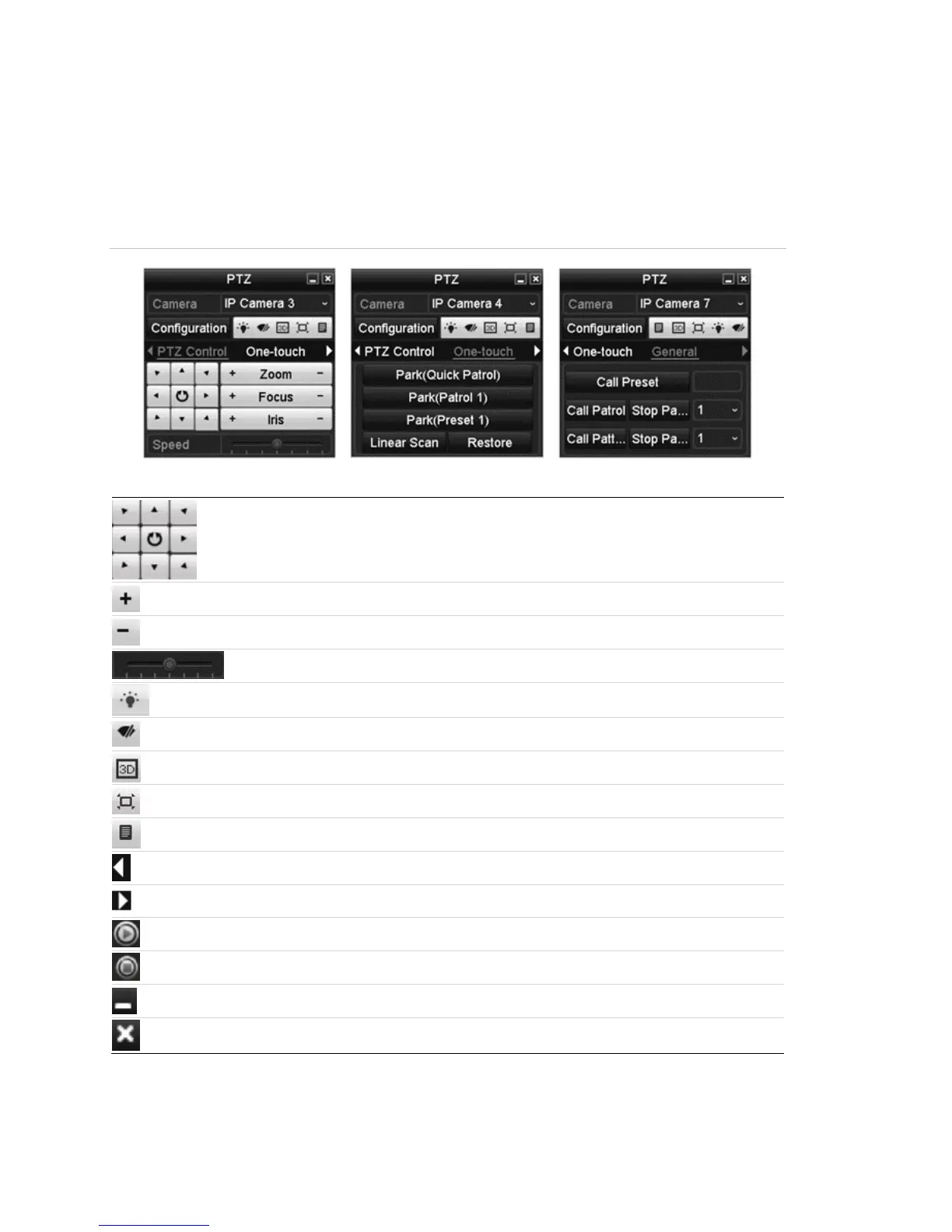
Figure 23: PZT panel
Table 18: PZT panel icons

Direction and auto-cycle buttons
Zoom Plus, Focus Plus, Iris Plus
Zoom-, Focus-, Iris-
PTZ movement speed
Light on/off
Wiper on/off
3D-zoom
Image centralization
Menu
Previous item
Next item
Start pattern/patrol
Stop the patrol/pattern movement
Minimize windows
Exit

Table of Contents

Other manuals for Clare Controls ClareVision Plus

Related product manuals