9.3 Triggering by Analog Signals
156
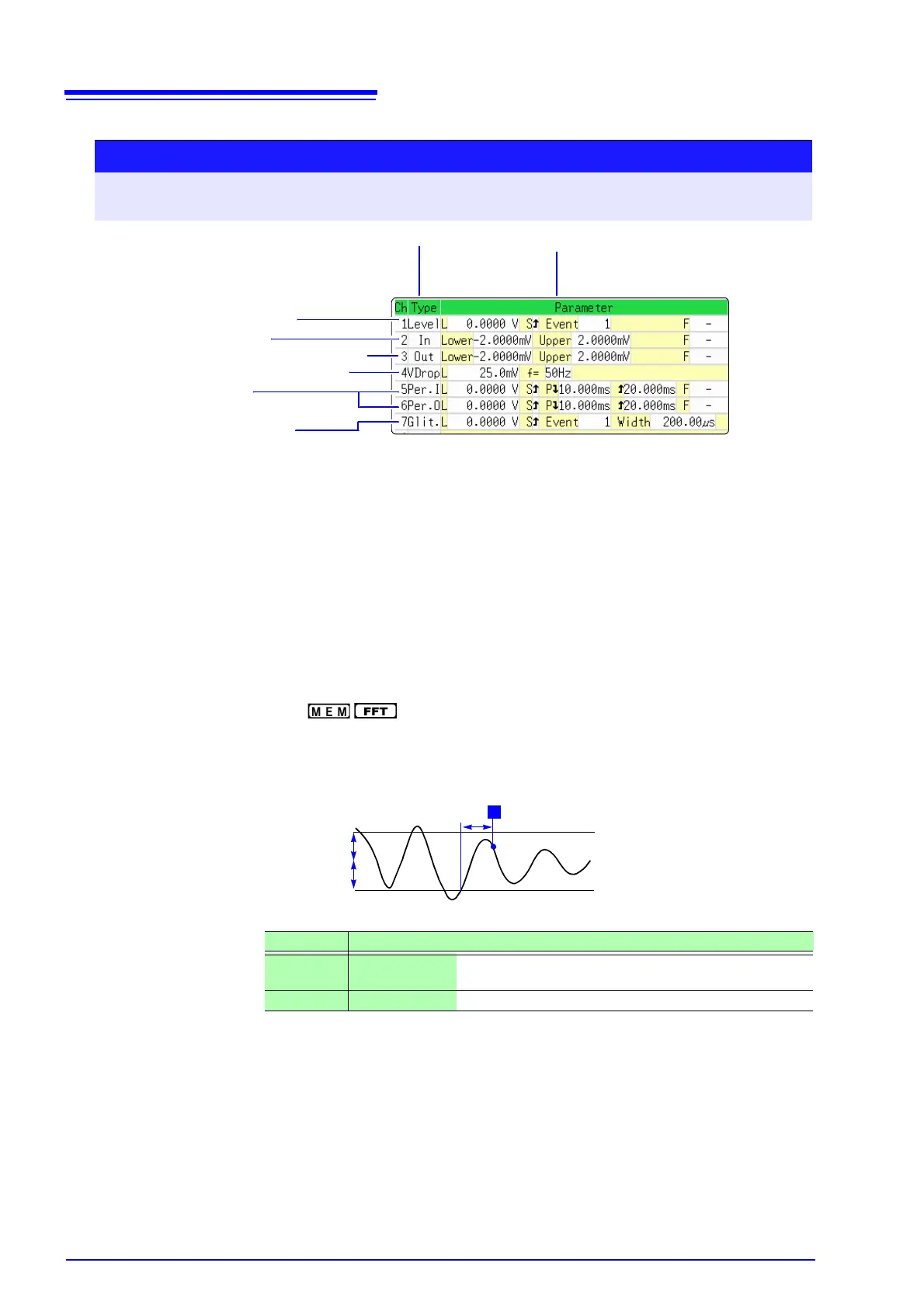
3. Voltage Sag Trigger ( only) _____________________________
Triggering occurs when the voltage peak drops below a preset level for more
than half a cycle. The allowable time axis range is 20 μs - 50 ms/div.
Procedure
To open the screen: Press the DISP key → Waveform screen → Press the TRIG.SET key → Trigger settings
window ([Analog Trg.] sheet)
1
Move the cursor to the [Type] item of the channel for which to make the setting.
2
Select the trigger type with the F keys.
3
Move the cursor to the parameter item with the CURSOR keys.
4
Select the parameter value with the F keys.
1 3
1. Level Trigger ( p.155)
2. In-Window Trigger
Out-of-Window Trigger ( p.155)
3. Voltage Sag Trigger ( p.156)
4. In-Period Trigger
Out-of-Period Trigger (
p.157)
5. Glitch Trigger ( p.157)
Type Parameters
[VDrop]
[L] (Level) Sets the level (voltage value) for the trigger. (The setting
can be made in 1/50 increments.)
[f=] (Frequency) Select 50 or 60 Hz.


 To Next Page