Output Mode for Machine with Shift Tray (continued)
3-51
1. Close the RADF securely, then press [AUTO RESET].
HINT
Key Operator can change the initial output mode. See p. 13-10.
2. Select the desired output mode.
To set Non-sort or Sort mode: proceed to the next step.
To set Group mode
: proceed to step 4.
3. To set Non-sort or Sort mode:
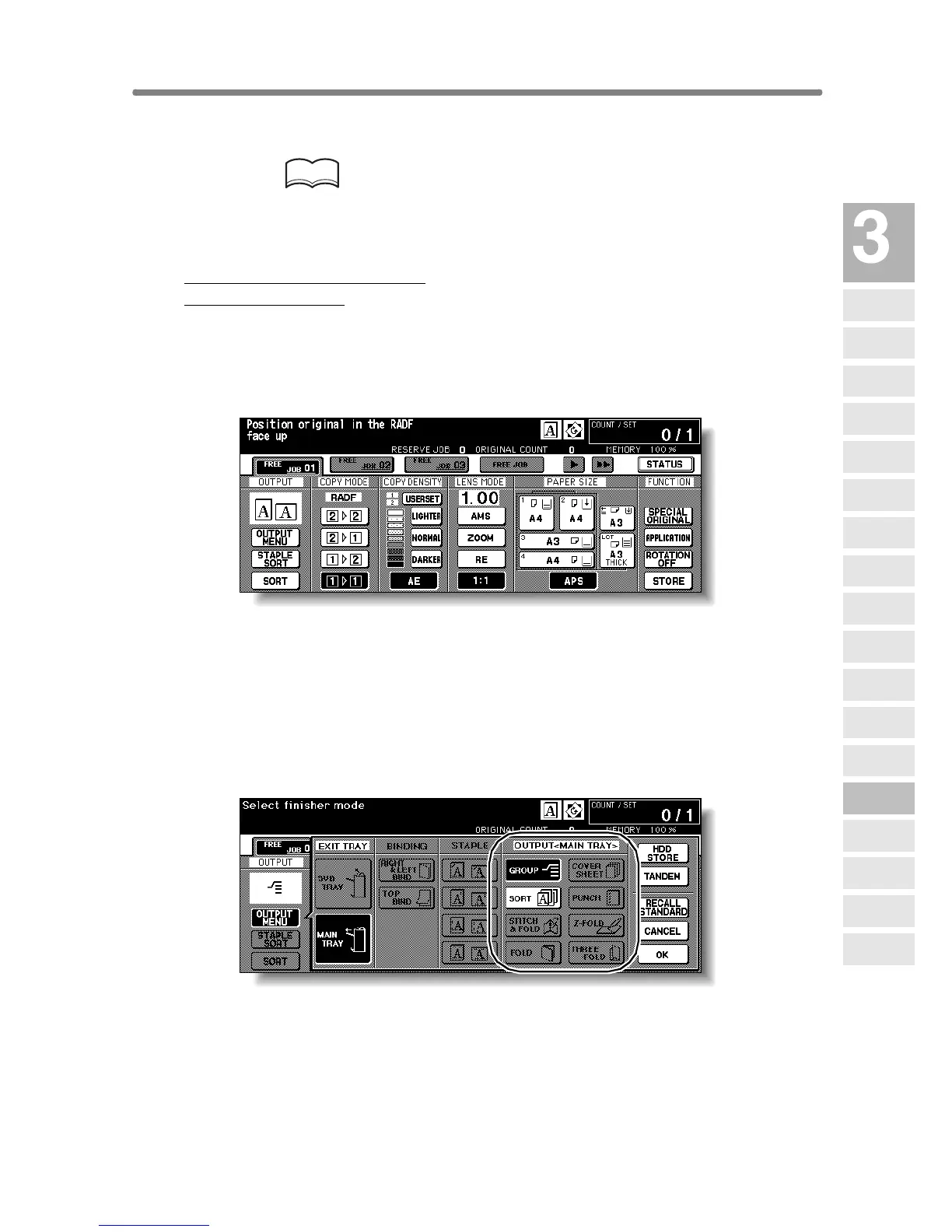
Check that SORT is already highlighted on the Basic Screen in initial condition.
To select Non-sort mode, touch SORT to deselect it.
Proceed to step 5.
4. To set Group mode:
Touch OUTPUT MENU on the Basic Screen to display the Output Mode
popup menu.
Select the desired output mode.
To set the Group mode, touch GROUP to highlight it
Touch OK to restore the Basic Screen. OUTPUT MENU will be highlighted.
5. Select additional copy conditions, as desired.
Copying
Operations
Positioning
Originals
Setting Print
Quantity
Set Job During
Warmup
Stop
Scan/Print
Paper Size
Lens Mode
Density
1-1, 2-2
2-1
Multi-Sheet
Bypass Tray
Using
Memory
Output without
Finisher
Finisher
Output Mode
Binding
Mode
Shift Tray
Output Mode
Recalling
Previous Job
Check Mode
& Proof Copy
Interrupt
Mode





 To Next Page