Programming Different Settings for an Output Job (Program Job)
(continued)
9-27
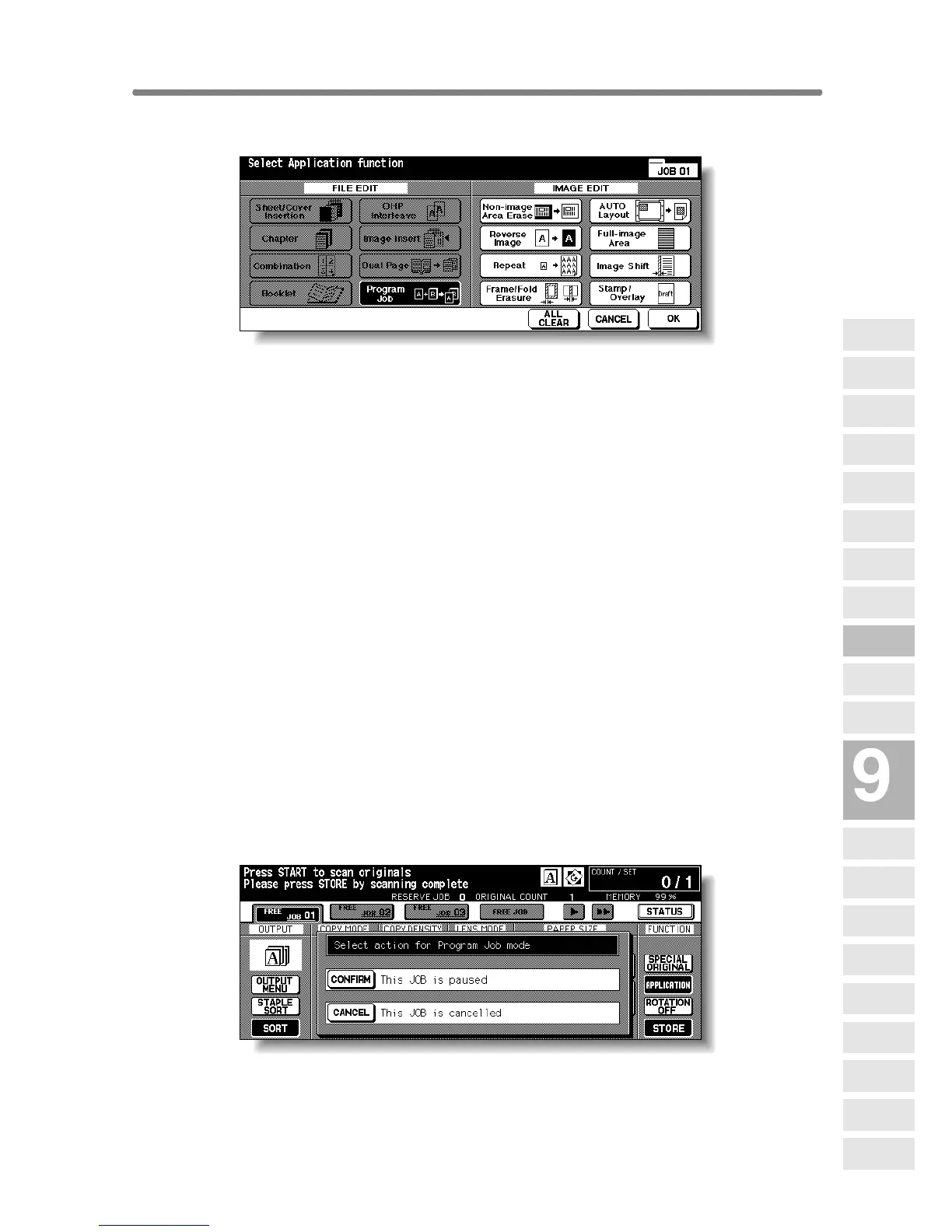
2. Touch Program Job on the Application Selection Screen.
The incompatible function keys will be dimmed to show inactivity.
3. Touch OK on the Application Selection Screen.
The Basic Screen will be restored.
The STORE key on the Basic Screen appears highlighted to show that the
Store mode is automatically selected.
4. Select the desired copy conditions.
5. Position originals FACE UP in the document feeder or FACE
DOWN on the platen glass.
If the number of document feeder originals exceeds 100, divide them into
blocks not exceeding 100 sheets and load them from the block with the first
page.
6. Press [START].
The paper size determined at this time will be applied to all subsequent JOBs.
When scanning for the current JOB is completed, the popup menu will be dis-
played in the Basic Screen.
7. Touch CONFIRM.
The current JOB images will be stored.
To delete the images, touch CANCEL.
Applications
Reverse
Image
Non-Image
Area Erase
Program Job
Dual Page
Image Insert
OHP
Interleave
Booklet
Combination
Chapter
Sheet/Cover
Insertion
Application
Selection Screen
Repeat
Frame/Fold
Erasure
AUTO
Layout
Full-Image
Area
Image Shift
Reduce &
Shift
Stamp
Overlay
Overlay
Memory










 To Next Page