13-4
[1] System Initial Setting
Set the following initial conditions of the copier.
• Date & Time setting: Current date and time, summer time
• Language select setting: Language used in LCD (English)
• IP address setting: IP address to be accessed from PC
• E-mail address setting: E-mail address to be informed of machine trouble
or request for supplies.
[1] Date & Time Setting
Set the current date and time, the summer time, and also the time differ-
ence.
❒ Default setting: Summer time off
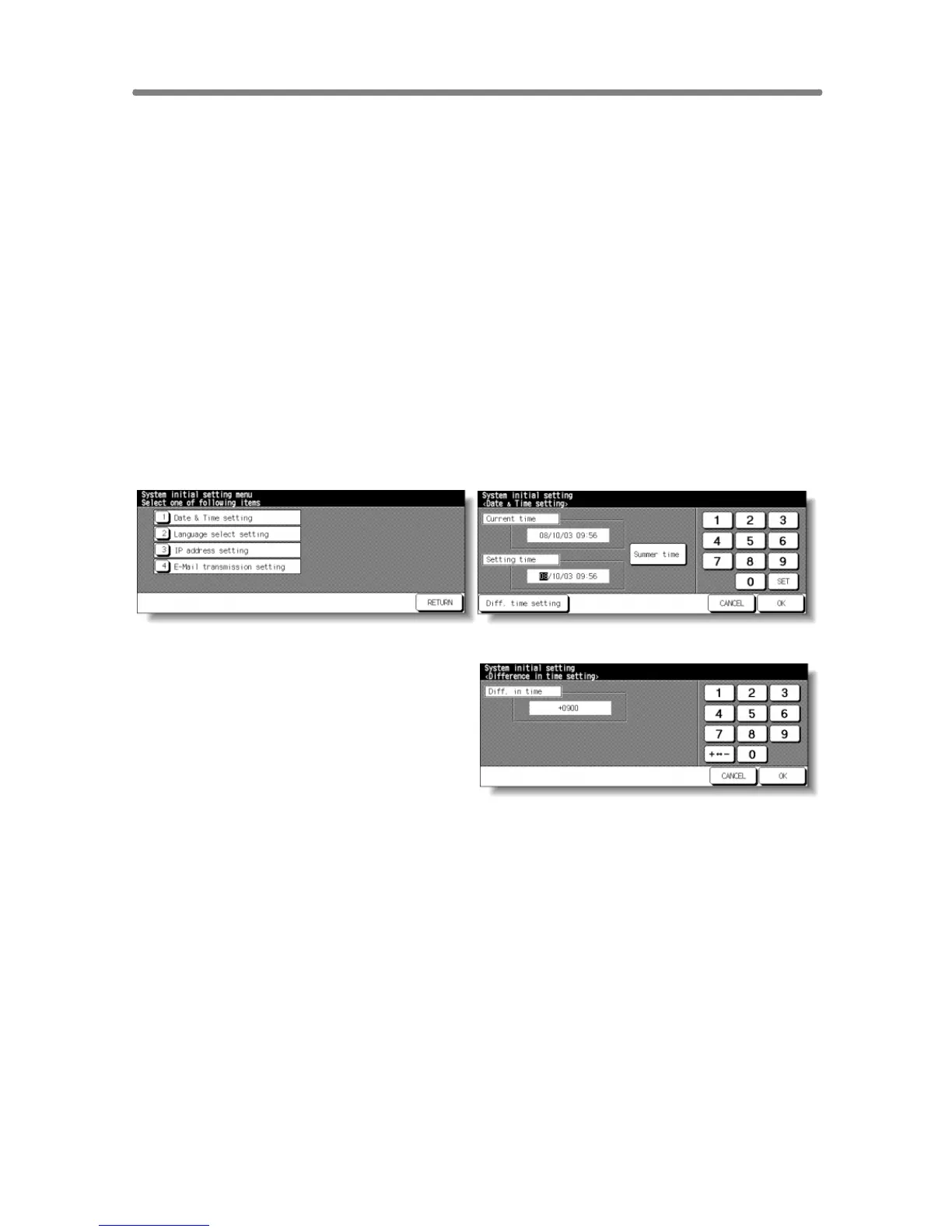
System Initial Setting Menu Screen Date & Time Setting Screen
Difference in Time Setting Screen
Procedure
1 Touch [1] System initial setting on the Key Operator Mode Screen to display
the System Initial Setting Menu Screen.
2 Touch [1] Date & Time setting to display the Date & Time Setting Screen.
3 Adjust the time.
The time that the copier currently has is displayed in the upper line, in the order
of date, month, year, and time (in 24-hour expression).
(1) Touch SET to move the highlighted section to the number to be changed.
(2) Use the keypad on the screen to enter the number.
4 To activate the summer time function, touch Summer time to highlight it. The
Present time will gain an hour.
5 The Difference in time setting is provided in order to give the time difference
information at the same time when E-mail is received.










 To Next Page