8-12
Copying Non-Standard Size Originals (Original
Form)
The copier usually detects the standard size of originals fed through RADF
or positioned on the platen glass (STD size mode).
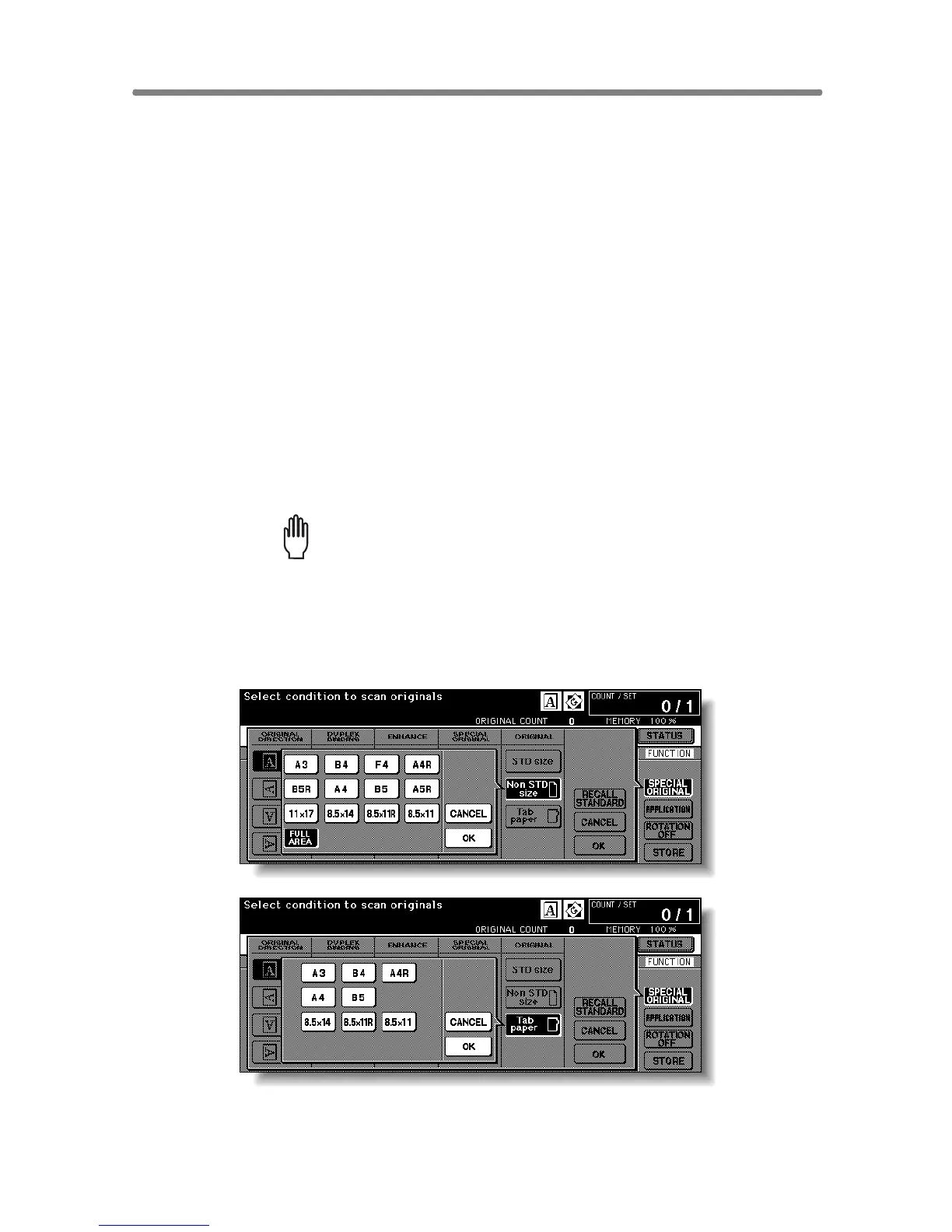
Use Non STD size mode to specify the scanning area manually for copying
or printing special size originals. Use Tab paper mode to copy a tabbed
original, including the image of the tab part, onto tabbed copy paper.
>>>Specifications of Original Form<<<
❒ Tab extension width: 12.5 mm or less
❒ Incompatible with Non STD Size: Mixed Original, Z-Folded Original, Tab
Paper, Storing image in Overlay Memory
❒ Incompatible with FULL AREA: Combination, Booklet, Dual Page, Non-
Image Area Erase, Image Shift
❒ Incompatible with Tab Paper: Mixed Original, Z-Folded Original, Non STD
Size, Sheet/Cover Insertion, Chapter, Combination, Booklet, OHP Inter-
leave, Image Insert, Dual Page, Storing image in Overlay Memory
1. Touch SPECIAL ORIGINAL on the Basic Screen.
The Special Original popup menu will be displayed.
Please Be Reminded!
When starting a new copying job, be sure to close the RADF securely,
then press [AUTO RESET].
2. Touch Non STD Size or Tab paper.
The popup menu will appear for Non STD size or Tab paper size setting.










 To Next Page