9-49
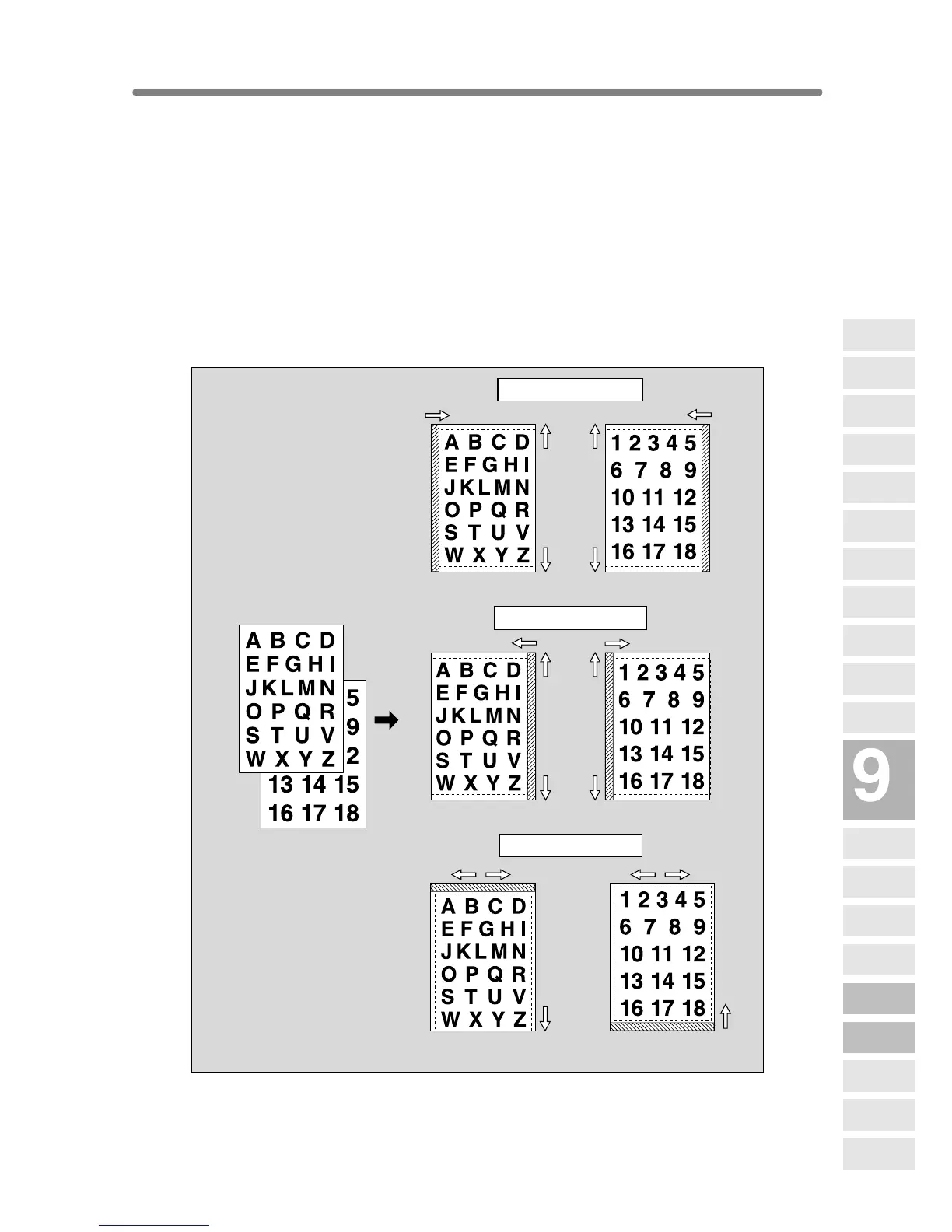
Reducing Images to Create Binding Margin
(Reduce&Shift)
Use Reduce & Shift instead of regular Image Shift to prevent image loss
when creating a binding margin.
>>>Specifications for Reduce & Shift<<<
❒ AMS is automatically selected and cannot be released.
❒ Shift amount: 0 to 250 mm in 1 mm increments
Setting in 0.1 mm increments using up/down arrow key is also available by
Key Operator setting. See p. 13-39 to 13-46.
❒ Incompatible Conditions: Change magnification, V/H zoom, APS, Mixed
Original, Dual Page, Non-Image Area Erase, Repeat, AUTO Layout, Over-
lay, Storing image in Overlay Memory
Originals
Right
Front Back
Up
Down
Left
Right
Left
Down
Right
Left
Up
Left binding margin
Right
Front
Front
Back
Back
Front Back
Up
Down
Left
Right binding margin
Top binding margin
Applications
Reverse
Image
Non-Image
Area Erase
Program Job
Dual Page
Image Insert
OHP
Interleave
Booklet
Combination
Chapter
Sheet/Cover
Insertion
Application
Selection Screen
Repeat
Frame/Fold
Erasure
AUTO
Layout
Full-Image
Area
Image Shift
Reduce &
Shift
Stamp
Overlay
Overlay
Memory










 To Next Page