Making Double-Sided Copy (1-2, 2-2) (continued)
3-24
Using Platen Glass
Use the platen glass to scan originals unsuitable for the document feeder.
>>>Specification for Double-Sided Copying Using Platen Glass<<<
❒ Use the Platen store mode.
❒ See p. 11-8 for the information on unsuitable RADF originals.
❒ Incompatible Conditions: Face up exit using Secondary (sub) tray, Image
Insert, OHP Interleave
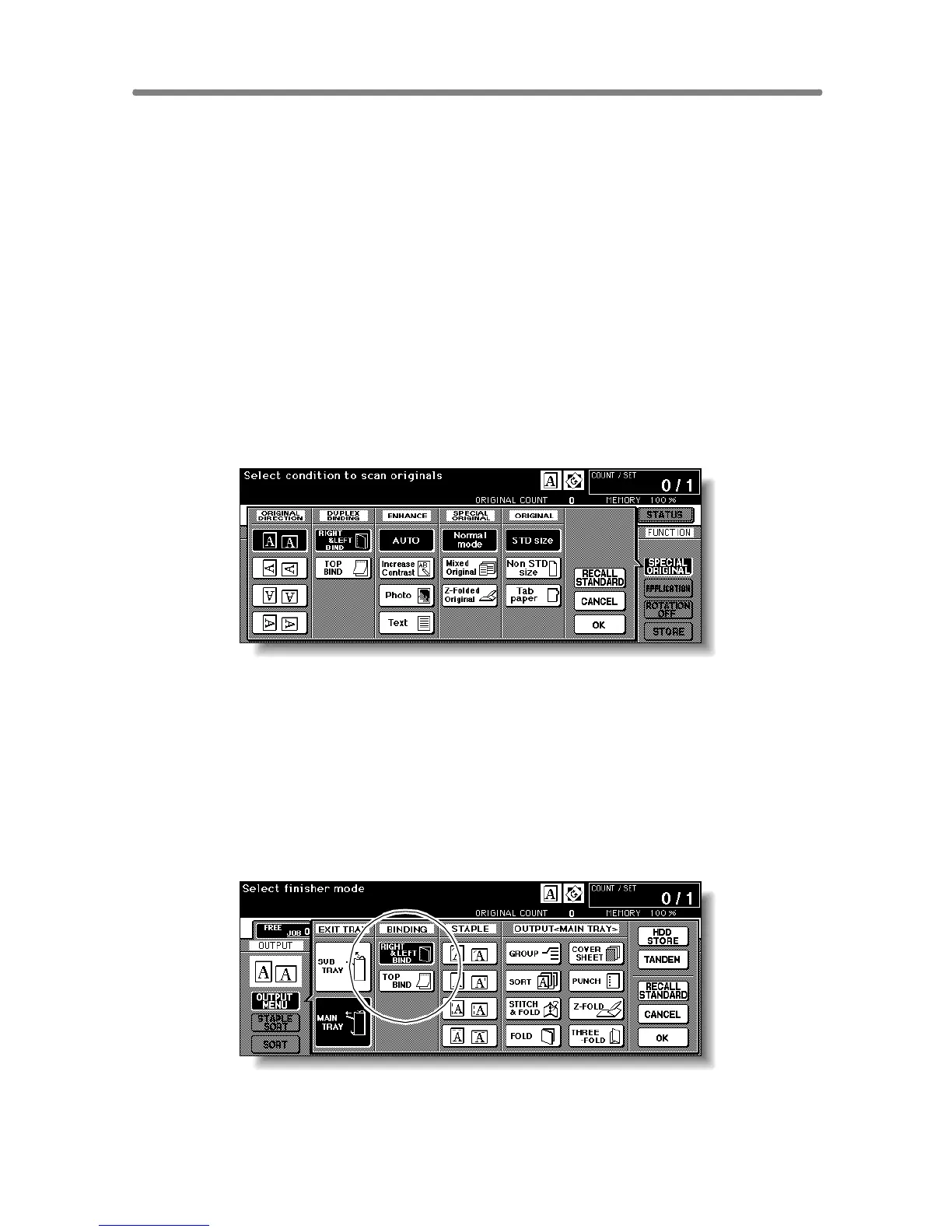
1. Check and specify the original set direction and binding mode.
The Original direction icon is located at the upper left corner of the Basic
Screen.
To change the original set direction, touch SPECIAL ORIGINAL on the Basic Screen to
display the Special Original popup menu, then touch the desired original direction key to
highlight it.
If the originals are upside down on the reverse side and you want to make
copies of the same direction on both sides, touch TOP BIND.
With this feature specified, next step is not needed. Proceed to step 3.
Touch OK to return to the Basic Screen.
2. Select the binding mode.
Touch OUTPUT MODE on the Basic Screen to display the Output Mode
popup menu, then touch the desired binding mode key to highlight it.
Output Mode popup menu with Finisher










 To Next Page