Loading Paper (continued)
2-31
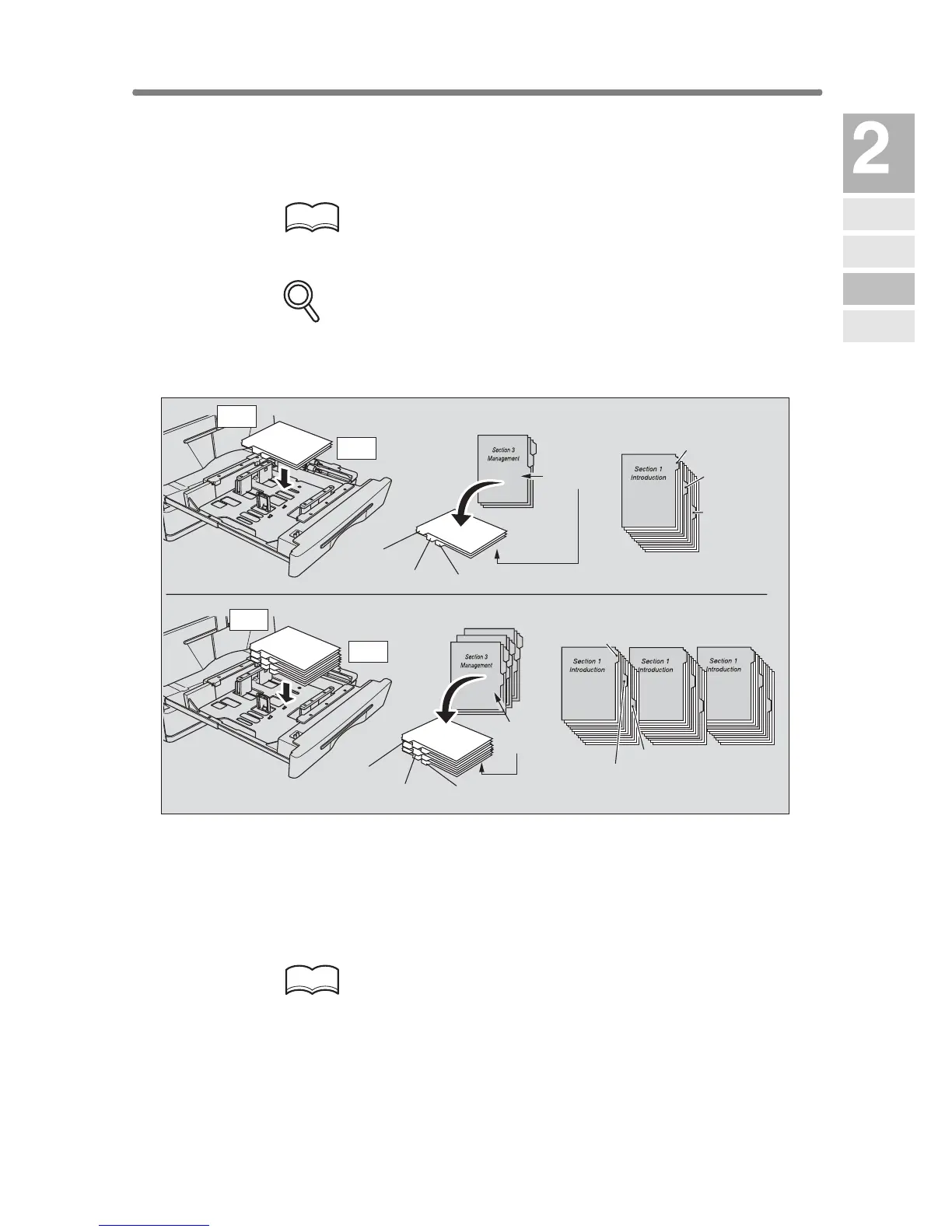
Loading Tabbed Sheets in Tray 3 or 4
When TAB is displayed on the tray key of the Basic Screen, follow the pro-
cedure below to supply the tray with tabbed sheets.
HINT
The tray paper type can be specified in the Key Operator setting. For
details, see p. 13-23 to p. 13-24.
FOR DETAILS
• Service can set the tray 1 or 2 to have the tabbed sheets loaded.
Contact your service representative, if desired.
• The tab extension width should be 12.5 mm or less.
1. Withdraw tray 3, or 4.
2. Open the paper feed roller.
3. Position the rear guide plate according to the size of the tabbed
sheets to be loaded.
HINT
See p. 2-34 for details on positioning the rear guide plate.
4. Place the tabbed sheets on the tray as illustrated above.
5. While pressing the release knob, move the rear side guide plate
against the paper.
6. Close the paper feed roller, then push in the tray until it locks into
place.
ONE FINISHED SET
THREE FINISHED SETS
Example: 3 Tabbed sheets loaded in position for one finished set.
Example: 9 Tabbed sheets loaded in position for 3 finished sets.
Printed
side
Printed
side
1st TAB
1st TAB
1st TAB
1st TAB
2nd TAB
2nd TAB
2nd TAB
2nd TAB
3rd TAB
3rd TAB
3rd TAB
3rd TAB
Rear
Front
Rear
Front
Machine
Information
Machine
Configuration
Turn On/Off
the Power
Loading
Paper
Changing
Paper Size










 To Next Page