2-34
Changing Paper Size of Tray 3 and 4
The main body trays 3 and 4 are user-adjustable. Change the paper size of
the tray according to the procedure below.
1. Withdraw the tray of the size to be changed.
2. Open the paper feed roller.
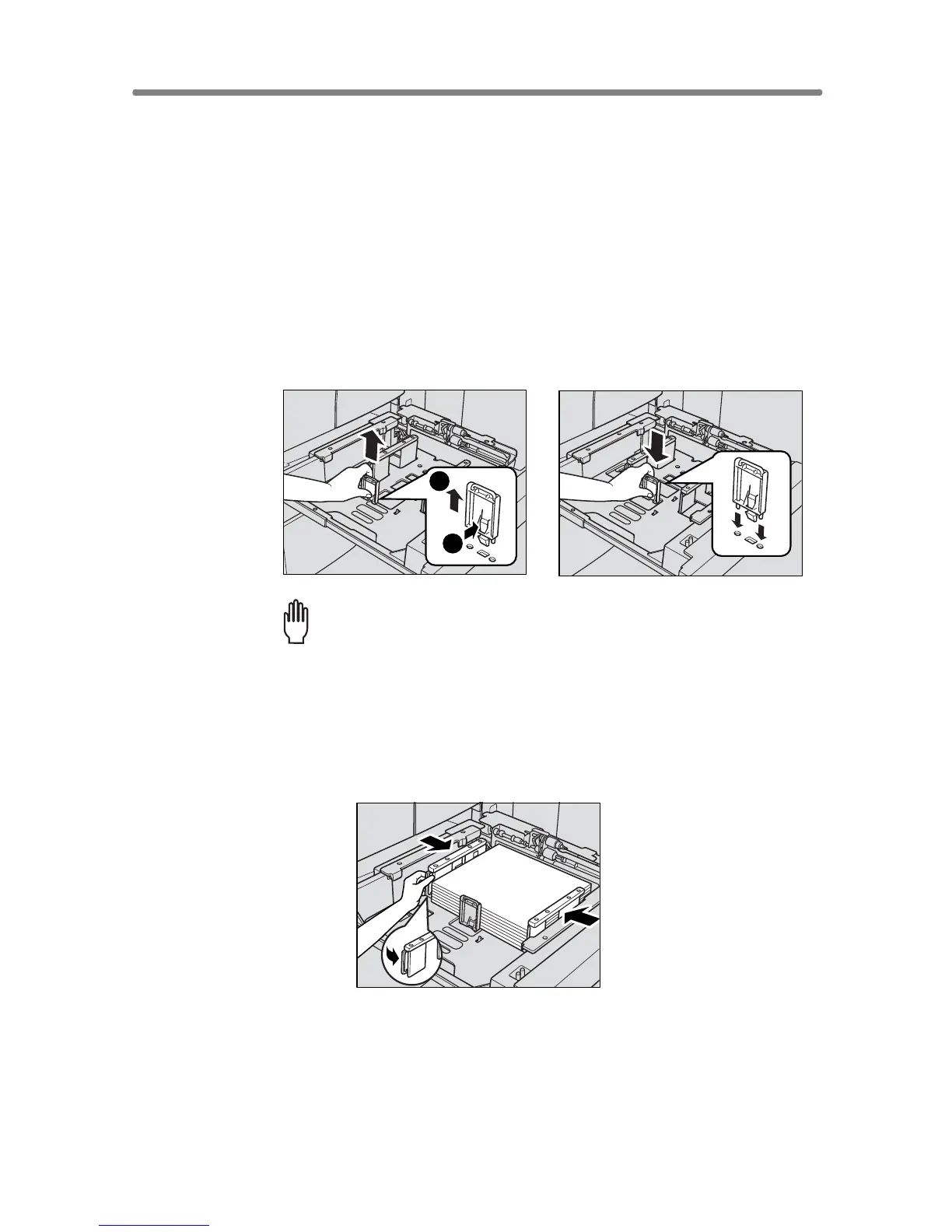
3. Remove the rear guide plate while pressing the knob, then insert
it into the position designated for your desired paper size.
The rear guide plate positions are marked on the tray base plate.
Please Be Reminded!
Be sure to insert the rear guide plate into the position of the paper size
to be set; otherwise machine trouble may occur.
4. Stack paper, then move the rear side guide plate against the paper.
Press the release knob to move the rear side guide plate, then release it to
lock.
5. Close the paper feed roller, then push in the tray until it locks into
place.
The tray key on the Basic Screen will indicate the paper size currently
specified.
1
2










 To Next Page