Dividing an Image into Right and Left Pages (Dual Page) (continued)
9-23
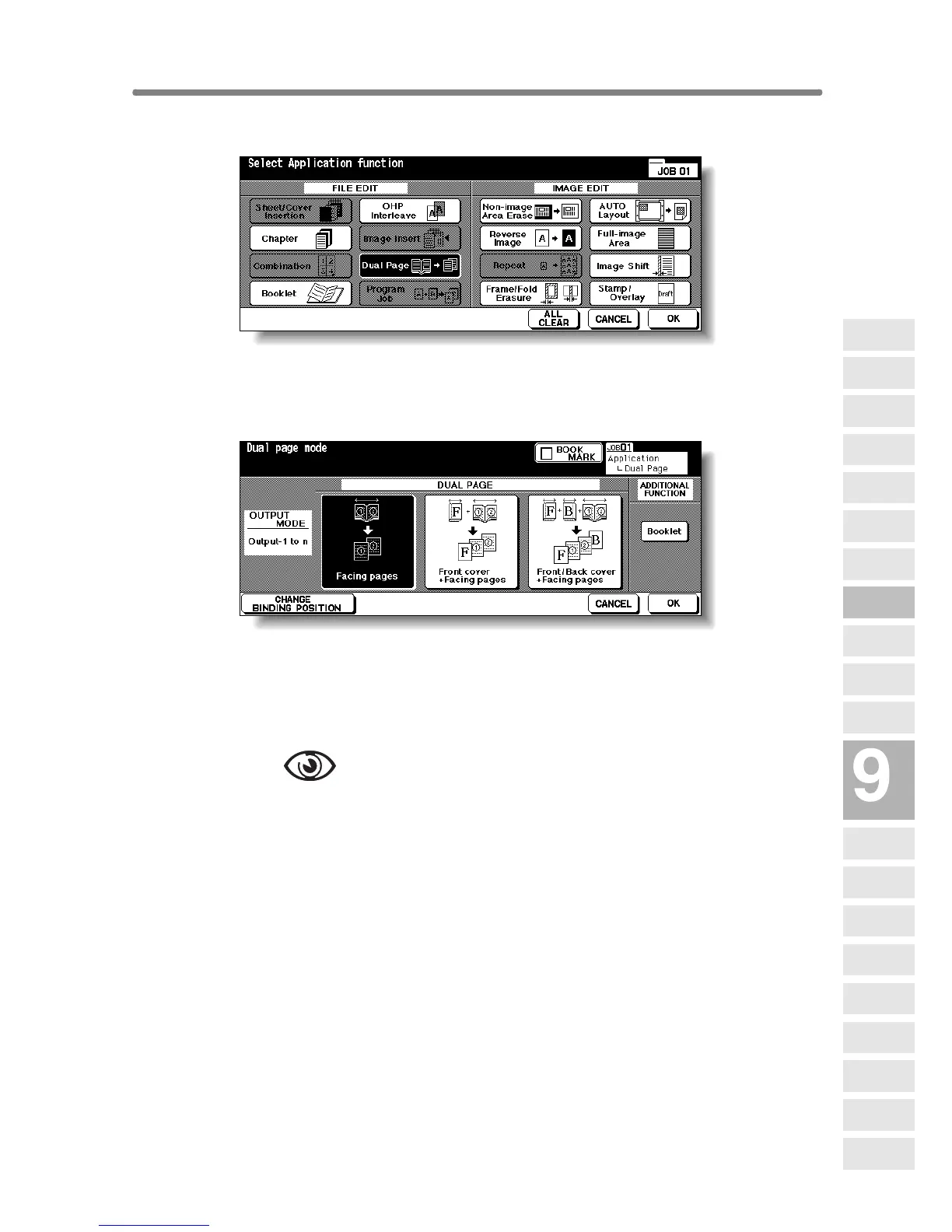
2. Touch Dual Page on the Application Selection Screen.
The Dual Page Screen will be displayed.
3. Select the desired Dual Page mode.
Touch to highlight the desired mode key.
4. Touch CHANGE BINDING POSITION to select the output order
according to the original pagenation.
OPTION
Touch Booklet on the Dual Page Screen to use this function.
5. Touch OK.
The Application Selection Screen will be restored.
6. Touch OK on the Application Selection Screen.
The Basic Screen will be restored.
APS and AMS are automatically released, and the STORE key appears high-
lighted to show that the Store mode is automatically selected.
Applications
Reverse
Image
Non-Image
Area Erase
Program Job
Dual Page
Image Insert
OHP
Interleave
Booklet
Combination
Chapter
Sheet/Cover
Insertion
Application
Selection Screen
Repeat
Frame/Fold
Erasure
AUTO
Layout
Full-Image
Area
Image Shift
Reduce &
Shift
Stamp
Overlay
Overlay
Memory










 To Next Page