Machine Configuration (continued)
2-16
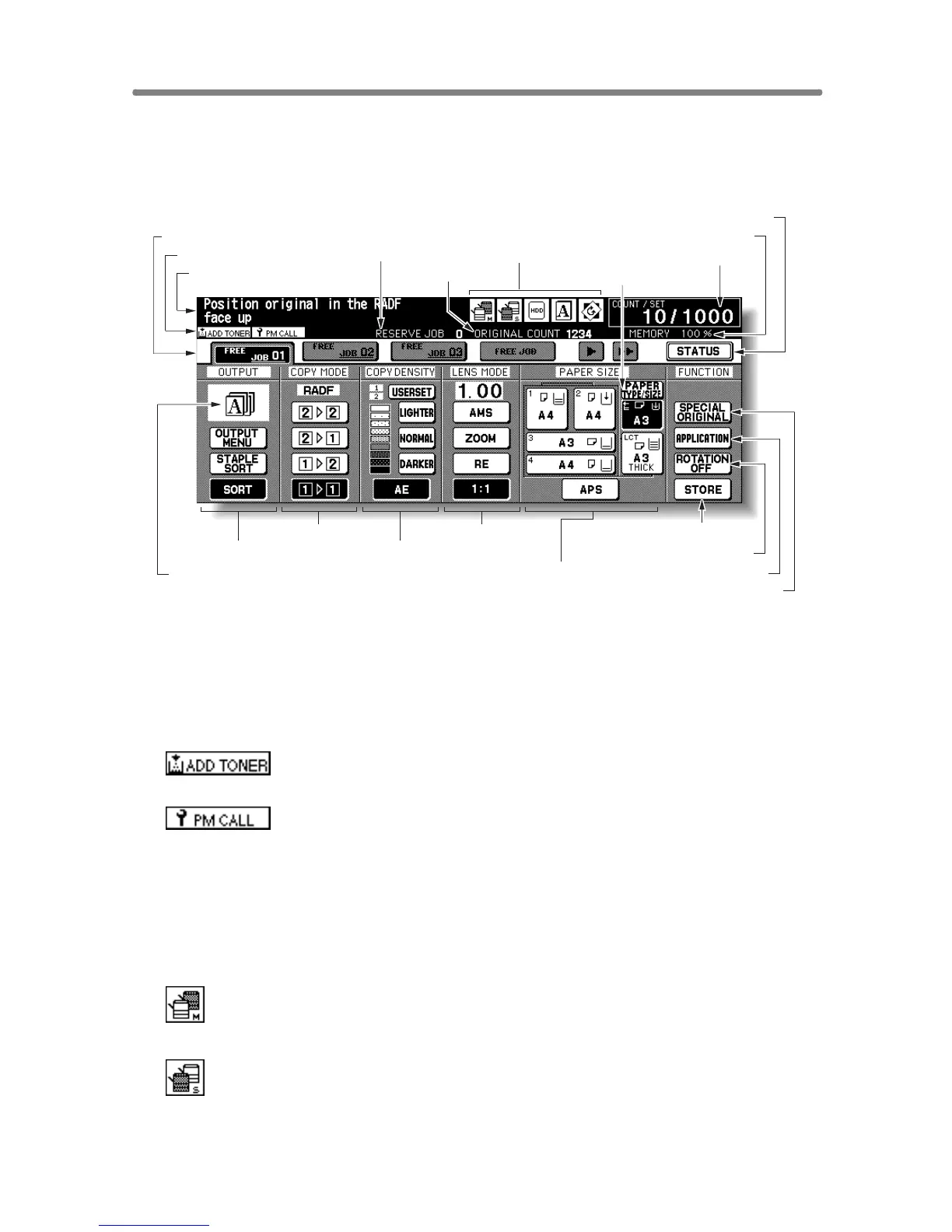
Basic Screen
The Basic Screen displays when copying operation becomes available after
warm-up.
1 Folder keys
FREE JOB is selected to specify a copy job conditions.
When scanning starts, FREE JOB changes to SCAN JOB, then changes
to PRINT JOB when the machine starts printing.
2 Notice icons
: ADD TONER icon is displayed when toner supply becomes
low.
: PM CALL icon is displayed when preventive maintenance
is due.
3 Message area displays the machine status and procedure required at
that time.
4 Reserve job counts the reserve jobs already specified.
5 Original count counts the original pages placed in the document feeder
as they are scanned.
6 : Master icon is displayed when the TANDEM key is selected on the
Output Mode popup menu.
: Sub icon is displayed when the copier operates in tandem with the
primary (master) copier.
1 Folder keys 9 Memory indicator
10 STATUS key
2 Notice icons
6 Master/ Sub/ HDD/ Rotation/
Original direction icons
8 Count/Set indicator
11 SPECIAL ORIGINAL key
14 STORE key
15 Paper size area
16 Lens mode area18 Copy mode area
17 Copy density area19 Output mode keys
20 Output icon area
12 APPLICATION key
13 ROTATION OFF key
3 Message area 5 Original count
4 Reserve job
7 PAPER TYPE/SIZE key










 To Next Page