[1] System Initial Setting (continued)
13-7
[3] IP Address Setting
When using the server function, this setting is required to enable a PC to
gain access to this machine.
NOTE:
Consult your network manager to perform this setting. Incorrect setting
may cause a trouble with other network systems.
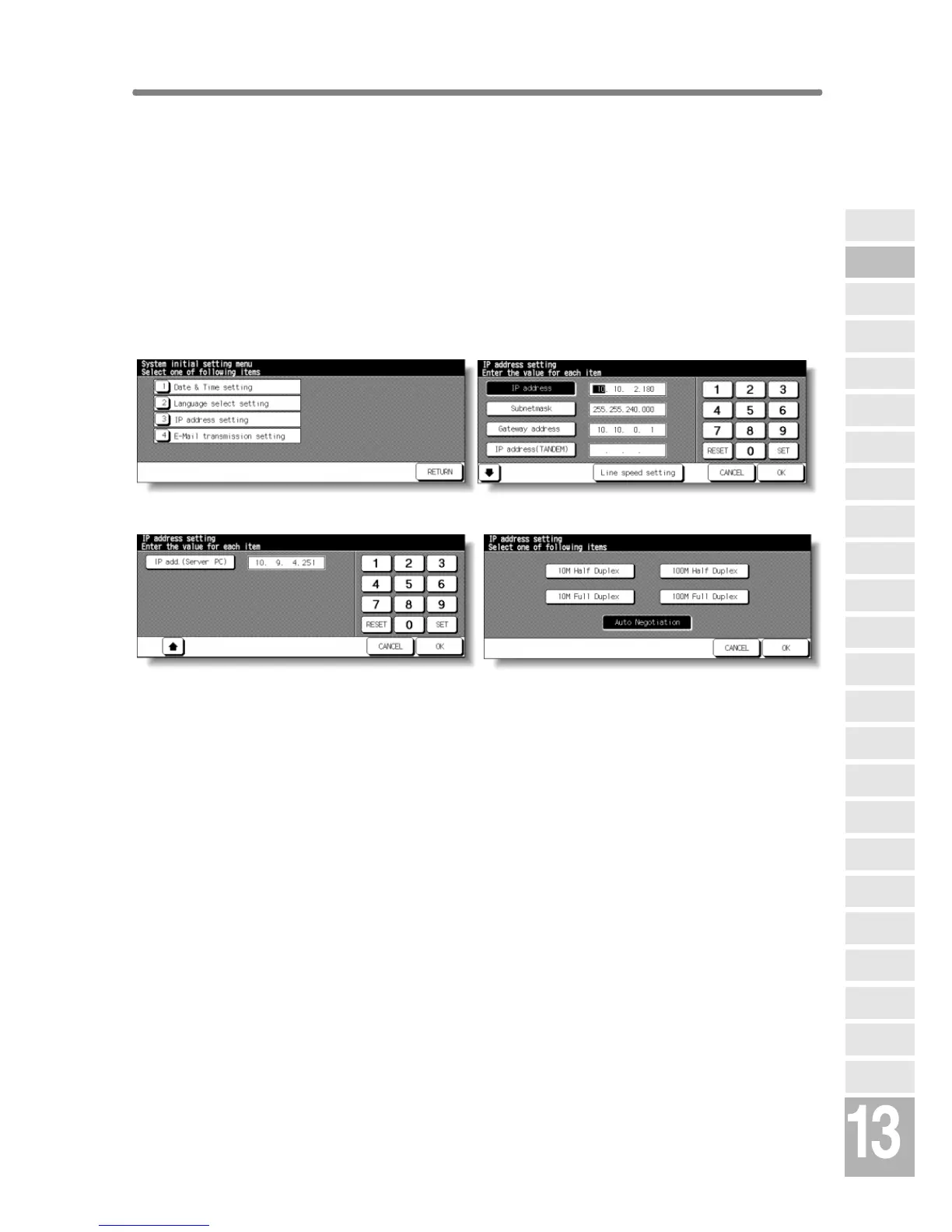
❒ Setting options: IP address; Subnetmask; Gateway address; Line speed
System Initial Setting Menu Screen IP Address Setting Screen
IP Address Setting Screen (next page) Line Speed Setting Screen
Procedure
1 Touch [1] System initial setting on the Key Operator Mode Screen to display
the System Initial Setting Menu Screen.
2 Touch [3] IP address setting to display the IP Address Setting Screen.
3 Make the required setting.
Touch to highlight the address key on the left, then enter the address number
using the screen keypad. Touch SET to fix the number, or touch RESET to
clear.
4 When customizing the line speed, touch Line speed setting to display the Line
Speed Setting Screen. Touch the desired key, then touch OK to restore the IP
Address Setting Screen.
5 Touch OK to complete the setting and return to the System Initial Setting Menu
Screen.
6 Touch RETURN to restore the Key Operator Mode Screen.
7 If no further changes are required, touch RETURN to restore the Basic Screen
to perform copying operations.
Key Operator
Mode
Non-Image
Area Erase
Scan
Transmission
HDD
Management
Centring
Adjustment
Timing
Adjustment
Background
Adjustment
Finisher
Adjustment
Side 2 Lens
Adjustment
Call Remote
Centre
Machine
Management
List Print
Memory
Switch
Power Save
Setting
Tray Auto
Select Setting
Control Panel
Adjustment
Weekly
Timer
Key Operator
Data Setting
Panel Contrast/
Key Sound
Paper Type/
Special Size
Lock/Delete
Job Memory
E.K.C.
User Setting
Mode
Copier Initial
Setting
System Initial
Setting
Key Operator
Mode










 To Next Page