Storing/Deleting Image Data in HDD/PC (Image Store/Delete) (continued)
10-5
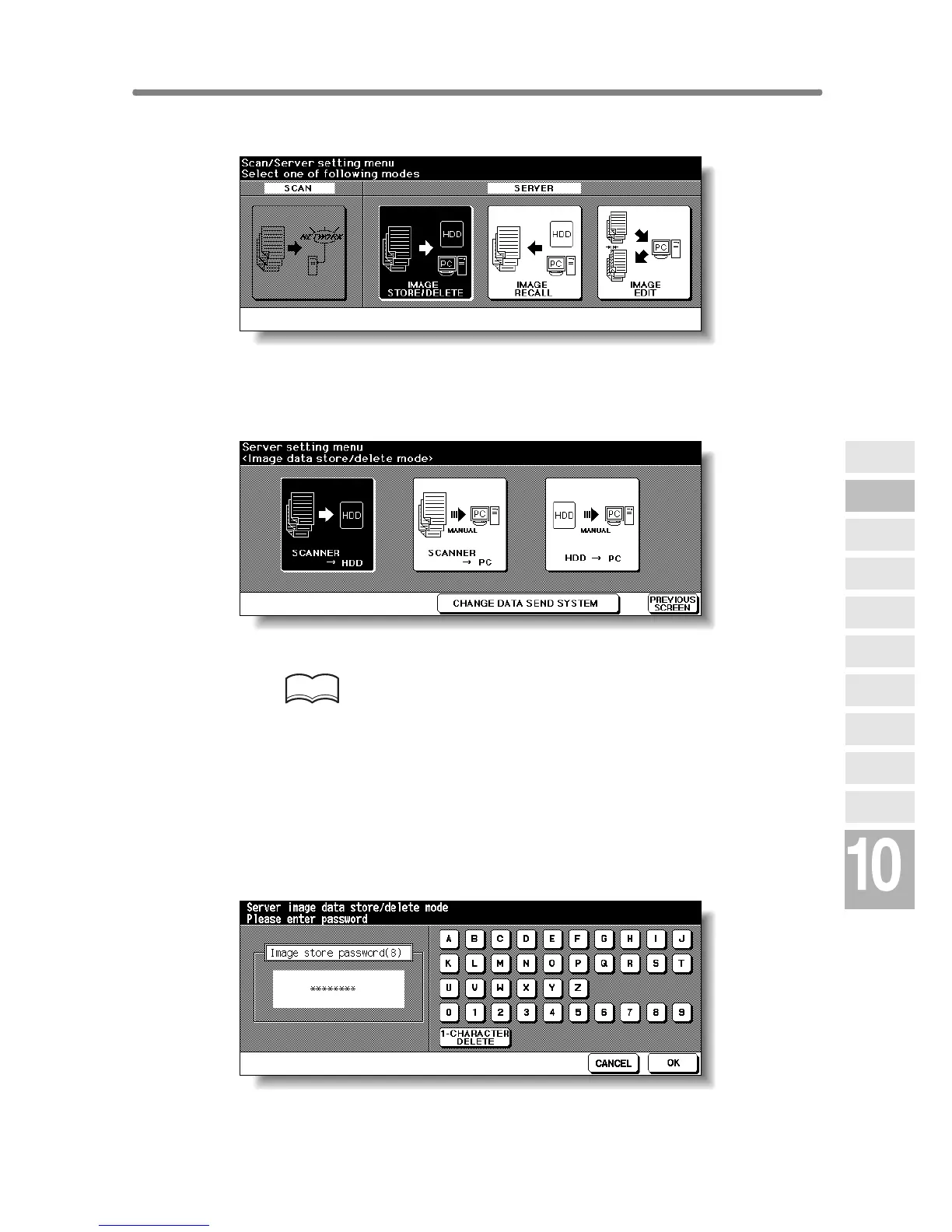
2. Touch IMAGE STORE/DELETE.
The Image Data Store/Delete Site Selection Screen will be displayed.
3. Touch SCANNER→HDD or SCANNER→PC.
The Image Data Password Entry Screen will be displayed.
HINTS
• To store the image data in PC and to use the CHANGE DATA SEND
SYSTEM key on the screen, follow the instruction according to the
setup application installed in a PC. For detailed information, refer to
the instruction of the setup application.
• The image data stored in HDD can be duplicated in PC using a spe-
cific backup tool. Contact your service representative, if desired.
4. Enter the desired image data password in up to 8 characters from
the touch screen keypad.
To correct an entry, touch 1-CHARACTER DELETE repeatedly to delete
each character, then enter the correct password.
Network
Function
Job Status
Machine
Information
HDD Job
Information
Environment
Setup
To Use Web
Utilities
Image Edit
Image Recall
Image
Store&Output
Image
Store/Delete
Server
Functions










 To Next Page