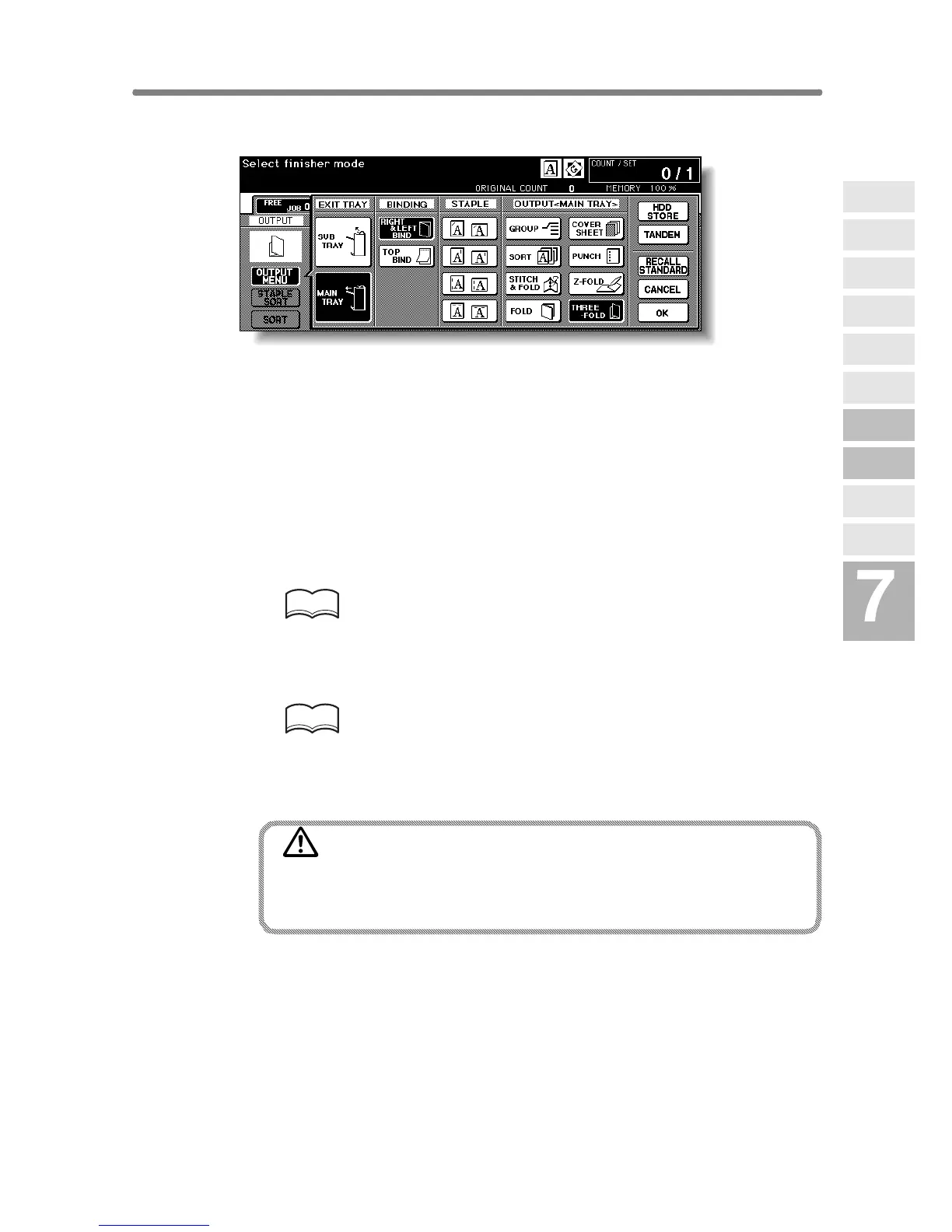
Output Three-Folded Copies (Three-Fold) (continued)
7-19
4. Touch THREE-FOLD to highlight it.
5. Touch OK on the Output Mode popup menu to complete the
setting and return to the Basic Screen.
The THREE-FOLD icon will be displayed in the OUTPUT icon area.
6. Select additional copying features, as required.
Touch to highlight the A4R or 8.5"x11"R tray key, if not already highlighted.
7. Enter the desired print quantity from the control panel keypad.
HINT
See p. 3-6 for details on setting print quantity.
8. Position originals.
HINT
See p. 3-2 to p. 3-5 for details on positioning originals.
9. Press [START].
CAUTION
When the Booklet tray capacity is exceeded, the Finisher will
cease operating. To avoid this, select the appropriate print
quantity from the specifications shown on p. 11-3.
Advanced
Information
Using Finisher
Manually
Cover Sheet
Feeding
Three-Fold
Z-Fold
Tandem Mode
Punch
Fold /
Stitch&Fold
Vertical/Hori-
zontal Zoom
Rotation
Weekly
Timer










 To Next Page