Adjusting Position of Copy Image (Image Shift) (continued)
9-47
3.
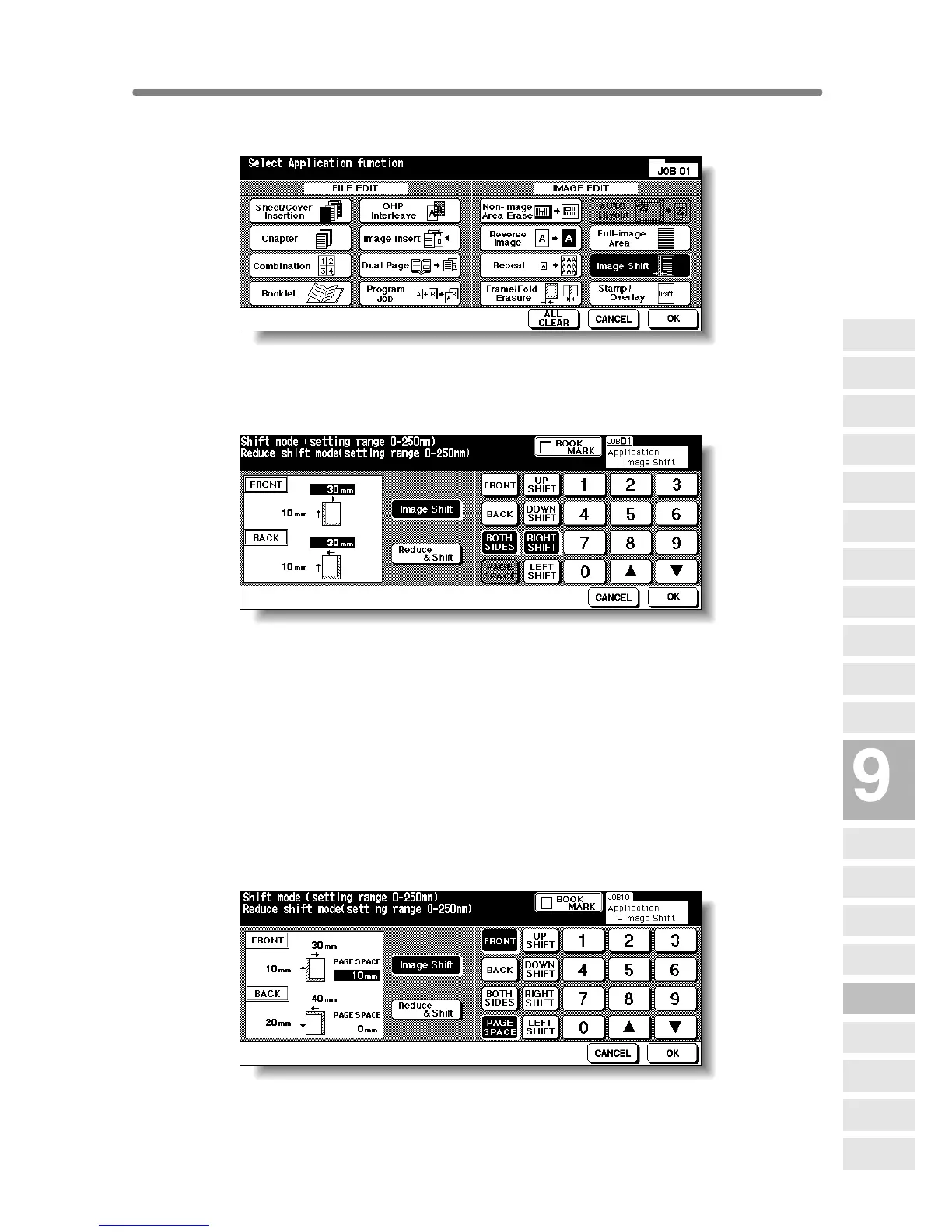
To uch Image Shift on the Application Selection Screen.
4. Touch Image Shift on the Image Shift Setting Screen, then specify
the shift direction and amount.
Touch FRONT or BACK to specify the shift direction and amount individually;
or BOTH SIDES to specify collectively. The BACK and BOTH SIDES keys
function only for duplex copying.
Touch the desired shift direction key to highlight it, then use the touch screen
keypad or up/down arrow key to enter the desired shift amount, from 0 mm to
250 mm in 1 mm increments.
The image display on the screen allows you to view the shift direction and
amount to be created on the printed sheets.
When Booklet or 2 Repeat mode of Repeat has been already selected, the
PAGE SPACE key appears clear on the screen to show its availability.
If desired, touch PAGE SPAC E to highlight it, then enter the desired amount
using the touch screen keypad or up/down arrow key.
Applications
Reverse
Image
Non-Image
Area Erase
Program Job
Dual Page
Image Insert
OHP
Interleave
Booklet
Combination
Chapter
Sheet/Cover
Insertion
Application
Selection Screen
Repeat
Frame/Fold
Erasure
AUTO
Layout
Full-Image
Area
Image Shift
Reduce &
Shift
Stamp
Overlay
Overlay
Memory










 To Next Page