Storing an Overlay Image in HDD / Overlaying Image Stored in HDD
(Overlay Memory) (continued)
9-65
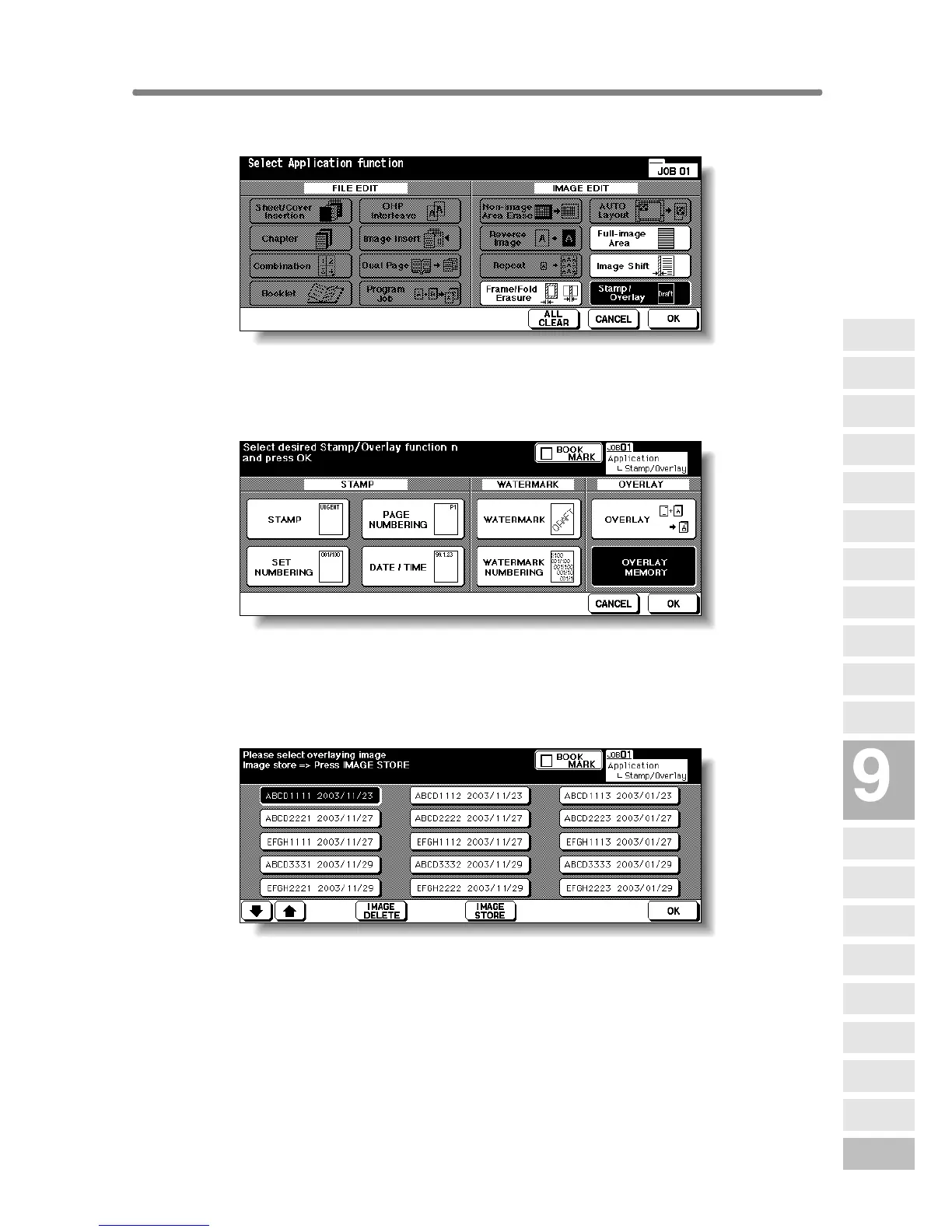
2. Touch Stamp/Overlay on the Application Selection Screen.
The Stamp/Overlay Selection Screen will be displayed.
3. Touch OVERLAY MEMORY.
The Overlaying Image Selection Screen will be displayed.
Proceed to step 9, when only recalling the stored image.
4. Touch IMAGE STORE to display the Image Name Entry Screen.
Applications
Reverse
Image
Non-Image
Area Erase
Program Job
Dual Page
Image Insert
OHP
Interleave
Booklet
Combination
Chapter
Sheet/Cover
Insertion
Application
Selection Screen
Repeat
Frame/Fold
Erasure
AUTO
Layout
Full-Image
Area
Image Shift
Reduce &
Shift
Stamp
Overlay
Overlay
Memory










 To Next Page