Machine Configuration (continued)
2-9
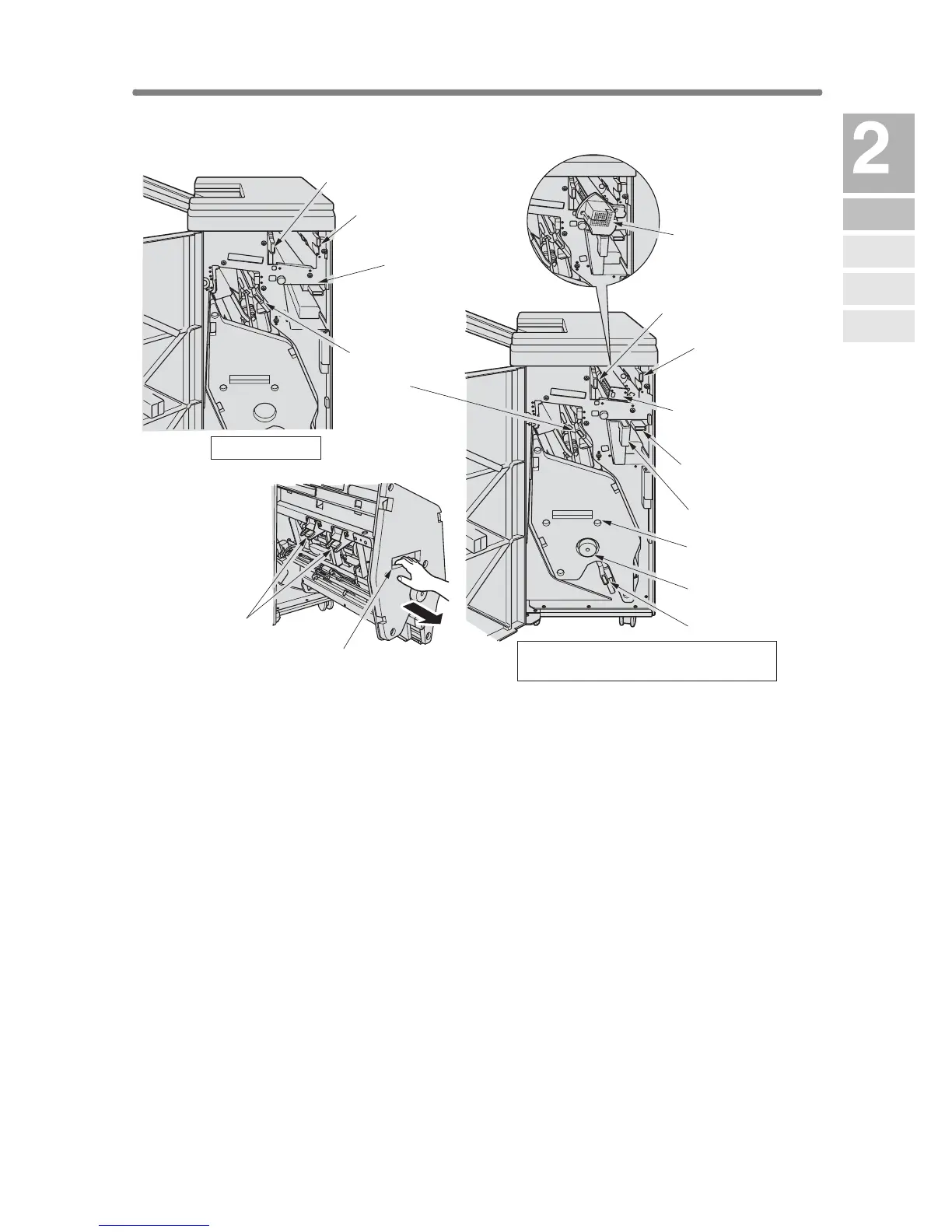
1 Entrance lever opens downward to remove mishandled paper.
2 PK-110/120/120 Type-A Punching kit (option) punches file holes in the
output copies.
3 Cover sheet conveyance lever opens to remove mishandled paper.
4 Sub tray conveyance lever opens to remove mishandled paper.
5 Stacker conveyance lever opens to remove mishandled paper.
6 Lower lever opens to remove mishandled paper.
7 Stacker unit knob can be turned to ease removal of mishandled paper
from the Stacker unit.
8 Stacker unit folds or staples & folds copies into booklet-styled sets, and
also folds max. 3 copies in three.
9 Waste basket holds waste paper punched out.
10 Cartridge housing holds staple cartridge and is to be replaced when
supplying staples.
11 Stacker unit handle withdraws unit to allow removal of mishandled
paper and replacement of staple cartridge.
FS-210 Finisher
with PK-110/120/120 Type-A Punching kit
1 Entrance lever
1 Entrance lever
2 PK-110 Punching
kit (option)
2 PK-120/120 Type-A
Punching kit (option)
3 Cover sheet
conveyance
lever
3 Cover sheet
conveyance
lever
4 Sub tray
conveyance lever
6 Lower lever
7 Stacker unit
knob
8 Stacker unit
9 Waste basket
10 Cartridge housing
11 Stacker unit handle
4 Sub tray
conveyance lever
5 Stacker
conveyance
lever
FS-110 Finisher
Machine
Information
Machine
Configuration
Turn On/Off
the Power
Loading
Paper
Changing
Paper Size










 To Next Page