Chapter 3—BD Alaris™ Pump Module Model 8100, Alaris™ Pump Module Model 8100, and Alaris™
Syringe Module Model 8110
138 BD Alaris
TM
System with Guardrails
TM
Suite MX User Manual
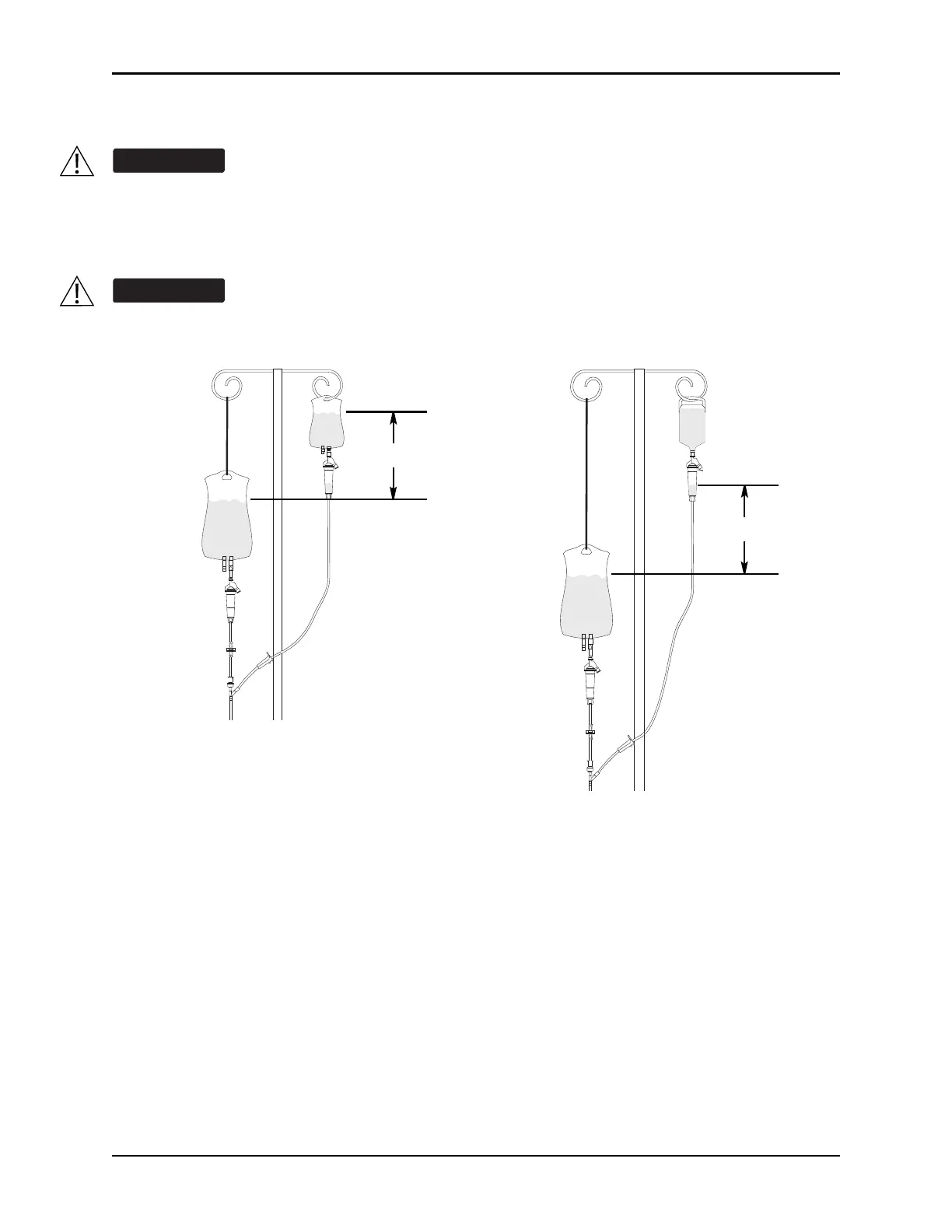
5. Attach the secondary administration set to the upper injection site on primary set.
6. Using the hanger provided with secondary administration set, lo
wer the primary fluid container to the
height indicated in following illustrations.
The generic workflow for pre-population of infusion parameters is as follows. Contact your EMR/HIS
vendor for detailed instructions. Using the EMR/HIS system scanner used for barcode medication
administration:
• Scan Patient's ID Band.
• Scan fluid/medication barcode label.
• Scan barcode label on the pump module.
NOTE:
If the infusion parameters are unable to be pr
e-populated on the system, error messages are displayed in
the EMR/HIS. Error messages are not displayed on the PCU. Refer to the EMR/HIS for more information.
The secondary administration set must be primed prior to beginning the secondary infusion.
The secondary solution container must be higher than the primary solution container.
Hanger
Primary
Container
Secondary Container
Bag
Primary
Container
Secondary Container
Bottle
at least 9½"
at least 9½"



 To Next Page