Chapter 13
| Basic Administration Protocols
Link Layer Discovery Protocol
– 365 –
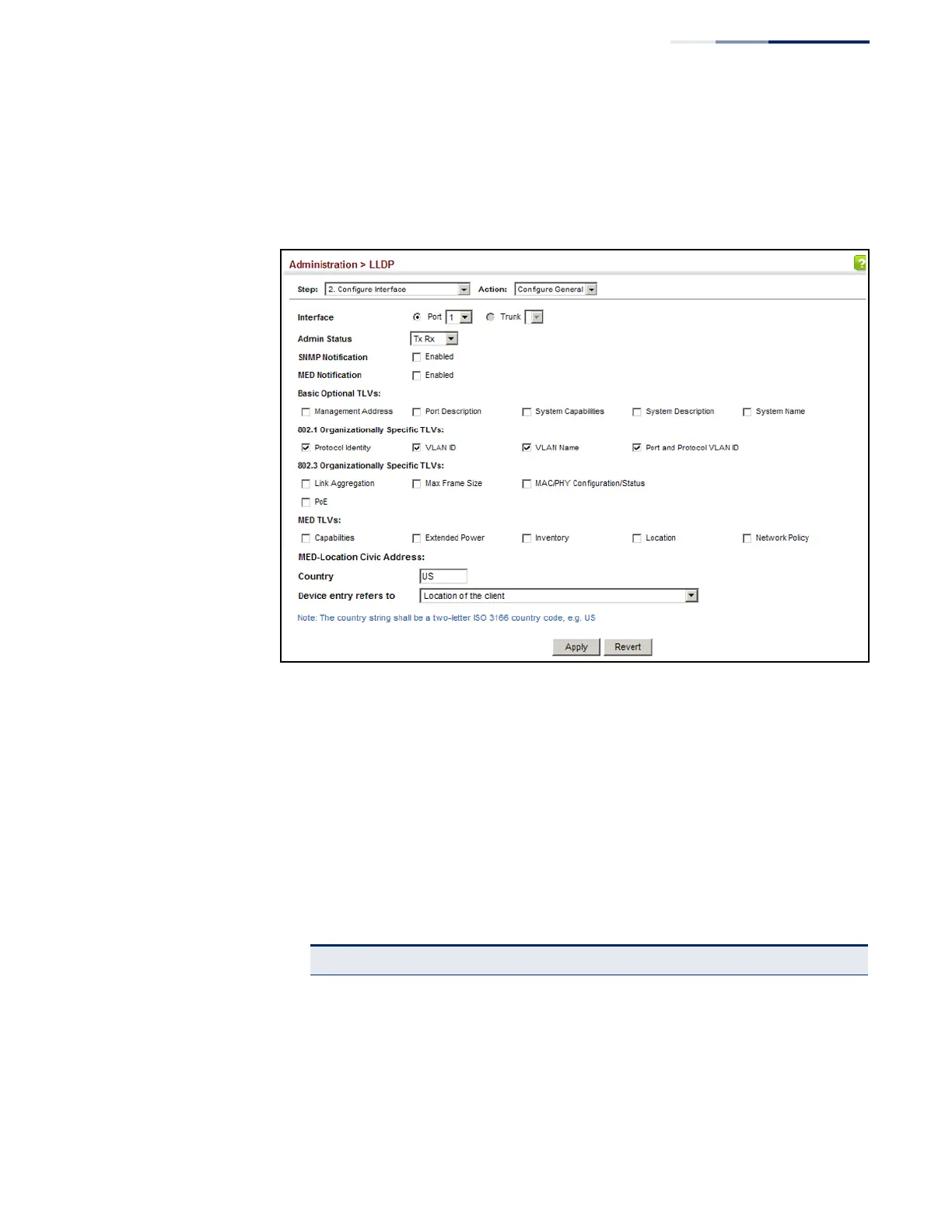
5. Set the LLDP transmit/receive mode, specify whether or not to send SNMP trap
messages, and select the information to advertise in LLDP messages.
6. Click Apply.
Figure 230: Configuring LLDP Interface Attributes
Configuring
LLDP Interface
Civic-Address
Use the Administration > LLDP (Configure Interface – Add CA-Type) page to specify
the physical location of the device attached to an interface.
Command Usage
◆ Use the Civic Address type (CA-Type) to advertise the physical location of the
device attached to an interface, including items such as the city, street number,
building and room information. The address location is specified as a type and
value pair, with the civic address type defined in RFC 4776. The following table
describes some of the CA type numbers and provides examples.
Table 24: LLDP MED Location CA Types
CA Type Description CA Value Example
1 National subdivisions (state, canton, province) California
2County, parish Orange
3City, township Irvine
4 City division, borough, city district West Irvine
5 Neighborhood, block Riverside
6 Group of streets below the neighborhood level Exchange



 To Next Page
 Loading...