Chapter 3
| Basic Management Tasks
Configuring Telnet Settings
– 89 –
◆ Password Threshold – Sets the password intrusion threshold, which limits the
number of failed logon attempts. When the logon attempt threshold is
reached, the system interface becomes silent for a specified amount of time
(set by the Silent Time parameter) before allowing the next logon attempt.
(Range: 1-120; Default: 3 attempts)
◆ Silent Time – Sets the amount of time the management interface is
inaccessible after the number of unsuccessful logon attempts has been
exceeded. (Range: 1-65535 seconds; Default: Disabled)
Note:
Password checking can be enabled or disabled for login to the console
connection (see “login” command in the CLI Reference Guide). You can select
authentication by a single global password as configured for the password
command, or by passwords set up for specific user-name accounts. The default is
for local passwords configured on the switch.
Web Interface
To configure parameters for the console port:
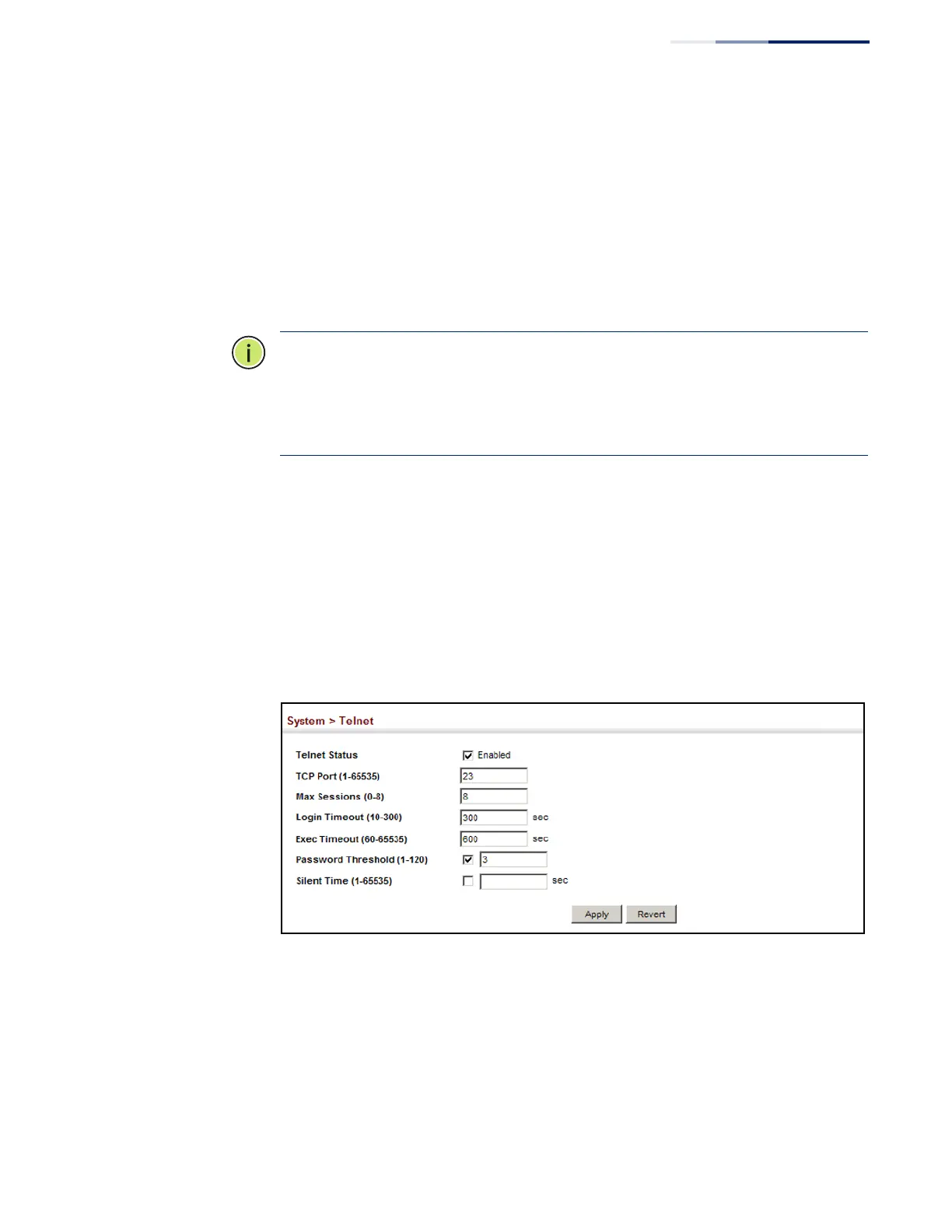
1. Click System, then Telnet.
2. Specify the connection parameters as required.
3. Click Apply
Figure 22: Telnet Connection Settings



 To Next Page
 Loading...