214323 257 Revision B
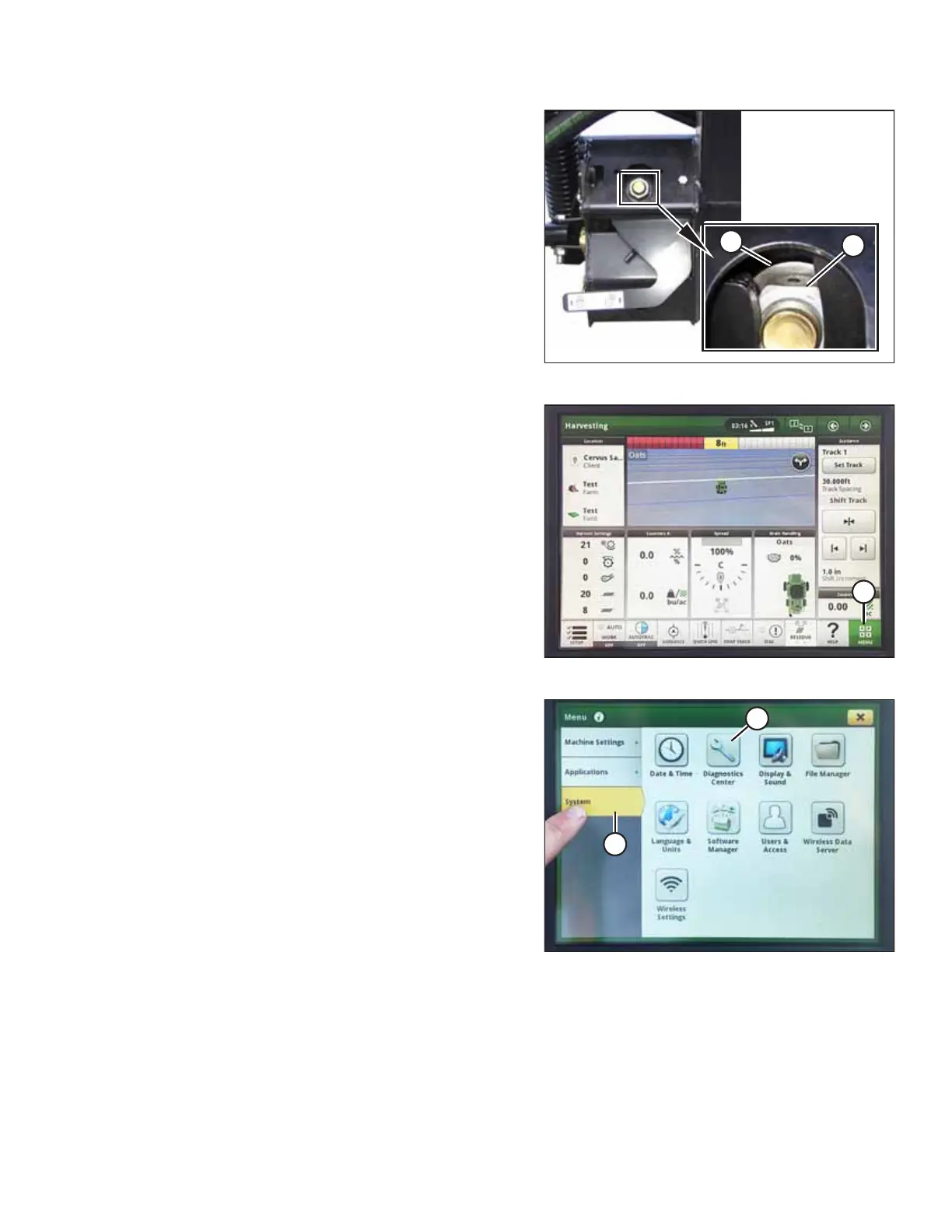
Figure 4.258: Float Lock
2. Ensure the float lock linkage is on the down stops at both
locations. When linkage is on the down stops, washer (A)
and nut (B) cannot be moved.
NOTE:
If the header is not on the down stops during the next two
steps, the voltage may go out of range during operation
causing a malfunction of auto header height control (AHHC)
system.
Figure 4.259: John Deere S7 Display – Harvesting Page
3. On the HARVESTING page, select MENU icon (A) in the
bottom right corner of the page.
Figure 4.260: John Deere S7 Display – Menu
4. On the MENU page, select SYSTEM tab (A). The
MENU opens.
5. Select DIAGNOSTICS CENTER icon (B). The DIAGNOSTICS
CENTER page opens.
AUTO HEADER HEIGHT CONTROL








 To Next Page