214323 78 Revision B
3.7.4 Header Angle
Header angle can be adjusted to accommodate different crop conditions and/or soil types.
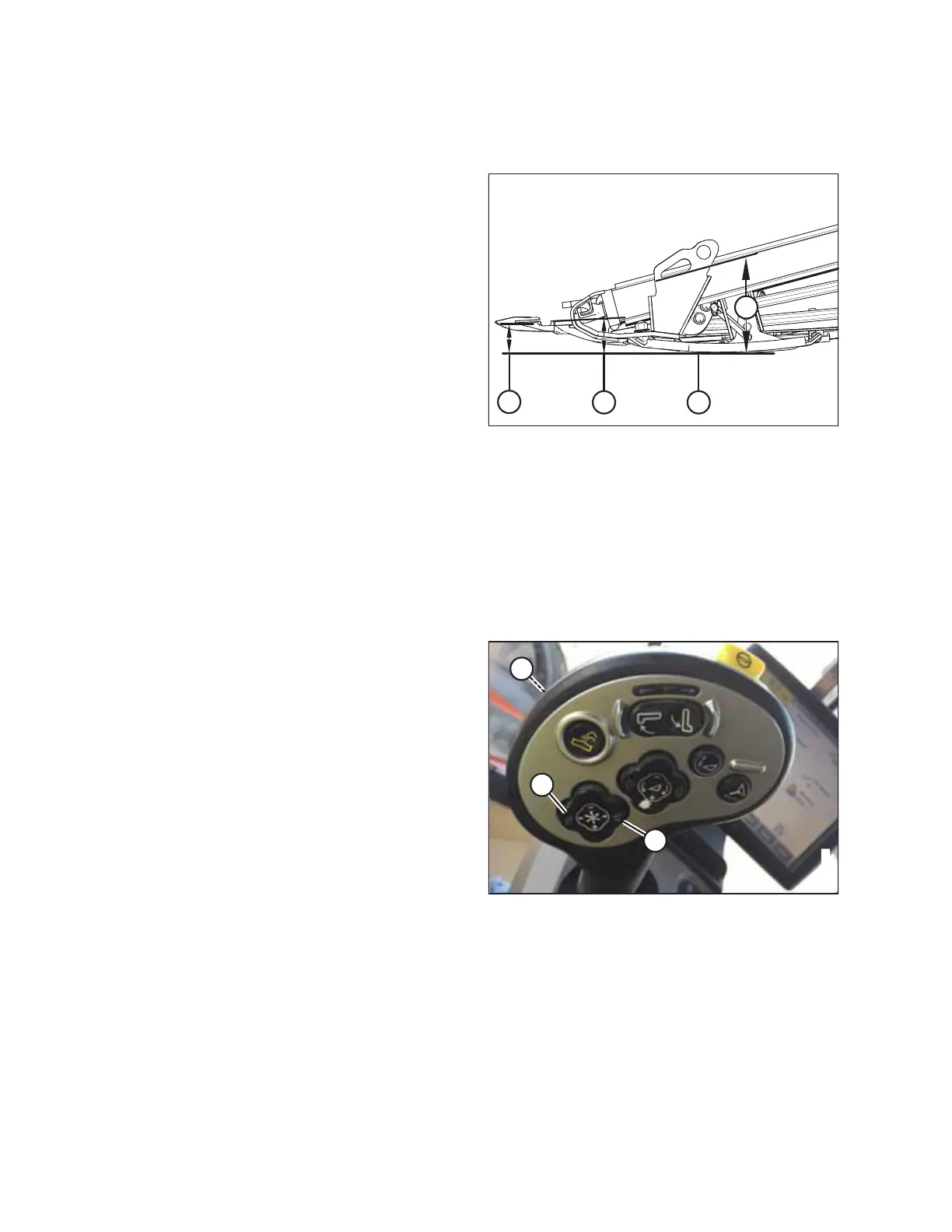
Figure 3.79: Header Angle
Header angle (A) controls the distance (B) between the knife
and the ground and is a critical component for effective cutting
on the ground. Adjusting the center-link determines the position
of the knife and guards and pivots the header at the point of
skid shoe/ground contact (C).
Header angle (A) is equal to guard angle (D) which is the angle
between the upper surface of the guards and the ground.
Adjusting Header Angle from Combine
The header angle is adjusted from the combine cab using a switch on the operator’s control handle and an indicator on the
center-link or on the monitor in the cab. The header angle is determined by the length of the center-link between the
combine adapter and the header, or by the degree of feeder house tilt on certain combine models.
Case combines:
Case combines use control handle switches to adjust the center-link to change the header angle.
Figure 3.80: Case Combine Controls
1. Press and hold SHIFT button (A) on the backside of the
control handle and press switch (B) to tilt the header
forward or press switch (C) to tilt the header back.
OPERATION








 To Next Page