214323 207 Revision B
4.13.2 Setting up Reel Settings – Gleaner
®
S9 Series
The reel calibration wizard on Gleaner
®
S9 Series combines allows you to configure the header’s reel speed settings
with ease.
DANGER
Never start or move the machine until you are sure all bystanders have cleared the area.
NOTE:
Changes may have been made to the combine controls or the display since this document was published. Refer to the
combine operator’s manual for the most up-to-date information.
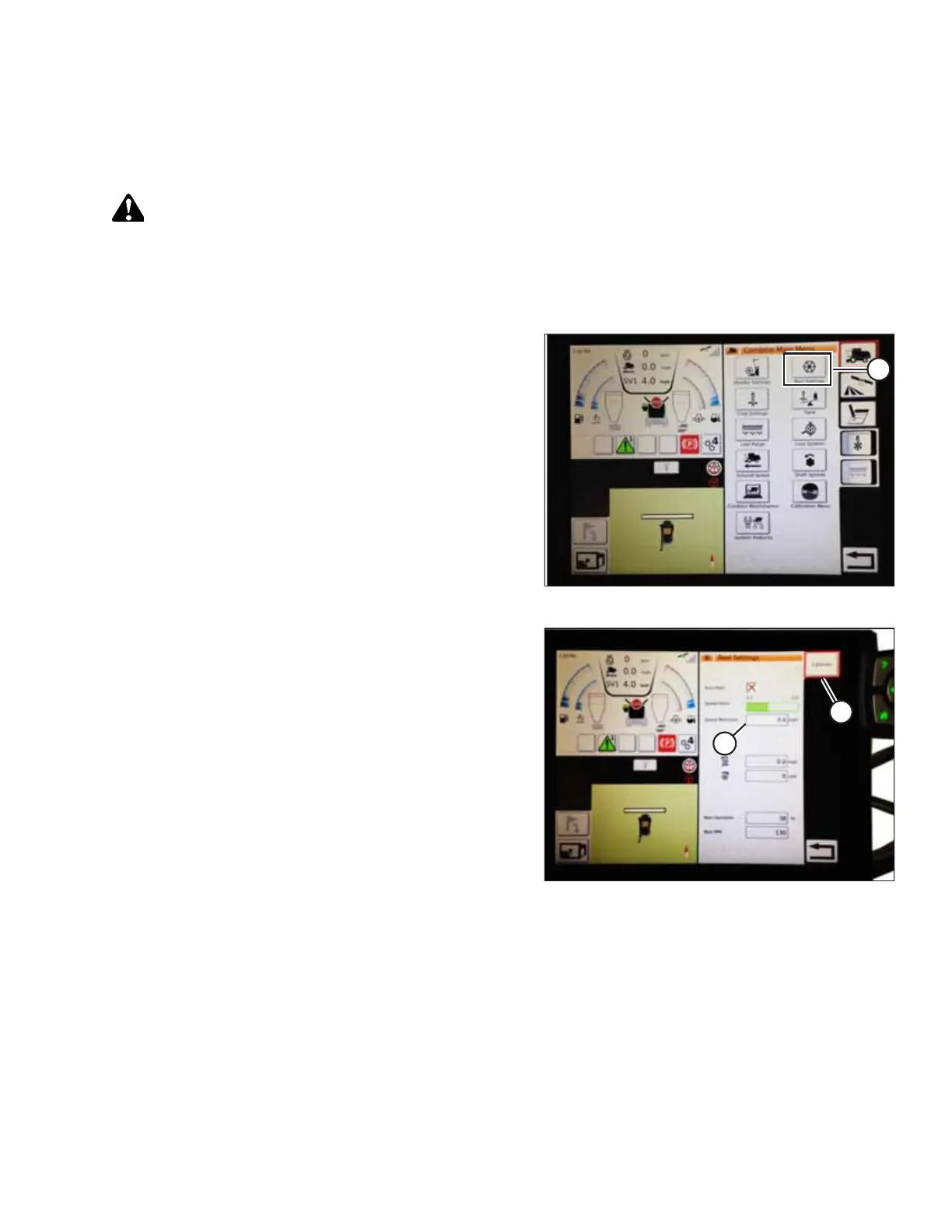
Figure 4.152: Reel Settings on Combine Main Menu
1. From the COMBINE MAIN MENU, touch REEL SETTINGS (A)
to open the REEL SETTINGS page.
Figure 4.153: Reel Settings Calibration
2. To set the minimum reel speed, touch SPEED MINIMUM
FIELD (B). The on-screen keyboard appears. Enter the
desired value. Touch the green check mark to accept the
new value, or the red X to cancel. The reel speed (in mph)
and rpm is shown.
NOTE:
At the bottom of the REEL SETTINGS page, the reel
diameter and reel pulses per revolution are displayed.
These values have already been set in the HEADER
SETTINGS page.
3. Calibrate the reel speed in the REEL SETTINGS page by
touching CALIBRATE button (A) at the top right of the page.
AUTO HEADER HEIGHT CONTROL








 To Next Page