401
1.4.6 Mode Settings
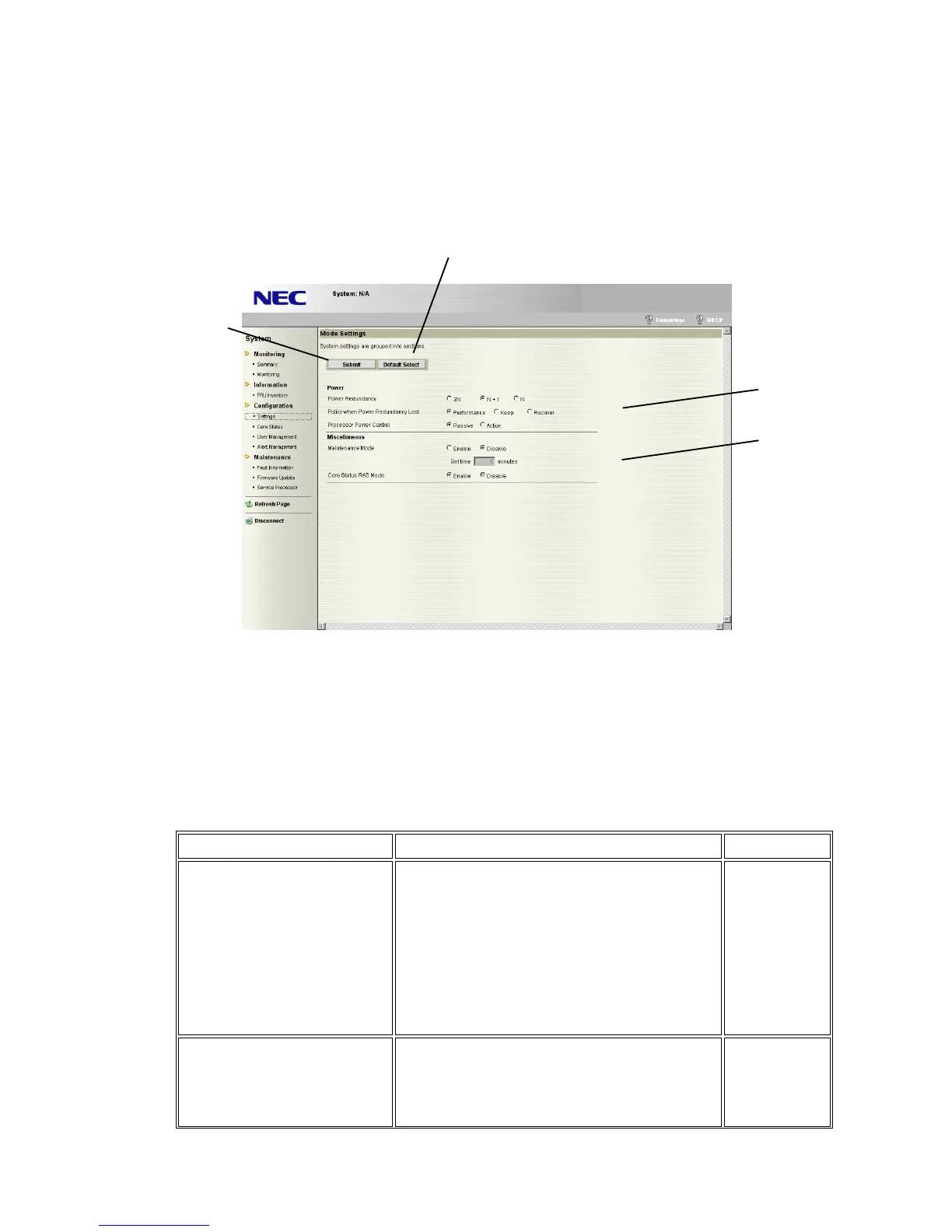
Mode Settings is displayed by selecting “Settings” and clicking “Mode Settings” of the menu
on the left side of the screen.
Various operations for the system can be set in Mode Settings.
(1) Clicking “Submit” enables to set the information for (3) and (4).
(2) Clicking “Default Select” enables to restore the operation mode status to default status.
(3) Power
Display/set power related setting information.
These settings will be applied after the server reset.
Property
Description
Default setting
Power Redundancy Select a type of the power redundancy
configuration.
- 2N : 2N configuration(Power Units are Fully
Redundant)
- N+1 : N+1 configuration (Power Units are
Redundant)
- N : N+1 configuration (Power Units are
Non-Redundant)
N+1
Policy when Power
Redundancy Lost
Select a taken action at power redundancy loss.
- Performance : Performance Mode
- Keep : Maintaining current performance
- Recover : Redauncy recovery mode
Performance
(1)
(2)
(3)
(4)





 To Next Page