571
Management Firmware Reset
When display of EXPRESSSCOPE® Monitor or Web Console does not perform properly,
when updating firmware or when changing vKVM settings, reset BMC(Service Processor)
by the following procedures.
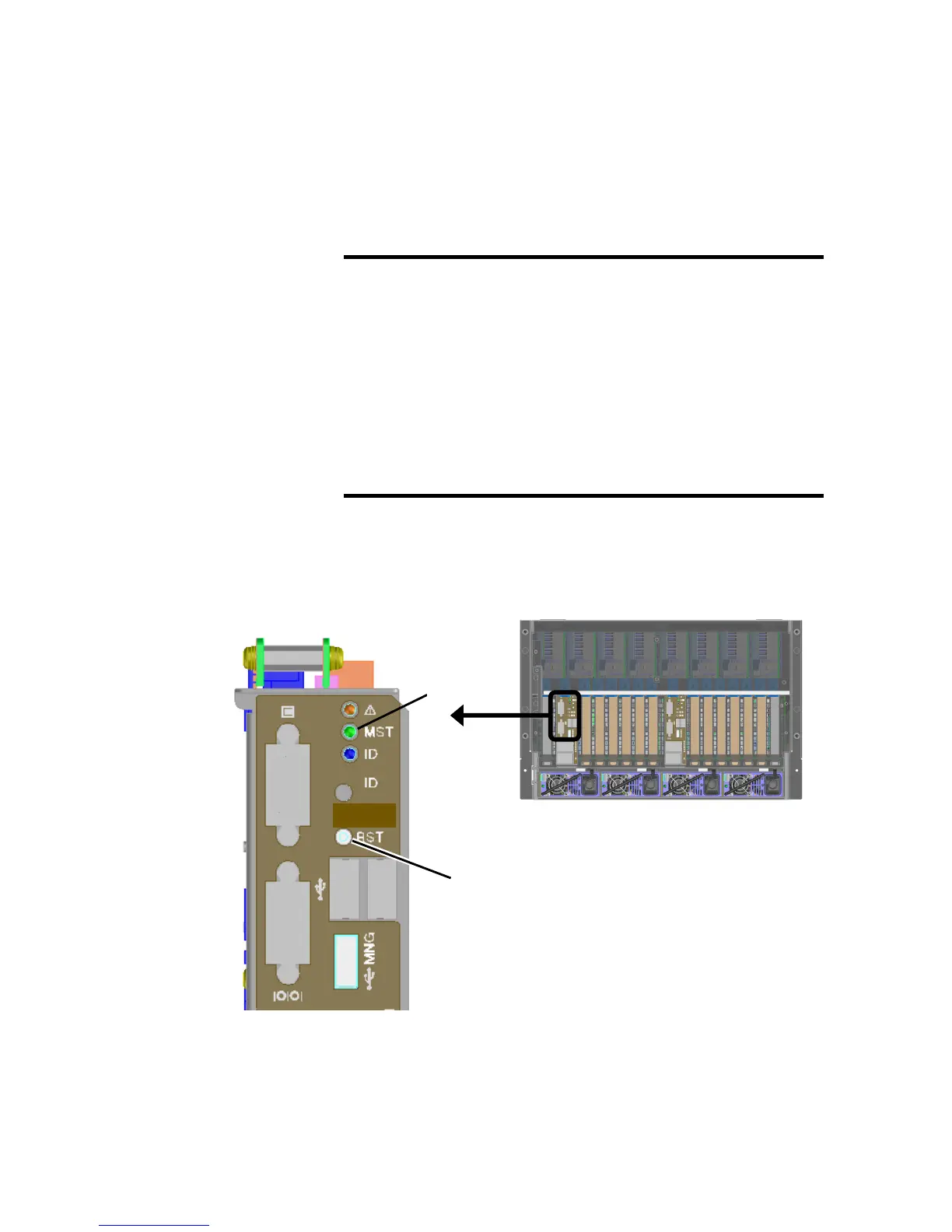
1. Press the MGM reset button of management module on the rear of the server.
Use a thin-tip object when pressing the button.
IMPORTANT:
• By performing reset of Management Firmware while connected to
Web console, the connection to remote console is disconnected.
• To connect to Web console after resetting Management
Firmware, connect it after waiting for 3 minutes or so.
• Use MGM reset button only when it might occurr hardware error
or failure. Otherwise SG information of the management firmware
might be corrupted.
• Don’t execute reset of Management Firmware during VMware
ESX/ESXi running.
Rear of the server
MGM Reset Button
*1
*1 This LED may not exist.





 To Next Page