415
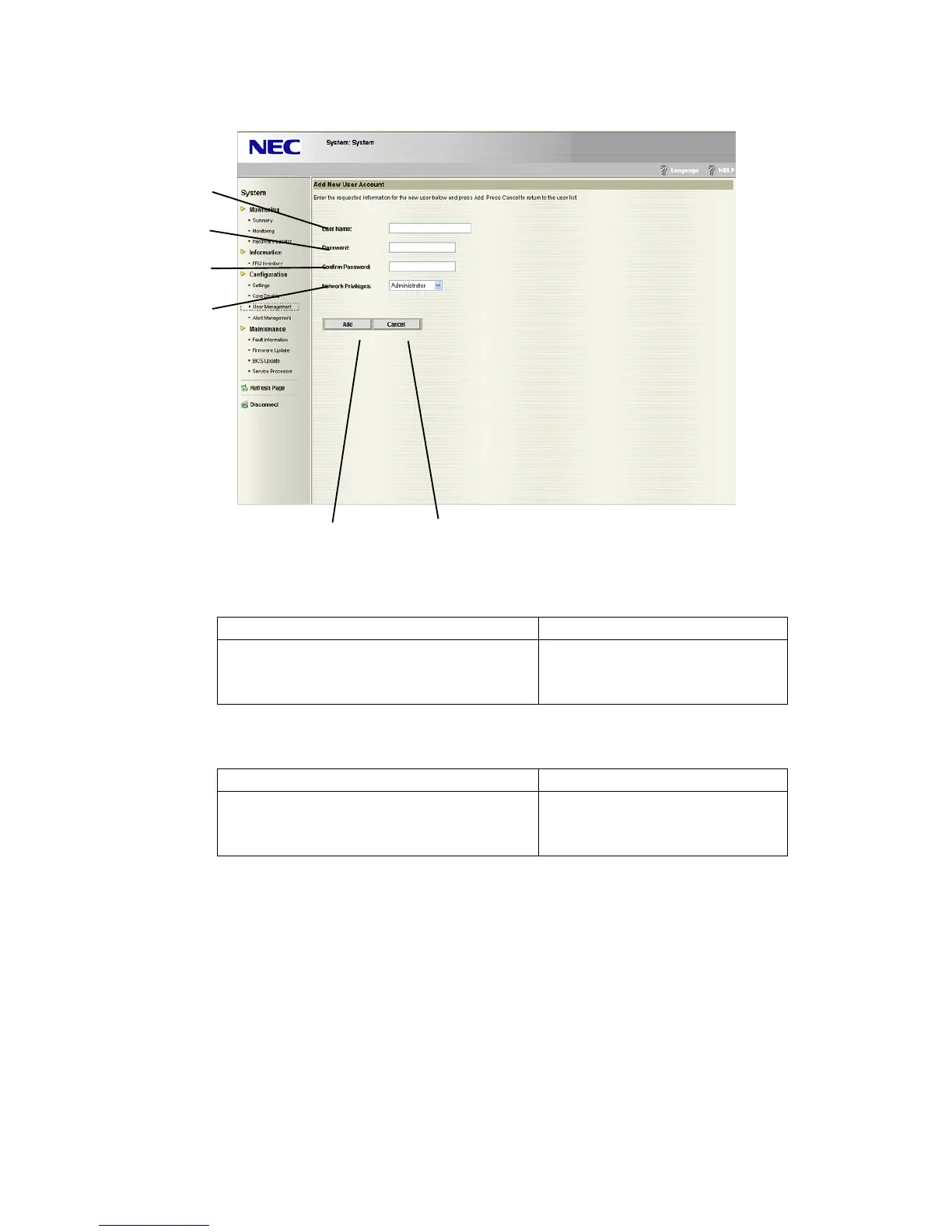
Add New User Account screen
Register new user account information.
(5) User Name
Enter new user name.
Usable ASCII character code Number of settable characters
alphabetic character
alphanumeric character
“_”, “-“
16
(6) Password
Enter password.
Usable ASCII character code Number of settable characters
alphabetic character
alphanumeric character
symbols(Except the space character)
20
(7) Confirm Password
Enter password for confirmation.
This must be the same as (6).
(8) Network Privileges
Select privilege level (Administrator, Operator, User) to be assigned to user account.
(9) Clicking “Add” enables to set the information of (5)-(8). The screen moves to the initial
screen of User Management after setting is completed.
(10) Clicking “Cancel” enables to move to the initial screen of User Management.
(5)
(6)
(7)
(8)
(9)
(10)





 To Next Page