Date Code 20130214 Instruction Manual SEL-2414 Transformer Monitor
Section 8
Instruction Manual
Front-Panel Operations
Front-Panel Overview
The SEL-2414 Transformer Monitor front panel makes data collection and con-
trol quick and efficient. Use the front panel to analyze operating information,
view and change device settings, and perform control functions. The SEL-2414
features a straightforward menu-driven control structure presented on the front-
panel liquid crystal display (LCD). Front-panel targets and other LED indicators
provide a fast means of checking operation status.
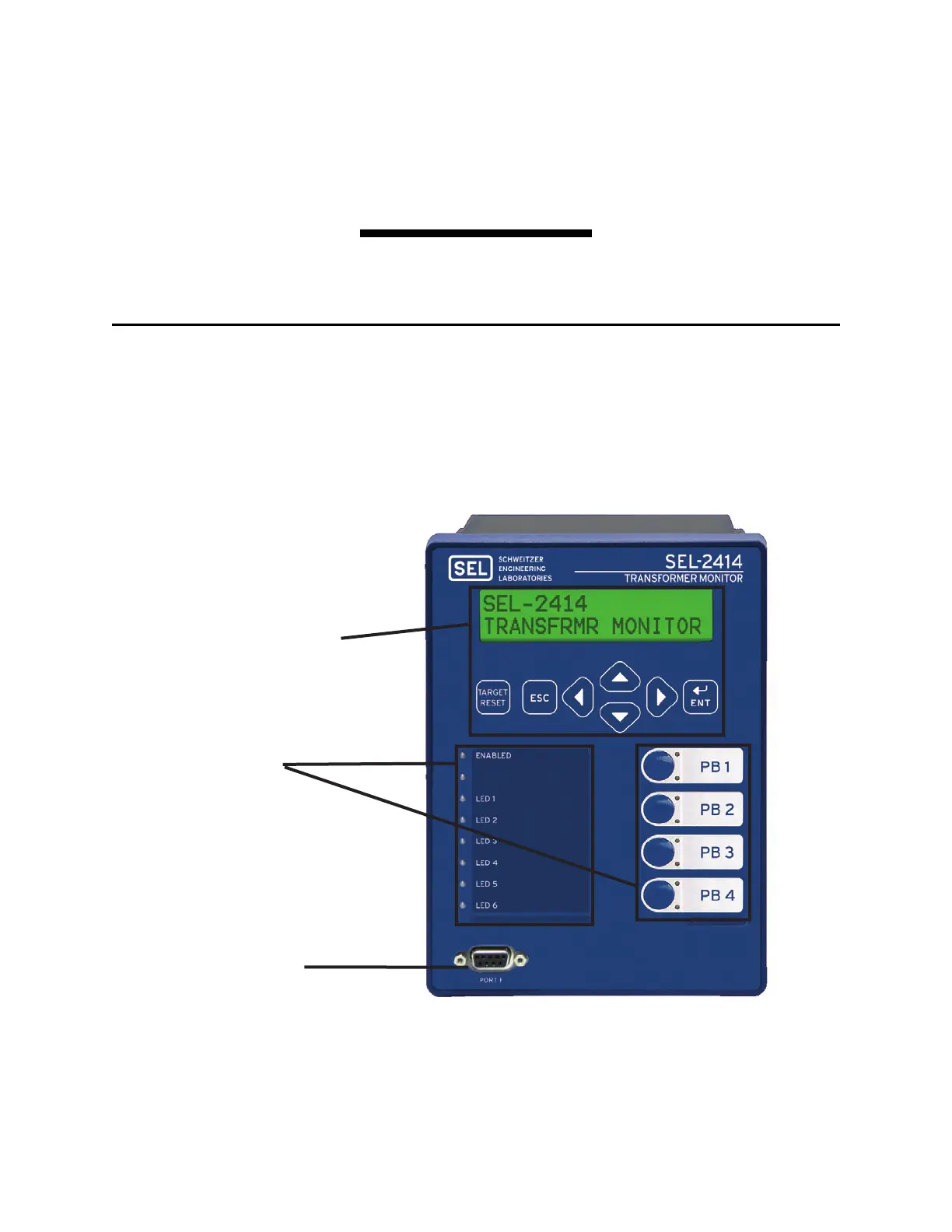
Figure 8.1 shows the many features of the versatile front-panel.
Figure 8.1 Front-Panel Overview
Human-Machine Interface (HMI)
- Use the HMI to access information
- Program the HMI to:
-- Display rotating messages (Display Points)
-- Control virtual pushbuttons (Local Bits)
EIA-232 Serial Port (PORT F)
See Section 7: Communications for details.
Program the front-panel:
- Target (Status) LEDs
- Pushbuttons
- Pushbutton (Operation) LEDs
Slide-in configurable front-panel labels
to change the identification of operation
and target LEDs. (The source for label
template files is the SEL-2414 Product
Literature CD. In addition, you can find
these files at www.selinc.com and
www.selindustrial.com.)



 To Next Page