Date Code 20130214 Instruction Manual SEL-2414 Transformer Monitor
Appendix B
Instruction Manual
Firmware Upgrade Instructions
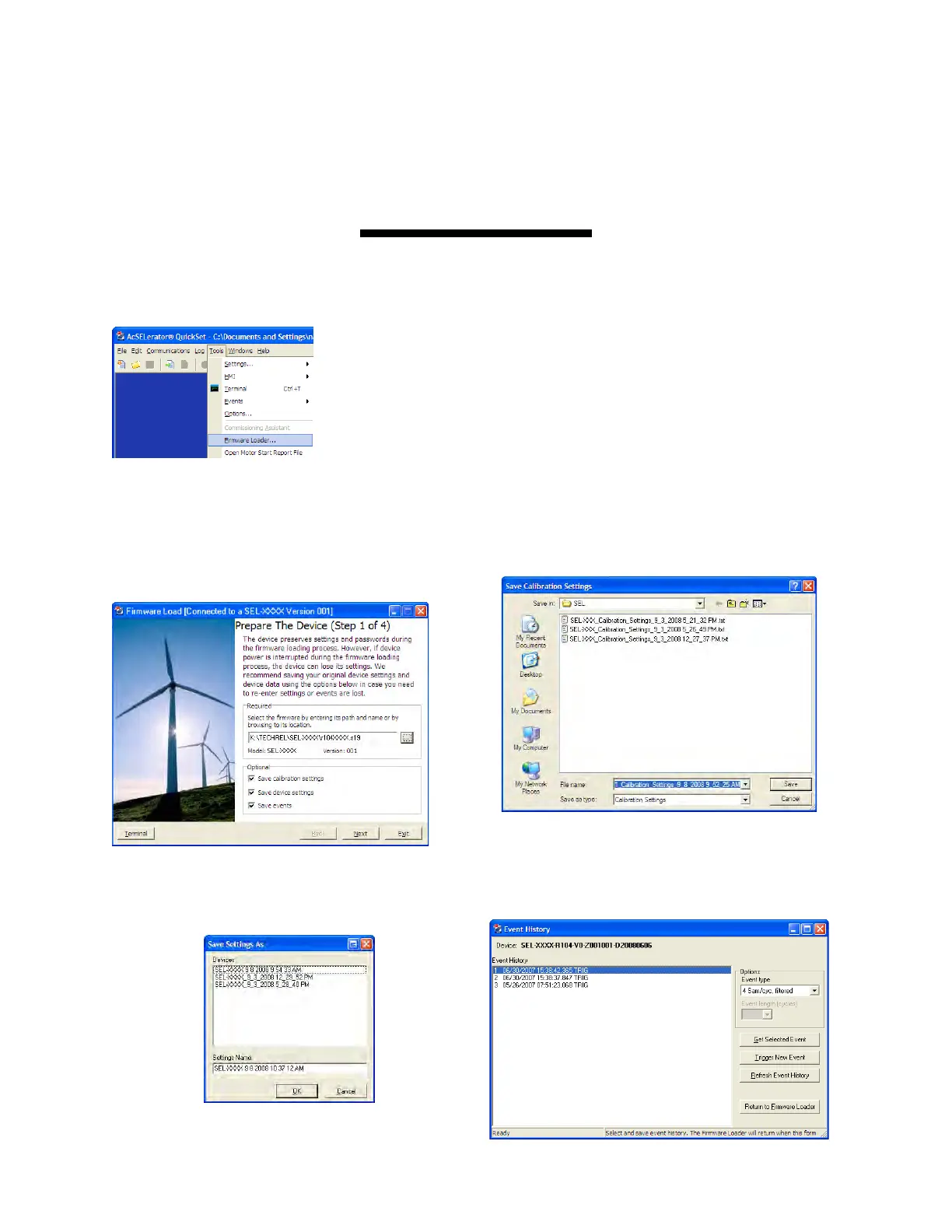
Select Tools > Firmware Loader from the ACSELERATOR QuickSet
®
SEL-5030 Software menu bar to launch a
wizard that walks you through the steps to load firmware into your SEL device.
Firmware Loader will not start if:
➤ The device is unsupported by ACSELERATOR QuickSet.
➤ The device is not connected to the computer with a
communications cable.
➤ The connected port does not support SELBOOT.
➤ The device is disabled.
Step 1: Prepare Device
a) Select the firmware to be loaded using the browse
control and select whether you want to save calibra-
tion settings, device settings, and event report files.
Select Next to continue the wizard.
b) Select a file name and path to save the settings or
accept the defaults as shown. Click Save.
c) After the device settings are downloaded, select a file
name and path to save the settings or accept the
default, as shown.
d) Click Return to Firmware Loader since this product
does not have event reports.



 To Next Page