6.18
SEL-2414 Transformer Monitor Instruction Manual Date Code 20130214
Settings
Global Settings (SET G Command)
AC Mode Processing (AC Control Voltage)
Figure 6.10 shows IN101R from Input IN101 applied to a pickup/dropout timer.
Different from the dc mode, only the delayed time information is available in the
ac mode. There are also no time settings for the debounce timer in the ac mode:
the pickup time delay is fixed at 2 ms, and the dropout time is fixed at 16 ms.
Device Word bit IN101 is the output of the debounce timer. To select the ac mode
of debounce, set IN101D = AC.
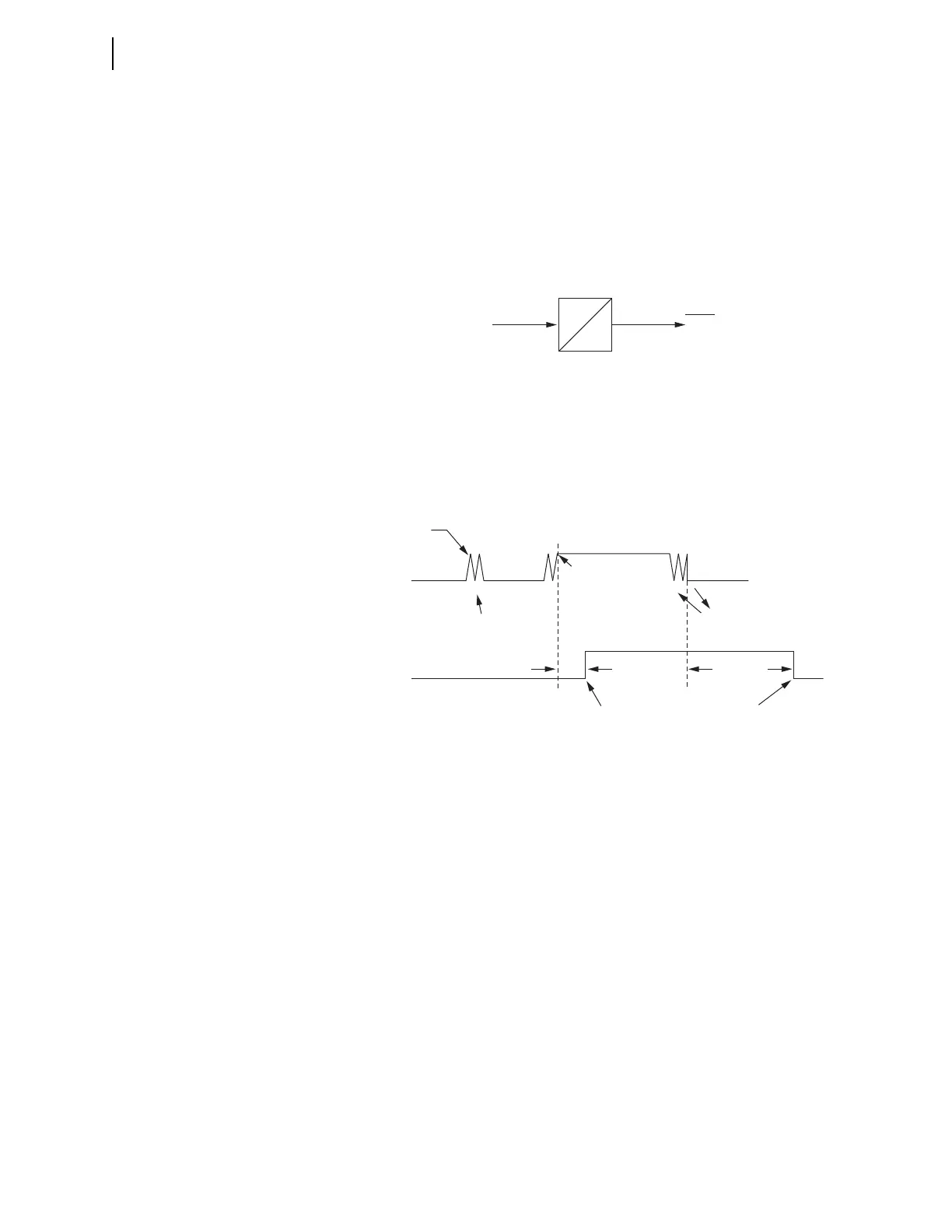
Figure 6.11 shows a timing diagram for the ac mode of operation. On the rising
edge of IN101R, the pickup timer starts timing (points marked 1 in Figure 6.11).
If IN101R deasserts (points marked 2 in Figure 6.11) before expiration of the
pickup time setting, Device Word bit IN101 does not assert, and remains at
logical 0. If, however, IN101R remains asserted for a period longer than the
pickup timer setting, then Device Word bit IN101 asserts to a logical 1.
Deassertion follows the same logic. On the falling edge of IN101R, the dropout
timer starts timing. If IN101R remains deasserted for a period longer than the
dropout timer setting, then Device Word bit IN101 deasserts to a logical 0.
Table 6.17 shows the settings prompt, setting range, and factory default settings
for a card in Slot 3.
Figure 6.10 AC Mode Processing
Figure 6.11 Timing Diagram for Debounce Timer Operation When Operating in
AC Mode
2 ms
16 ms
IN101
Device
Word
Bit
IN101R
Debounce Timer
IN101R
2 ms
IN101R Deasserted;
DDOT Counts
IN101R Deasserted;
DDOT Counts
Dropout Time
(16 ms)
Debounce Dropout
Timer Expires;
Device Word Bit
IN101 Deasserts
Debounce Pickup
Timer Expires;
Device Word Bit
IN101 Asserts
IN101R Asserted;
DPUT Counts
IN101R Asserted;
DPUT counts
Device Word
Bit IN101
1
2
111 11
222 22
DPUT = Debounce Pickup Timer
DDOT = Debounce Dropout Timer
1 = Rising Edge: DPUT Counts
2 = Falling Edge: DDOT Counts



 To Next Page