6.9
Date Code 20130214 Instruction Manual SEL-2414 Transformer Monitor
Settings
Device Settings (SET Command)
Analog Input Settings
See Table 2.1 to determine the slots that support the AI card.
Table 6.8 shows the setting prompt, setting range, and factory default settings for
an analog input card in Slot 3. For the name setting (AI301NAM, for example),
enter only alphanumeric and underscore characters. Characters are not case sen-
sitive, but the device converts all lowercase characters to uppercase. Although the
device accepts alphanumeric characters, the name AI301NAM setting must begin
with an alpha character (A–Z) and not a number.
Analog Outputs
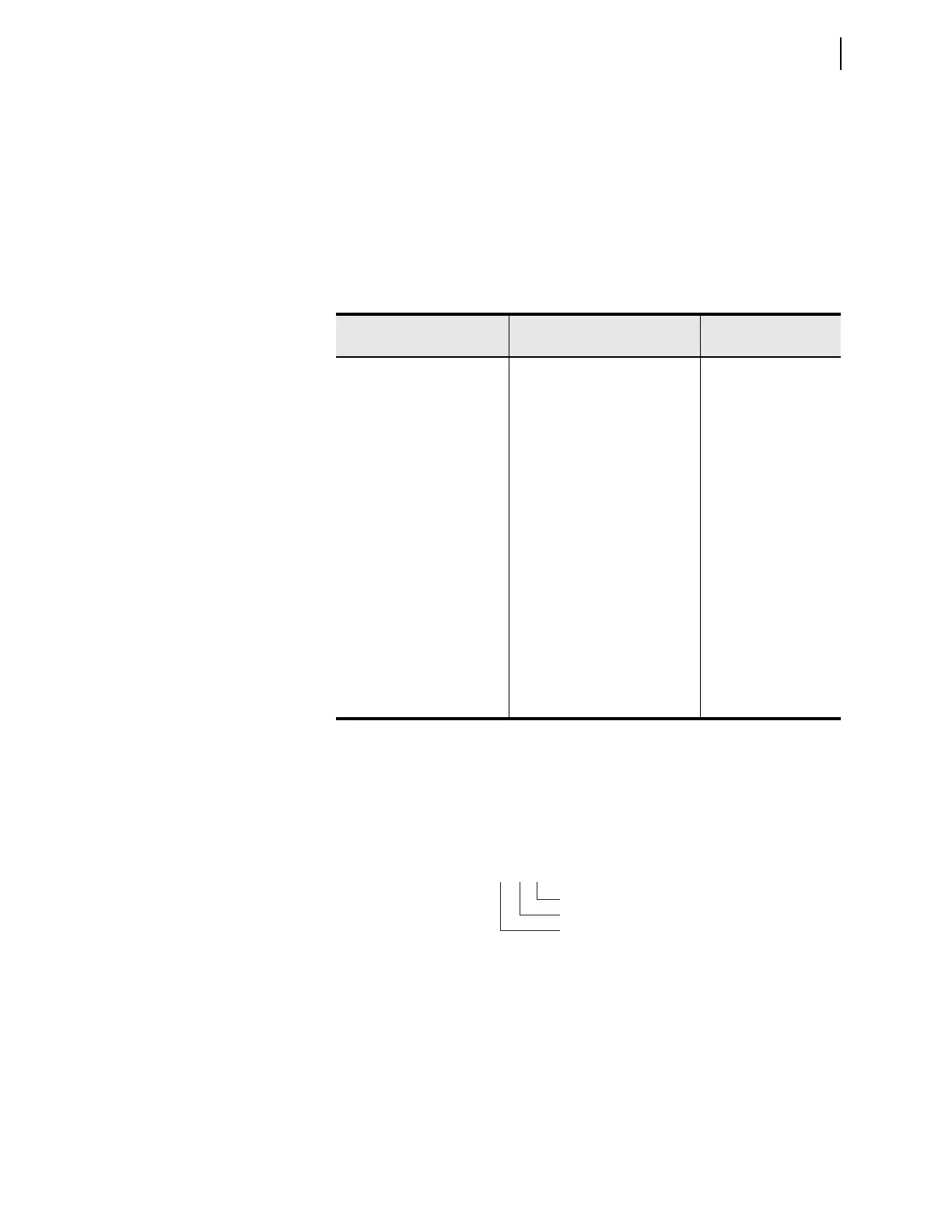
Because of the flexibility to install different cards in the rear-panel slots of the
device, the setting prompt adapts to the x and y variables shown in Figure 6.4.
Var iable x displays the slot position (3 through 6) and variable y displays the
Analog Output number (1 through 8).
For an analog input/output card in Slot 3, setting AO301AQ identifies the analog
quantity we assign to Analog Output 1 (when set to OFF, the device hides all
associated AOx0y settings and no value appears on the output). You can assign
any of the analog values in Appendix I: Analog Quantities to an analog output.
Table 6.9 shows the setting prompt, setting range, and factory default settings for
an analog card in Slot 3. For the name setting (AI301NAM, for example), enter
only alphanumeric and underscore characters. Characters are not case sensitive,
Table 6.8 Analog Input Card in Slot 3
Setting Prompt Setting Range
Setting Name :=
Fac tory Default
AI301 Instrument Tag Name 8 characters 0–9, A–Z, _ AI301NAM := AI301
AI301 Type I, V AI301TYP := I
a
a
Voltage setting range for a voltage transducer, i.e., when AI301TYP := V
AI301 Low Input Value –20.480 to +20.480 mA AI301L := 4.000
AI301 High Input Value –20.480 to +20.480 mA AI301H := 20.000
AI301 Low Input Value –10.240 to +10.240 V AI301L := 0.000
AI301 High Input Value –10.240 to +10.240 V AI301H := 10.000
AI301 Engineering Units 16 characters AI301EU := mA
AI301 Engineering Unit Low –99999.000 to +99999.000 AI301EL := 4.000
AI301 Engineering Unit High –99999.000 to +99999.000 AI301EH := 20.000
AI301 Low Warn Level 1 OFF, –99999.000 to +99999.000 AI301LW1 := OFF
AI301 Low Warn Level 2 OFF, –99999.000 to +99999.000 AI301LW1 := OFF
AI301 Low Alarm OFF, –99999.000 to +99999.000 AI301LAL := OFF
AI301 High Warn Level 1 OFF, –99999.000 to +99999.000 AI301HW1 := OFF
AI301 High Warn Level 2 OFF, –99999.000 to +99999.000 AI301HW2 := OFF
AI301 High Alarm OFF, –99999.000 to +99999.000 AI301HAL := OFF
Figure 6.4 Analog Output Names
Output Number (1 through 4)
Slot Position (3 through 6)
Analog Output
AOx0y



 To Next Page