TM Palletizing Operator User’s Manual Product Version: 1.0 / Document Version: 1.0 114
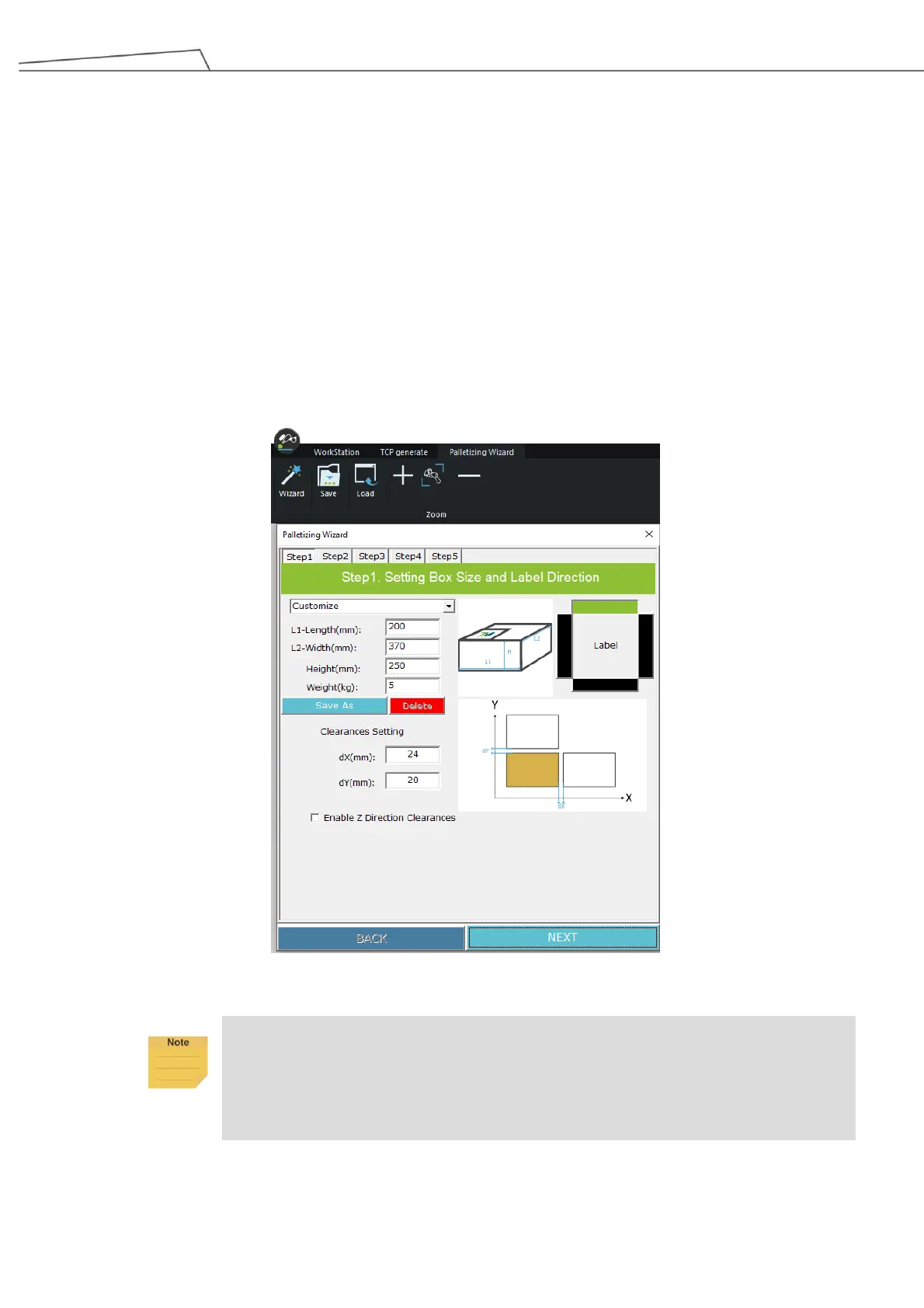
6.4.1 Step 1 - Setting Box Size and Label Direction
In Step 1, users can set the Length (mm), Width (mm), Height (mm) and Weight (kg) of the box, the
direction of the packaging label, and the clearances between the boxes in dX/dY/dZ directions.
The figure below is based an example of
Length: 200 mm
Width: 370 mm
Height: 250 mm
dx: 24 mm
dy: 20 mm
Users may also “Save As” or “Delete” their box size setting.
The following figure presents an example.
Figure 97: Palletizing Wizard_Step 1
Enabling Z Direction Clearance will allow users to set tasks between layers, such as
insertion of slip sheet. When you enable Z Direction Clearance, you will be able to set the
layer in Step 3. For further information, refer to Step 3 – Create Pallet Layers and
Advanced5_Interval_Between_Layers in Section 6.6.2



 To Next Page