TM Palletizing Operator User’s Manual Product Version: 1.0 / Document Version: 1.0 123
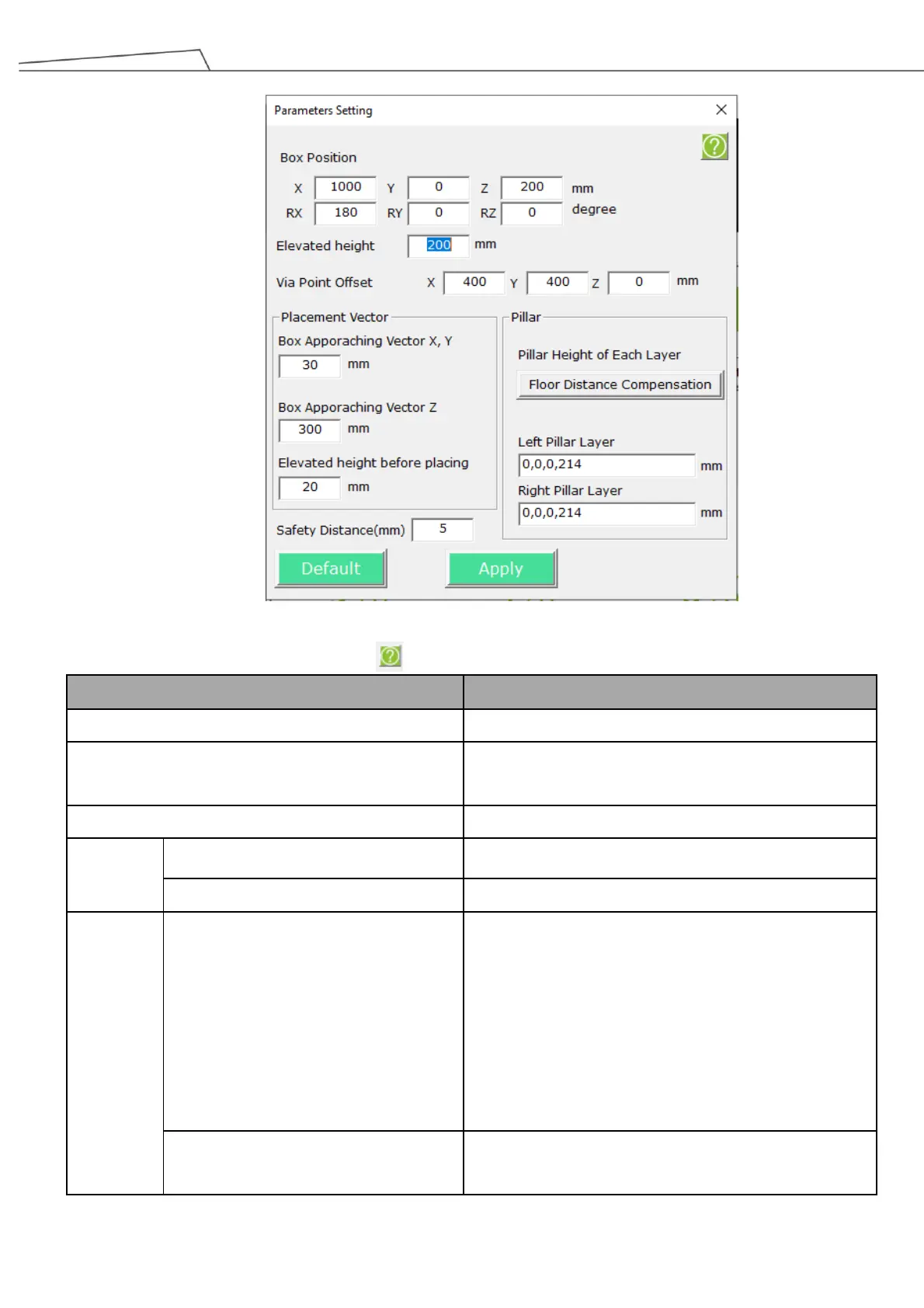
Figure 105: Parameter setting
Users may click the Question Icon to view the parameter descriptions.
The robot position of gripping box.
The elevated height along Z-axis after the robot grips the
box.
Position relative to the Gripping Up point
Box Approaching Vector X, Y, Z (D)
Box approaching vector in X, Y, Z axis
Elevated Height Before Placing (E)
The elevated height before placing the box
Set pillar height and left/right pillar layer \n (This
parameter indicates the absolute height of the pillar. \n
For instance, if the parameters are set as 100, 300,\n it
means the absolute height of the pillar is 100mm. When
the first layer of boxes is stacked.\n Consequently, the
absolute height would be 300mm\n when the second
layer of boxes is stacked.)
Floor Distance Compensation
Users may click on this option if required. The robot will
attempt to adjust pillar height to place boxes. The



 To Next Page