275
The Piano Roll View
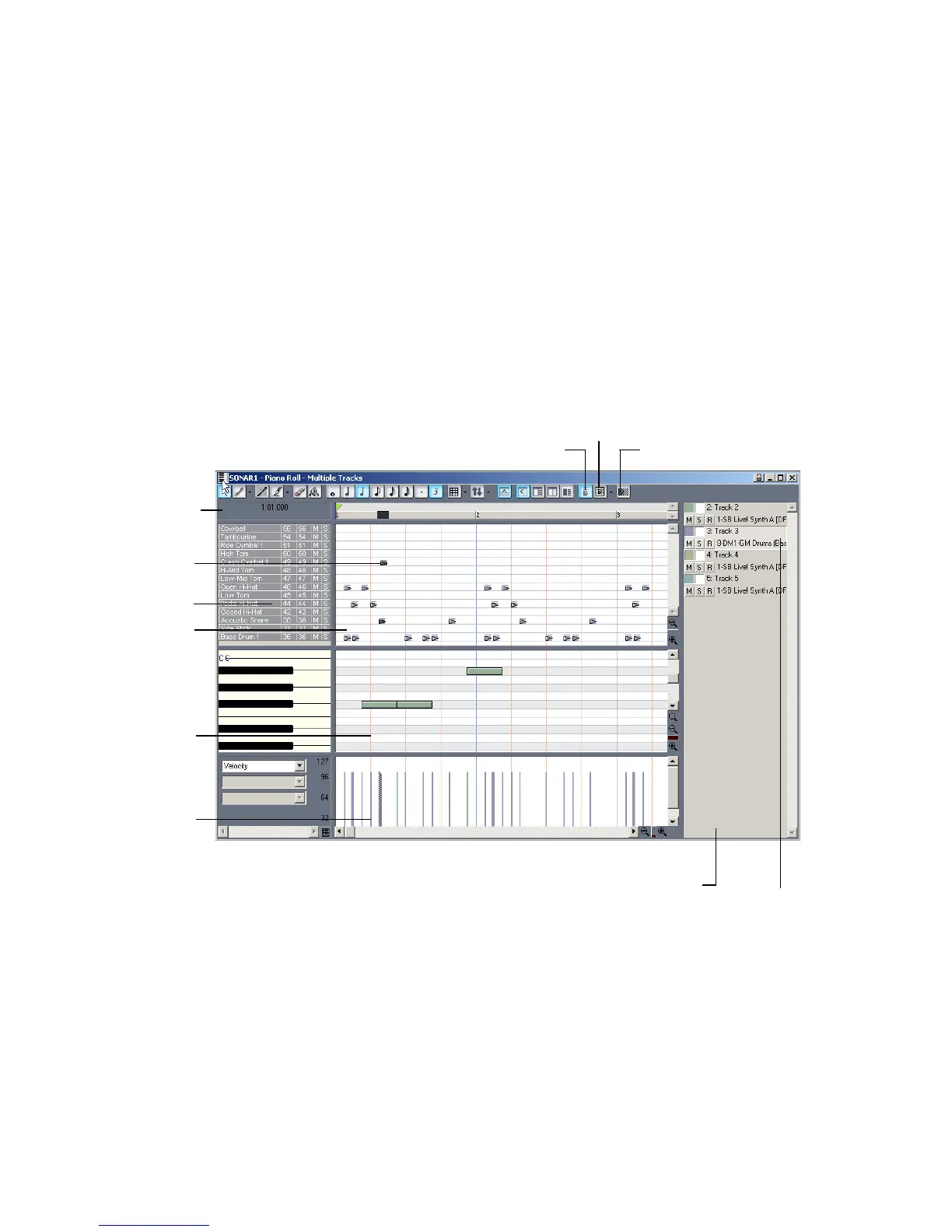
The Piano Roll view displays all notes and other events from one or more MIDI
tracks in a grid format that looks much like a player piano roll. Notes are
displayed as horizontal bars, and drum notes as diamonds. Pitch runs from bottom
to top, with the left vertical margin indicating the pitches as piano keys or note
names. Time is displayed running left to right with vertical measure and beat
boundaries. The Piano Roll view makes it easy to add, edit, and delete notes from a
track.
The Piano Roll view consists of the Note Map pane, the Drum Grid pane, the Note
pane, the Controllers pane, and the Track List pane.
Note Map Pane
In this pane displays your drum map settings, mute or solo an individual pitch,
and preview individual pitch sounds. For more information about the Note Map
Pane, see “The Note Map Pane” on page 342.
Show Velocity Tails button
Selected Note
Drum Grid pane
Track List pane
Inspector toolbar:
selected note’s
properties
Note Map pane
Show/Hide Grid button
Show Durations
Note pane
Controllers
pane
Selected track



 To Next Page