148
To Automatically Disable All Local Control Whenever You
Launch SONAR
1. In the directory where SONAR is installed, double-click on the TTSEQ.INI file
to open it.
2. In the Options section, add the line:
SendLocalOff=1
3. Save the file and close it.
4. When you launch SONAR, it automatically sends a Local Off message to your
keyboard.
Note: Not all keyboards respond to this message.
Playing Files in Batch Mode
SONAR allows you to play several files in sequence automatically using the Play
List view. You can use this feature in live performance applications or just for fun.
SONAR’s Play List view lets you create and work with a series of project, MIDI,
and bundle files. As each file plays, SONAR loads it and displays it in the Track
view and other views like any other project file.
The Play List View
The Play List view lets you create, edit, and save a play list (or set) of up to 999
SONAR projects. Once you’ve created the list, you can play back the entire
sequence automatically. You can even program the list to pause between songs for
a fixed amount of time or to wait for a keystroke before proceeding.
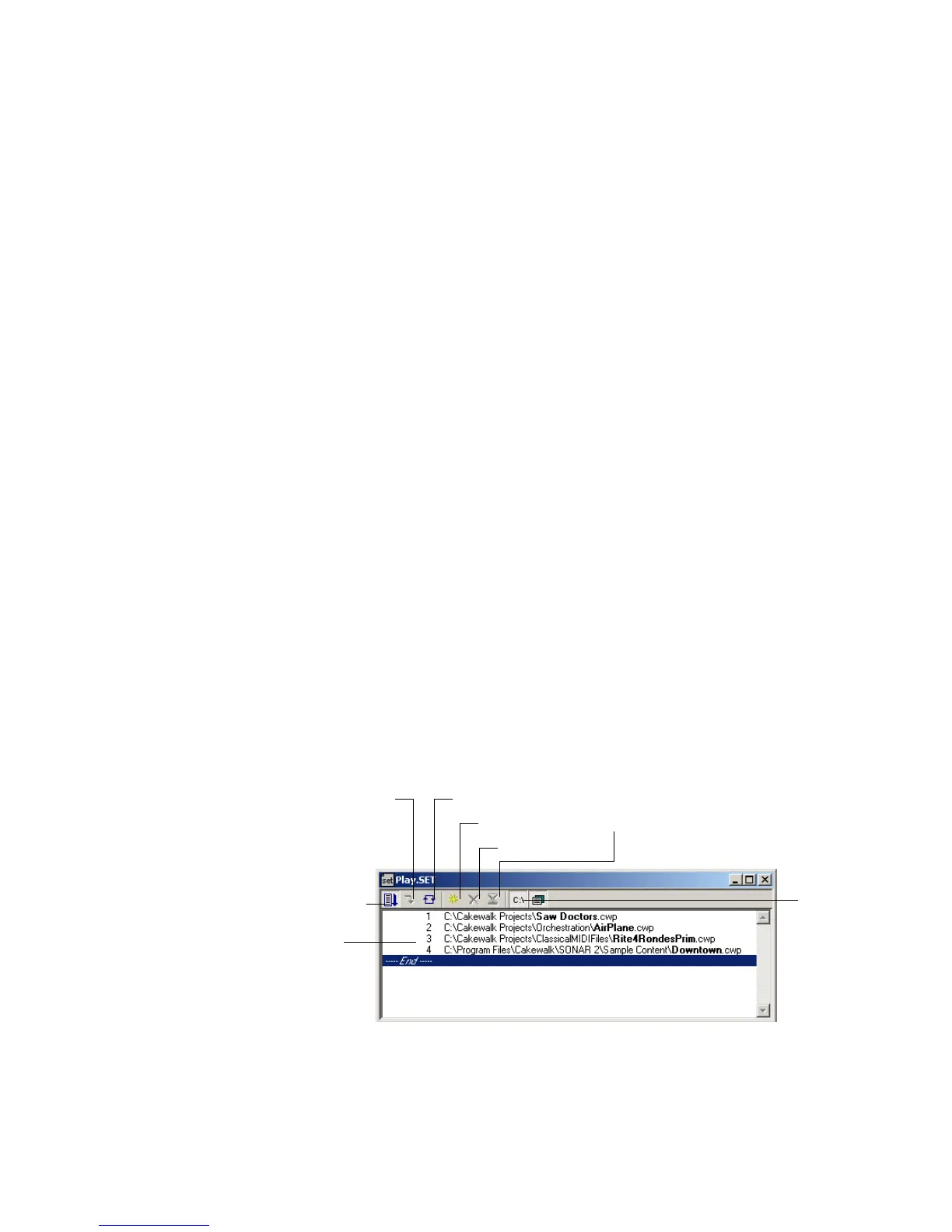
The Play List view looks like this:
Play lists can be saved for future use. Play list files have the extension .
SET.
Add a song
Enable the play list
Switch to the next song
Repeat the list
List of songs
Drop a song
Set a delay
Display full
path



 To Next Page