526
The Staff View
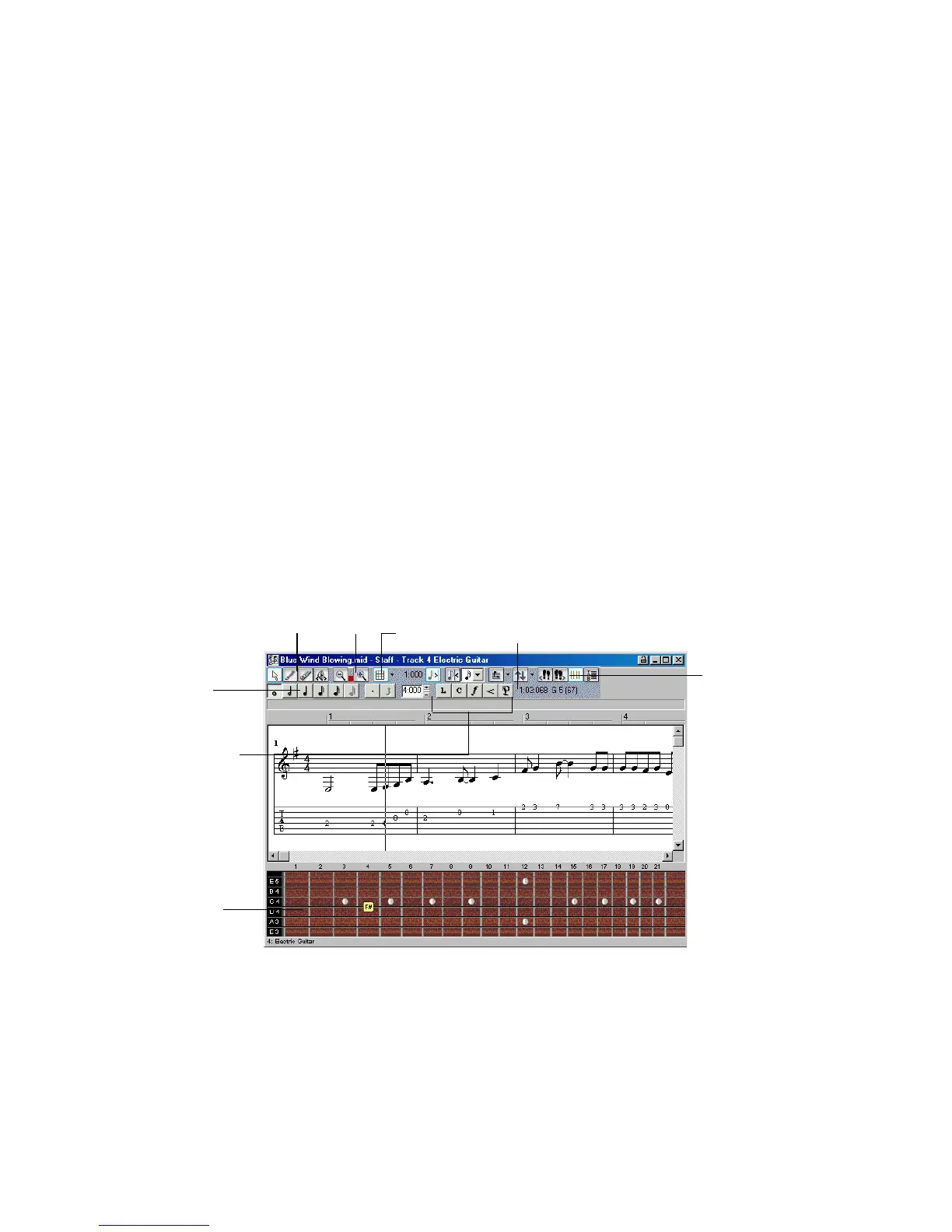
The Staff view is composed of a Staff pane and a Fretboard.
When you first open the Staff view, you may see only the Staff and not the
Fretboard. Resize the Staff view by dragging its edges until you can see everything
easily. When you save your file, whatever size the Staff view is will be the way it
appears the next time you open the file.
The Staff pane displays MIDI note events as musical notation. For some
musicians, this may be the most familiar and comfortable view in which to work.
The Staff pane provides many features that make it easy for you to compose, edit,
and print music.
For guitar players who are new to musical notation, the Fretboard represents the
notes in the Staff pane as they would appear on a six-string guitar neck in
standard tuning. The number of strings and the tuning are configurable. All notes
that appear in the Staff pane at the Now time are shown in the Fretboard. If you
enter notes in the Staff at the Now time, they appear on the Fretboard. Likewise,
you can enter notes into the Staff at the Now time by clicking the guitar strings on
the fretboard. Notes and chords shown in the Fretboard can be easily edited by
dragging them up and down the guitar strings.
Notehead tools
Zoom
Fretboard
Dynamics and markings
Snap Grid Time and pitch locator
Editing tools
display button
Fretboard pane



 To Next Page