656
Each MIDI device should be set to a unique MIDI channel or range of channels to
avoid note-doubling. Refer to the manuals for your MIDI devices for information
on how to set their MIDI channels.
If your master keyboard now seems to double notes (they sound thicker), or if you
can play only one half as many at once, first make sure that no MIDI channel is
being used by more than one of your MIDI devices. If no MIDI channel is assigned
to duplicate devices and you hear doubling or only half as many notes as you
should, see “My Keyboard Doubles Every Note I Play” on page 647.
Set Up to Record Digital Audio
In general, the inputs of sound cards take 1/8” stereo mini-jacks. Sound cards
usually have two inputs—one for line level inputs and the other for microphones
(at mic level). The line level input is stereo; the mic input could be either stereo or
mono. If your final output does not terminate in a 1/8” jack (and it probably
doesn’t), you will need an adapter to plug it into your sound card.
Most sound cards use the Windows Volume Control to adjust the master input and
output volumes and to control which recording inputs are active. If you don’t hear
audio tracks, or if you can’t easily control the audio volume in SONAR, go to Start-
Accessories-Volume Control and check the settings there. See your sound card’s
documentation for more.
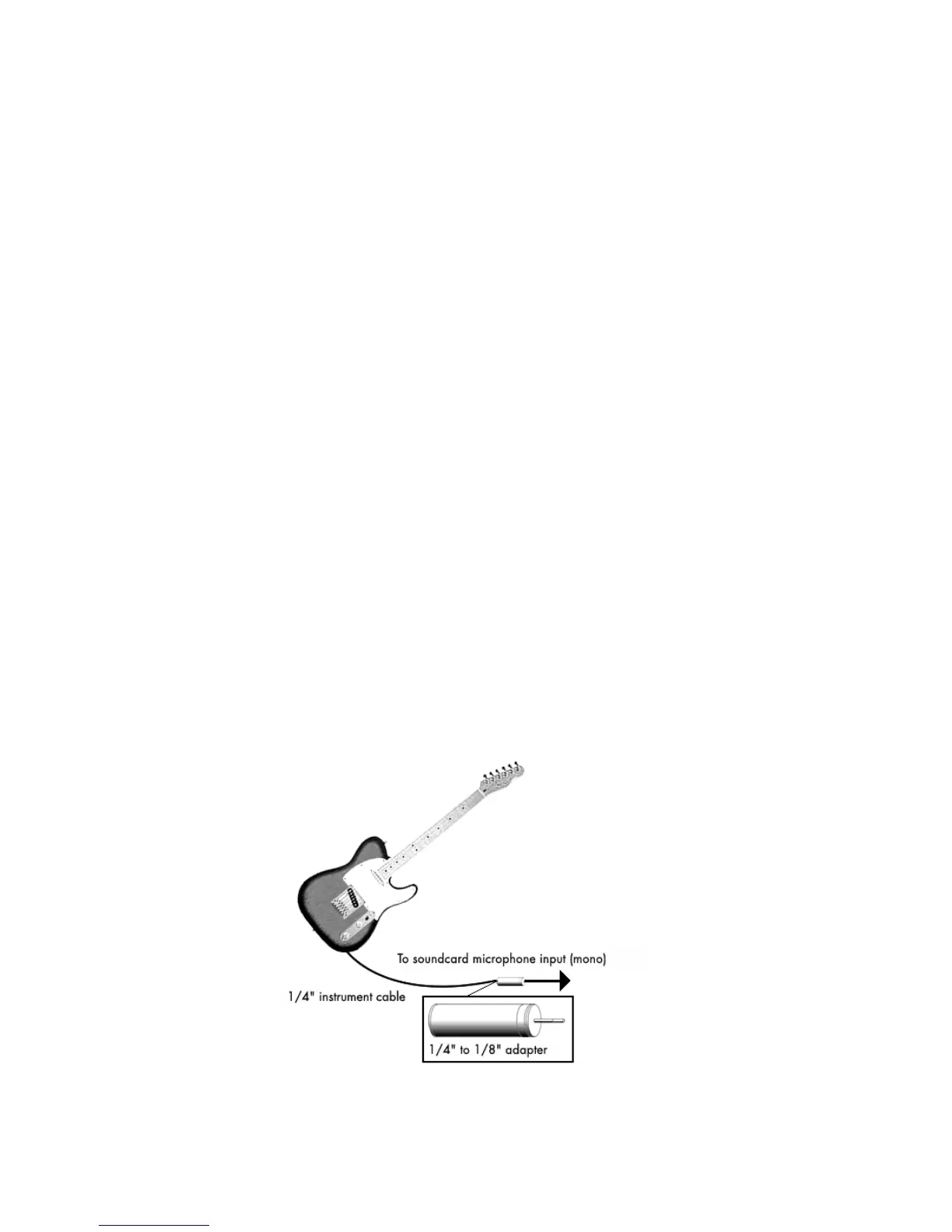
Electric Guitar Direct-In
You can connect an electric guitar directly to your sound card using a 1/4” mono
to 1/8” stereo adapter. The following diagram shows this setup:



 To Next Page