279
To Edit a Note
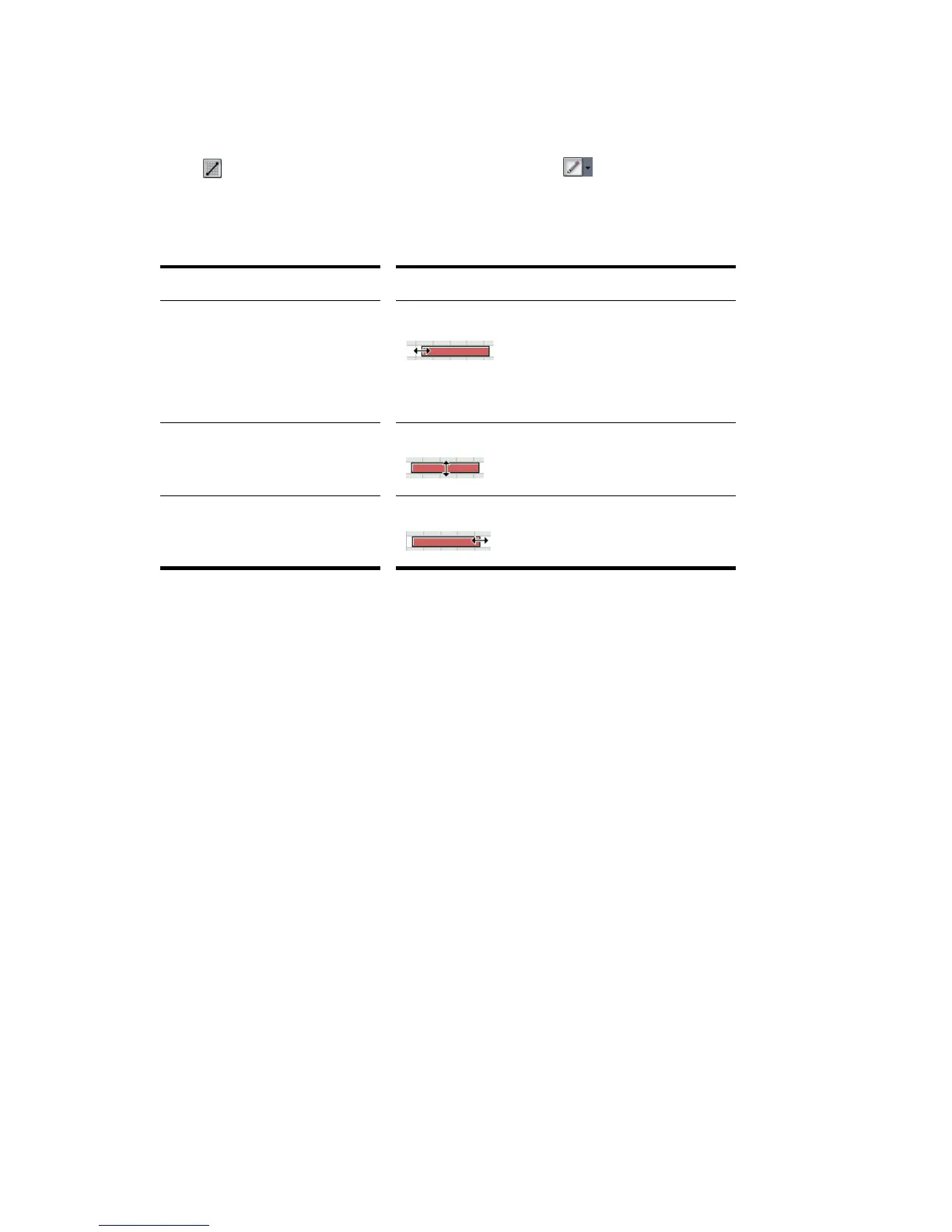
1. Click to select the Draw Line tool (or the Draw tool , if you have do not
have Auto Erase enabled).
2. Edit notes as described in the table:
If the snap grid is enabled and set to Snap To, the start time of each note is
restricted to points on the snap grid, and the length of each note is restricted to an
even multiple of the snap increment. For example, if the snap resolution is set to a
quarter note, you can move notes only to quarter-note boundaries, and you can
increase or decrease the duration only by quarter notes. If the snap grid is set to
Move By, notes can only be moved by multiples of the snap resolution.
To Change Note Velocity or Channel
1. Right-click a single note to display the Note Properties dialog box.
2. Edit the desired start time, pitch, duration, velocity, or channel.
3. Click OK when you are done.
SONAR updates the note event accordingly. Note that you can also edit note
velocity in the Controllers pane and the Note Properties toolbar. For information
on changing note velocities in the Drum Grid Editor, see “Editing Note Velocities”
on page 341. For more information, see “Velocity, Pitch Wheel, and Aftertouch” on
page 313.
To do this… Do this…
Change the start time, but not the
duration
Drag the left edge of the note in either direction.
The start time of the note is moved to the new
location.
Change the pitch Drag the middle of the note up or down.
Change the duration Drag the right edge of the note in either direction.



 To Next Page