TOS93 Series User’s Manual 273
System Settings
Setting the Date/Time
Set the time zone, date, and time.
The date and time are used when saving setup memory.
If you change the time zone, the year, month, and day change accordingly.
If the product is connected to LA
N a
nd can access the Internet, setting Auto Adjustment under Auto Clock
Adjustment in the Interface setup (p.270) to enable will cause the date to be updated automatically
according to the time zone.
1
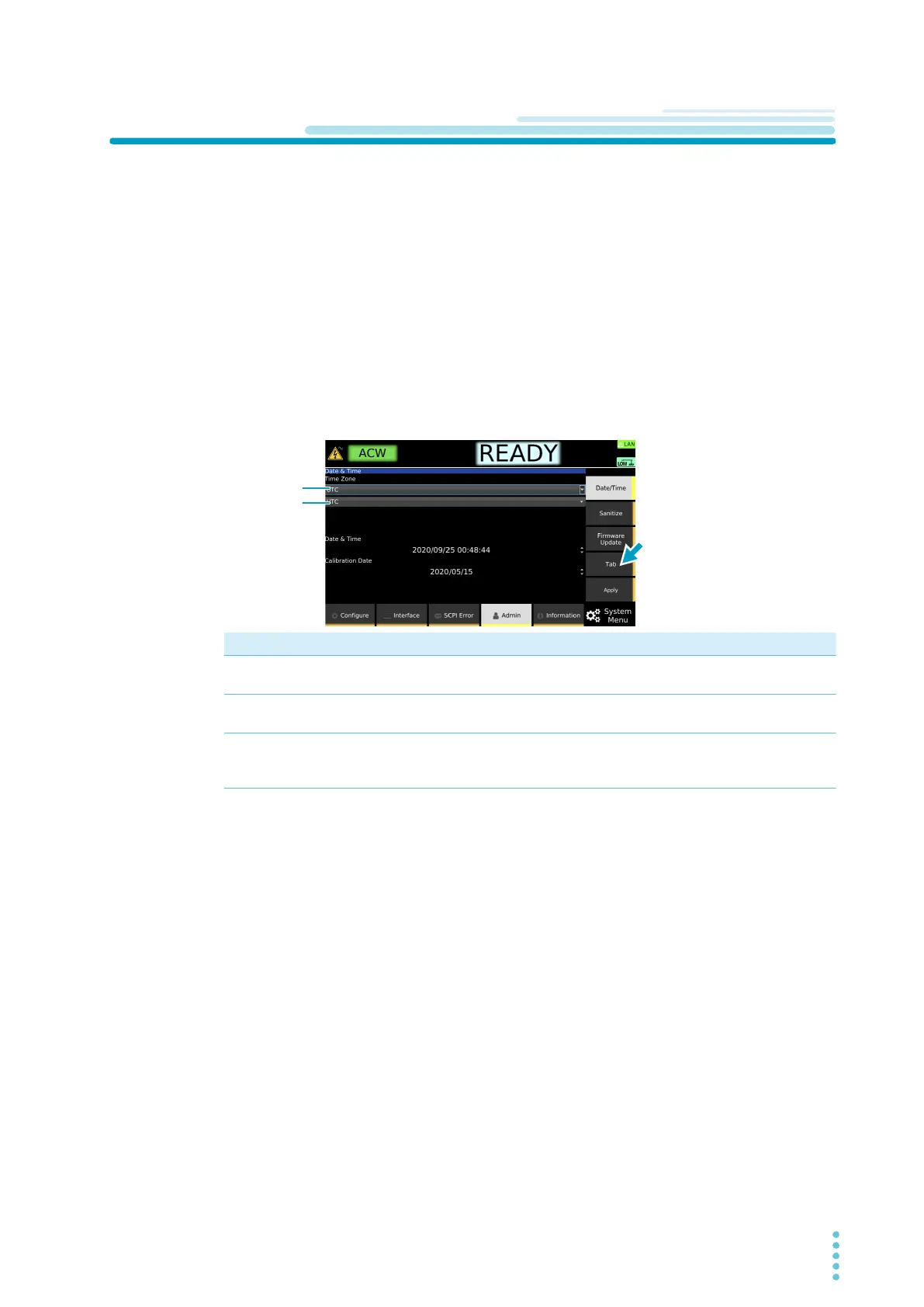
Press SYSTEM > Admin > Date/Time.
The date/time setup screen appears.
2
Set the time zone or the date and time.
Each time you press the Tab key, the item that you can set changes.
3
Press Apply.
A confirmation screen appears.
4
Press arrow (→) key to select OK, and then press ENTER.
This completes the setting.
Purpose Operation
Set the time zone (region name) Press Tab to select the item in the top row of Time Zone, and
then use the rotary knob to select the region name.
Set the time zone (city name) Press Tab to select the item in the bottom row of Time Zone,
and then use the rotary knob to select the city name.
Set the year, month, day, and time. Press Tab to select the year, month, day, or time of Date &
Time, and use the numeric keypad or rotary knob to enter the
value.
Region name



 To Next Page