58 User’s Manual TOS93 Series
Withstanding Voltage and Insulation Resistance Tests | Setting Test Conditions
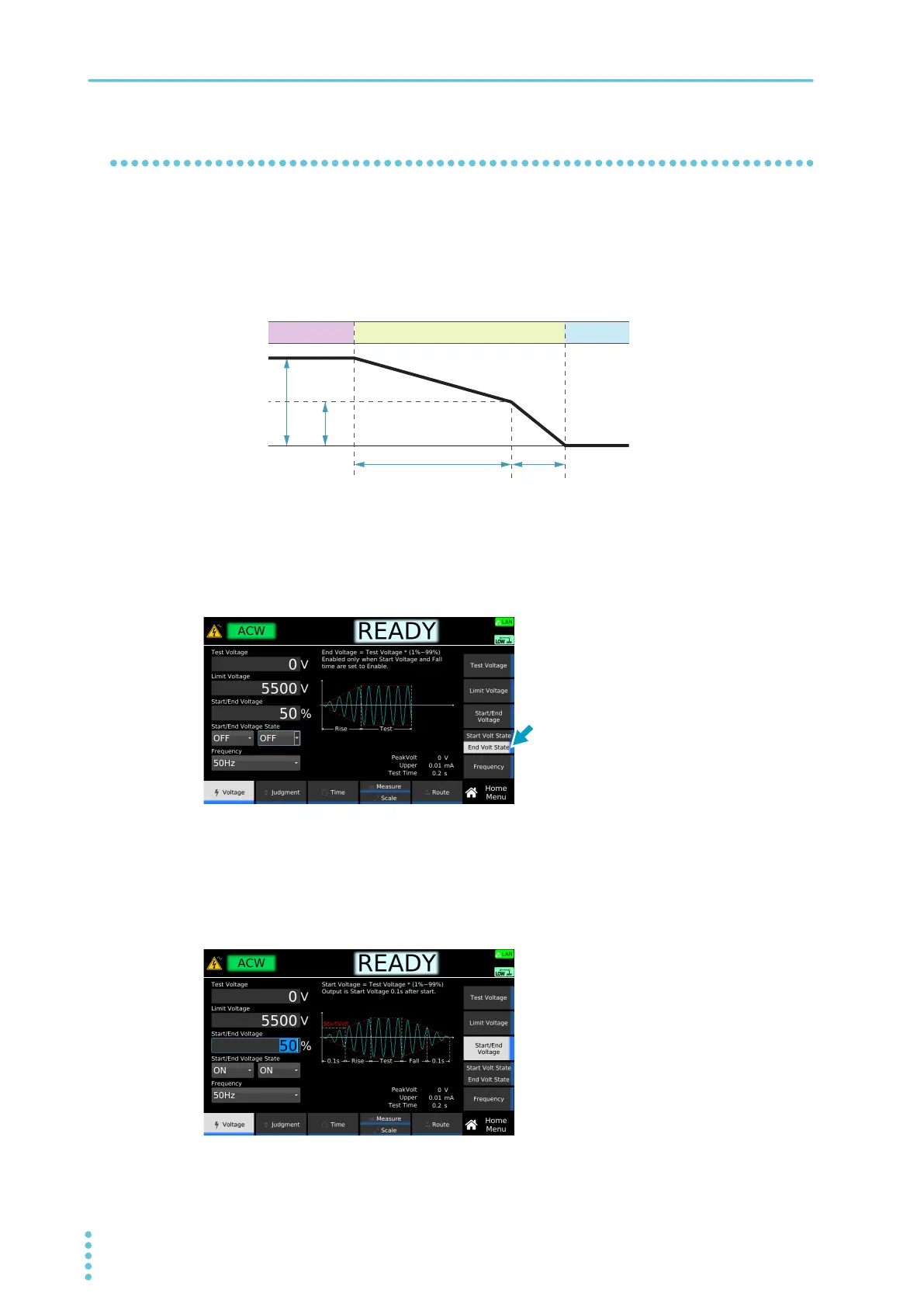
End Voltage
Set a voltage to finish Fall Time (p.67) in percentage to the Test voltage. Once the voltage has reached
End Voltage, it will fall to around 0 V in
0.1 sec.
This command is valid when both Start Volt State (p.57) and Fall Time (p.67) are set to ON. If you do not
want to set the end voltage, set End
Volt State to off.
1
On the Home Menu screen, press Voltage.
2
Press End Volt State repeatedly until End Volt State is selected.
Each press of the key switches between Start Volt State and End Volt State.
3
Turn the rotary knob to select ON or OFF.
4
If you select ON, press Start/End Voltage, and then use the numeric keypad or the
rotary knob to enter a percentage value.
This completes the setting.
Test Voltage
Start/End Voltage
When Start/End Voltage is set to 50%
100%
50%
TEST
FALL READY
Test status
Output off
Example: Home Menu screen of ACW



 To Next Page