50 User’s Manual TOS93 Series
Basic Operation | Basic Panel Operations
Changing values
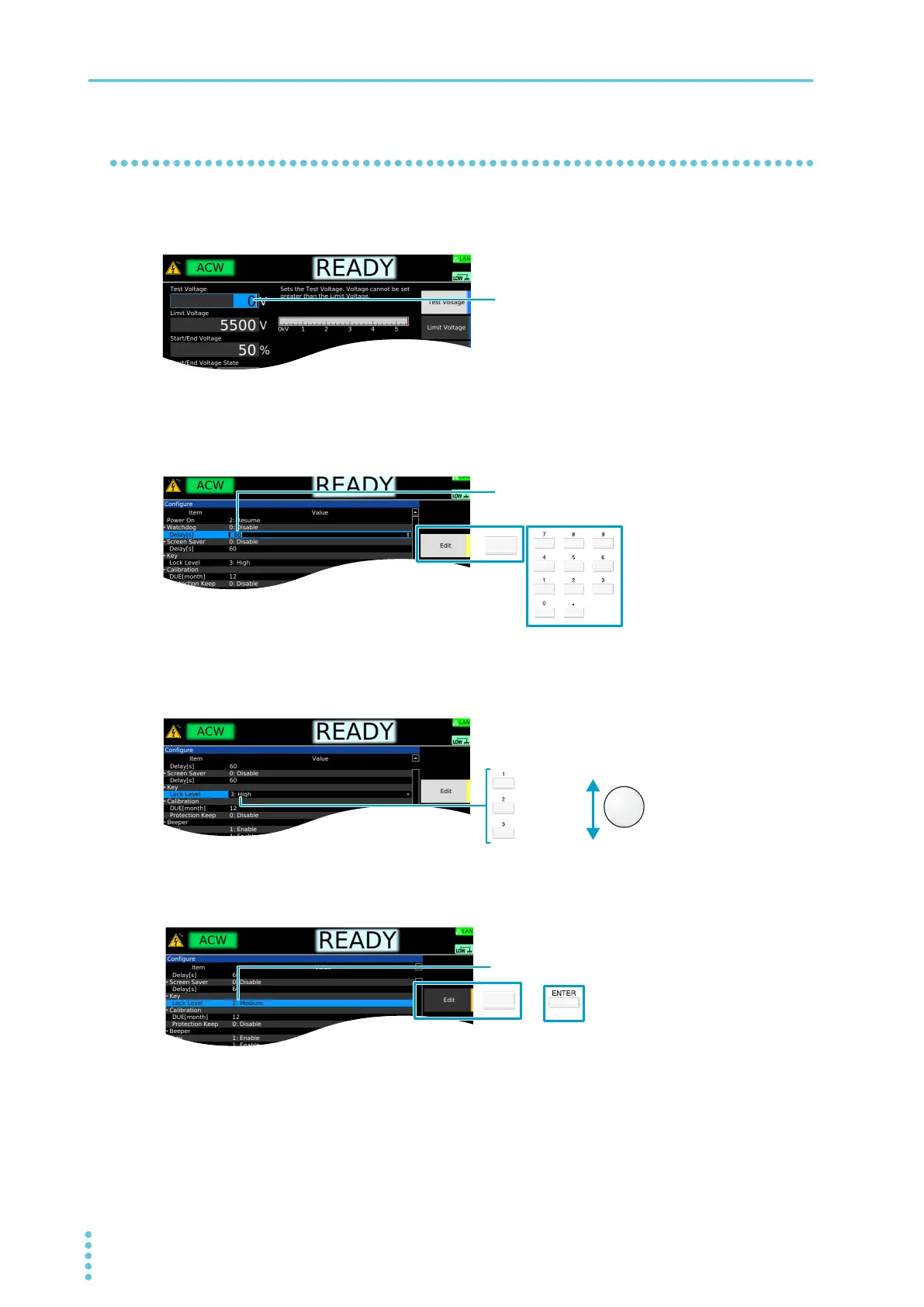
To change the test voltage or other values, use the numeric keypad or the rotary knob. If you enter a value
with the numeric keypad, following input, press the ENTER key to confirm the value.
On screens in which “Edit” is shown in the sub-function area, use the rotary knob to select the item you
want to change, and then press the Edit
key or a numeric key to start changing the value. Procedures
using the Edit key are provided in this document.
When changing a setting, if there are multiple items you can choose from, select the item using the rotary
knob. If there is a number before the item name, you can also select using the numeric keypad.
Proc
edures using the rotary knob are provided in this document.
To confirm a value you entered, press the ENTER
or Edit key. Procedures using the ENTER key are
provided in this document.
Use the numeric keypad or the rotary knob to change
the value.
Pressing Edit or a numeric key makes it possible to edit
the value.
1: Low
2: Medium
3: High
Rotary knobNumeric keypad
Use ENTER or Edit to confirm the value.



 To Next Page