Transmitting/Editing Machine Setting File (Environment Setup) (contin-
ued)
10-55
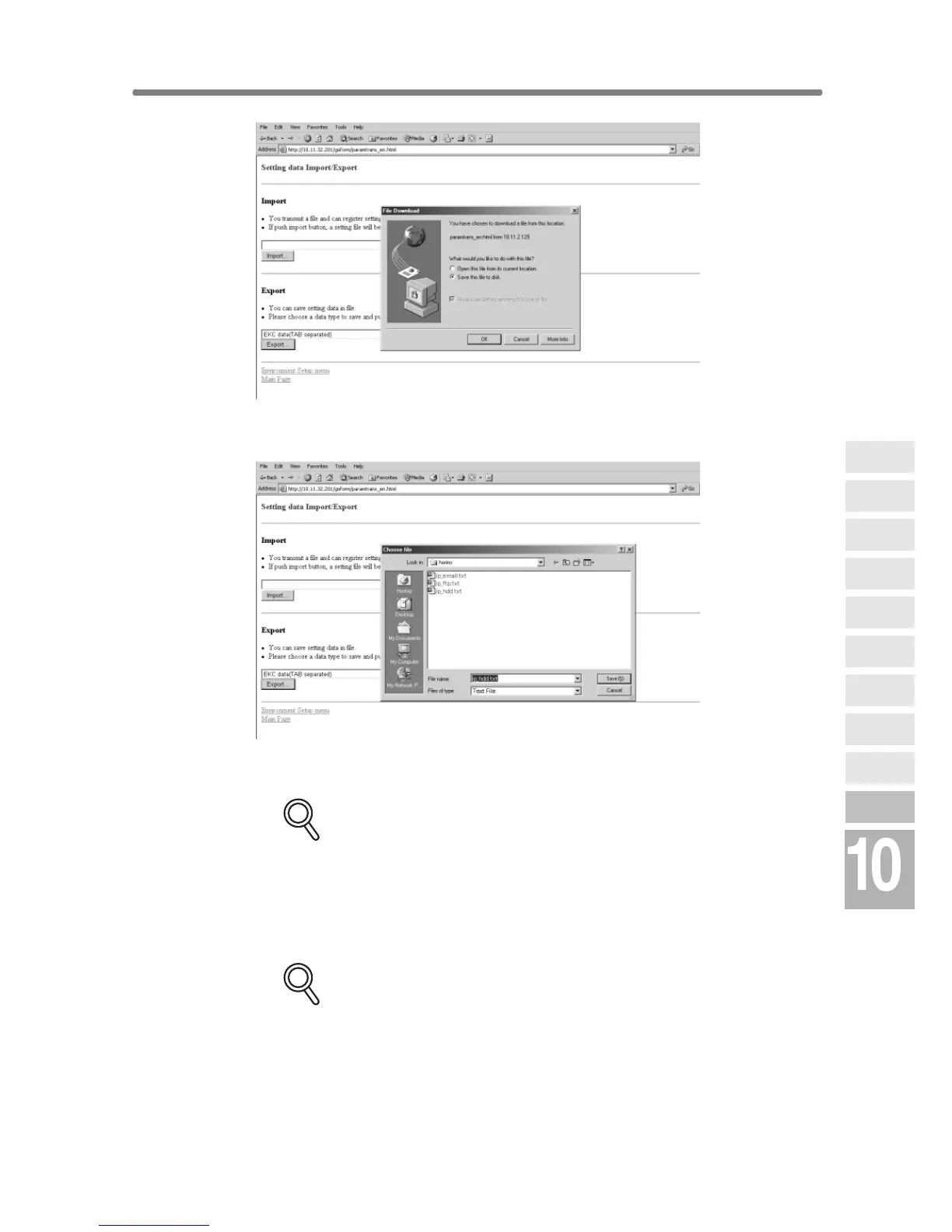
Confirm that the radio button heading “Save this file to disk” is marked in the
File Download dialog box, then click on [OK].
In the dialog box, designate the folder for saving the machine setting file, then
click on [Save].
DETAILS
The file name is automatically assigned as described below. Select the
data to be exported, changing the name if desired.
• ekc_tab.txt (E.K.C. data)
• ip_email.txt (E-mail data of Scan Transmission Setting data)
• ip_hdd.txt (HDD data of Scan Transmission Setting data)
• ip_ftp.txt (FTP data of Scan Transmission Setting data)
DETAILS: Error Message
The file cannot be accessed when the machine is operating. If an error
message is displayed, try again to save the file after the current machine
operation is completed.
A dialog box will be displayed when the saving operation is completed.
Click on [Close].
Network
Function
Job Status
Machine
Information
HDD Job
Information
Environment
Setup
To Use Web
Utilities
Image Edit
Image Recall
Image
Store&Output
Image
Store/Delete
Server
Functions










 To Next Page