214323 383 Revision B
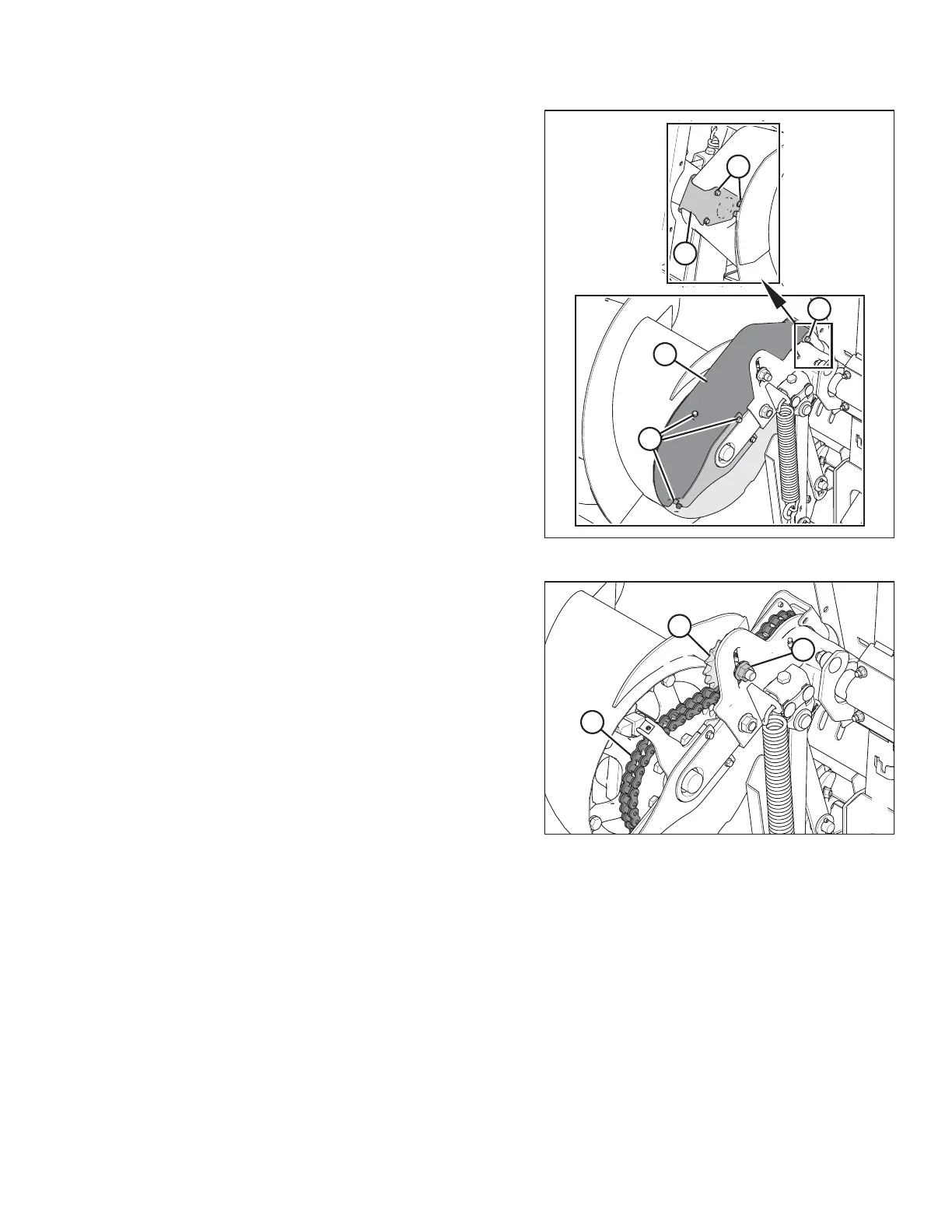
Figure 6.62: Auger Drive
3. Remove four bolts (A) securing the top cover to the left
side of the auger chain case.
4. Remove bolts (B) on cover retainer plate (D).
5. Remove top cover (C).
Figure 6.63: Auger Drive
6. Loosen bolt (C) securing idler sprocket (A).
7. Rotate the auger in reverse to take up the slack in lower
strand of chain (B).
8. Push down idler sprocket (A) to eliminate the remaining
slack in lower strands (B).
9. Rotate the auger back and forth to check the slack, and
repeat Step 8, page 383 if necessary. A slight amount of
slack is acceptable.
NOTE:
Do NOT use excessive force on idler to tighten chain.
10. Tighten idler bolt (C) and torque to 290 Nm (215 lbf∙ft).
MAINTENANCE AND SERVICING








 To Next Page