166
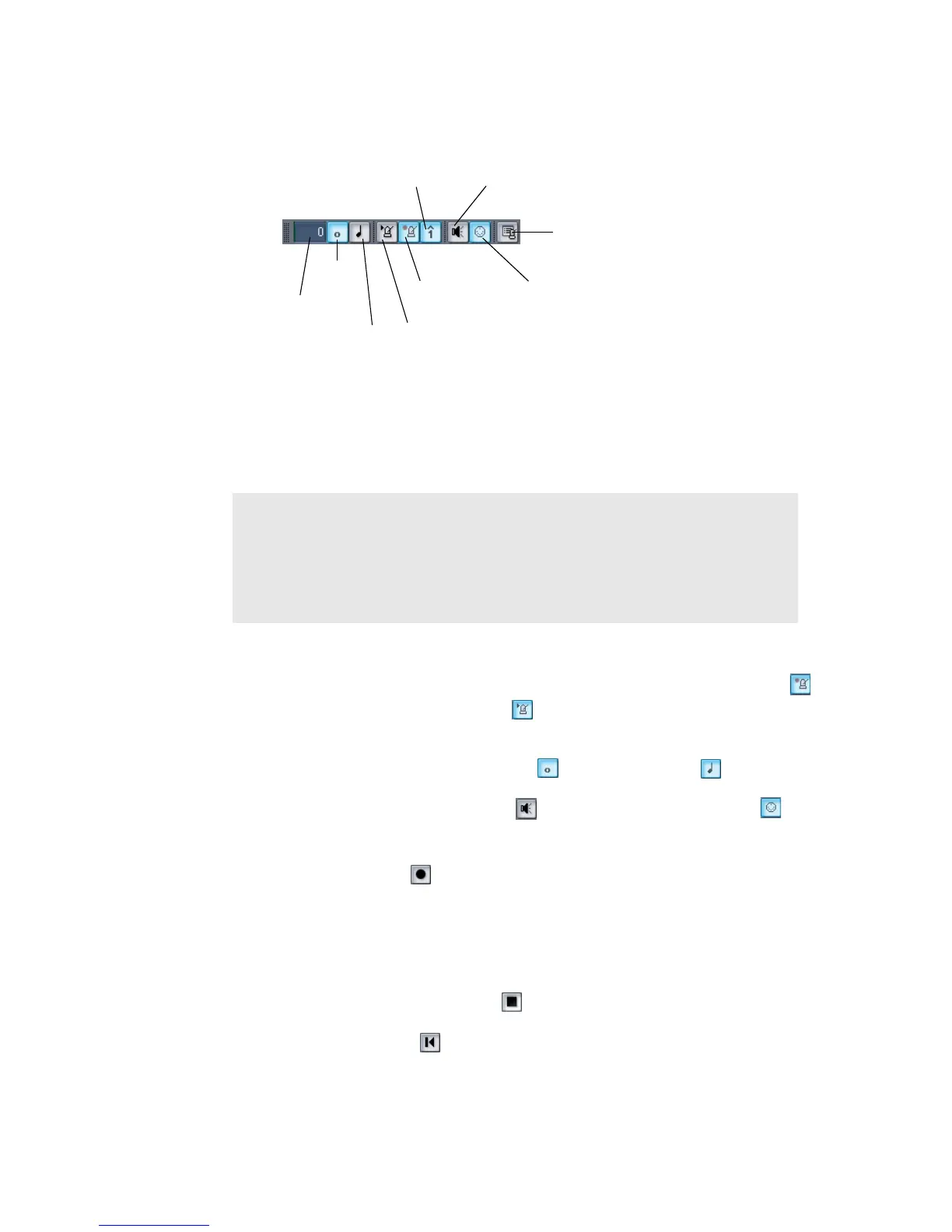
Most metronome options can be set in the Metronome toolbar:
If you don’t see the Metronome toolbar, use the View-Toolbars command to open
the Toolbars dialog box, and check the Metronome checkbox. The metronome MIDI
note parameters must be set in the Metronome Settings dialog box.
To Set the Tempo and Metronome for a New Project
1. In the Metronome toolbar, select the Metronome during Recording and
Metronome during Playback options.
2. If you want to hear a count-in before recording begins, set the count-in to 1 or
more. Select Count-in Measures or Count-in Beats .
3. Select Use Audio Metronome and/or Use MIDI Metronome .
4. Arm at least one track.
5. Press r or click to start recording. The count-in will play, and the Now time
will start to advance.
6. If necessary, stop playback and adjust the tempo using the tempo controls in
the toolbar and restart playback. Repeat until the metronome plays the tempo
you want.
7. Press the Spacebar or click to stop recording.
8. Press w, or click to rewind to the beginning of the piece.
Measures
Count-in
Beats
Metronome during
playback
Metronome settings
Accent first beat
Use Audio Metronome
Use MIDI note
Metronome during
record
Note:
If you are synchronized to an external clock source, you cannot use
the count-in feature. For more information, see “Synchronizing Your
Gear” on page 601.



 To Next Page