0978-04L
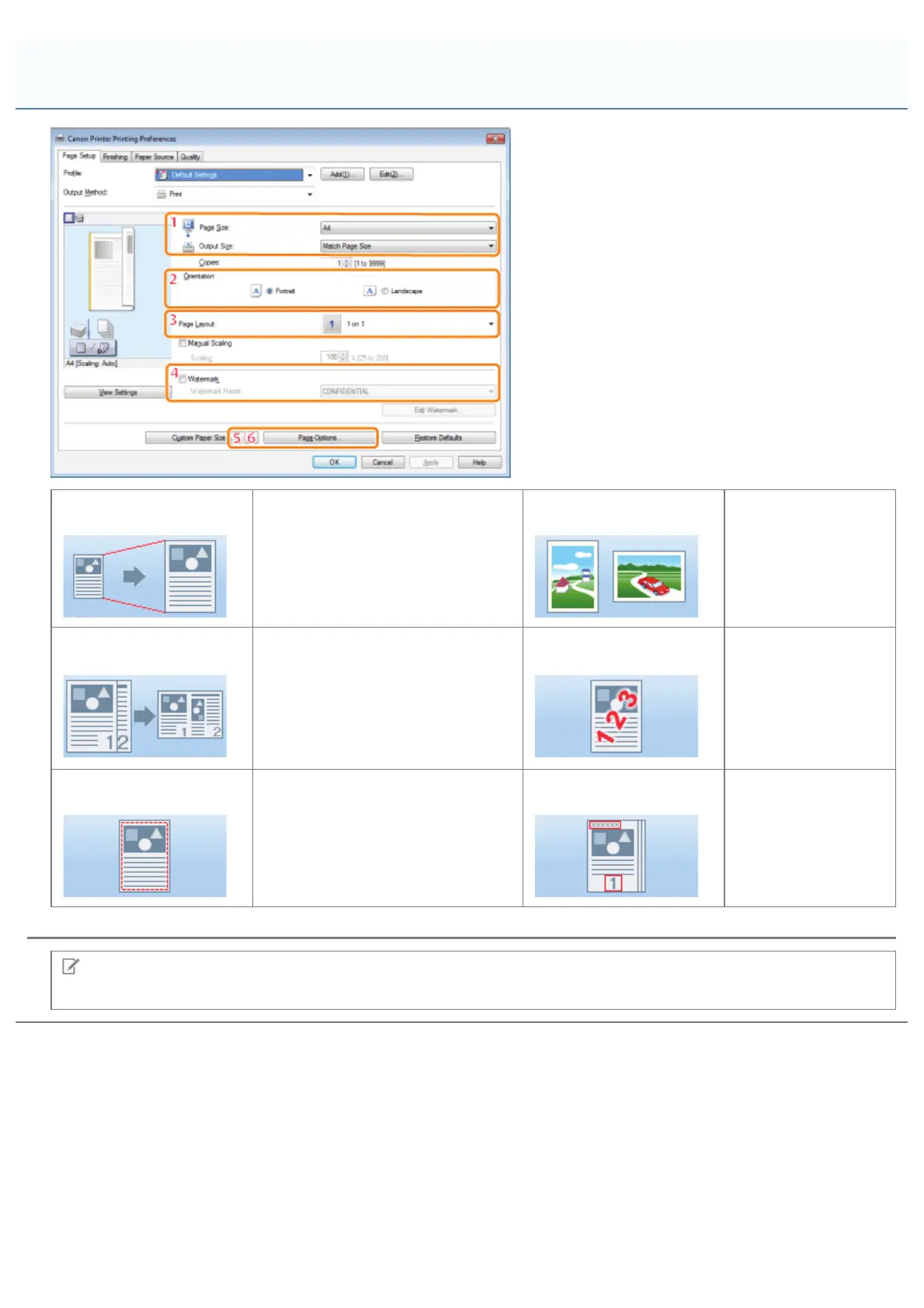
1.Output Paper Size
Enables you to select the paper
size actually output from the printer
(see "Scaling Documents").
2.Print Direction
Sets the print
direction relative to
the orientation of the
paper.
3.Page Layout
Prints multiple pages arranged on
one sheet of paper (see "Printing
Multiple Pages on One Sheet").
4.Watermark
Prints pages with a
watermark (such as
"COPY")
superimposed on the
document (see
"Watermark
Printing").
5.Page Border
Prints each page with a border.
6.Header/Footer
Prints pages with
headers and/or
footers with the date,
page number, etc.
NOTE
For instructions on how to display the printer driver screen, see "Printing" or "Configuring the Default Print Settings."
[Page Setup] Tab
㻞㻝㻜㻌㻛㻌㻥㻣㻜



 To Next Page