0978-05R
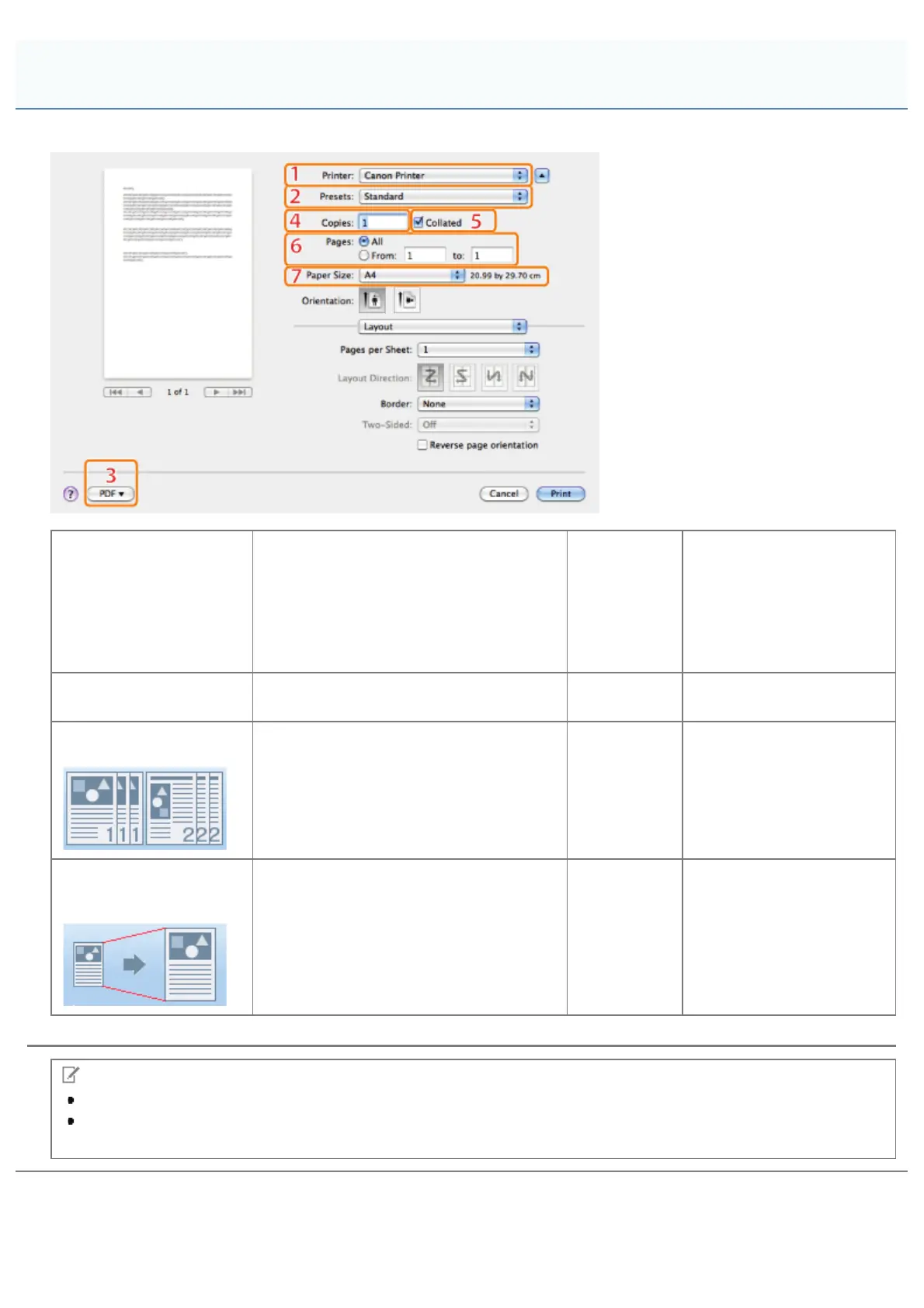
Selecting [Print] from the [File] menu of the application displays the [Print] dialog box.
1.Printer Selection
Selects the printer to use from those
previously added to the [Printing] pane of
the [Print & Fax] or [Print & Scan] dialog
box in the [System Preferences].
2.Presets
Combinations of frequently
used settings can be saved
as presets. These saved
presets can then be
selected for printing (see
"Using [Presets] for
Printing").
3.Save As PDF
Saves the document as a PDF file.
4.Copies
Specifies the number of
copies to print.
5.Collated
If two or more copies are to be printed,
enables them to be output in sets.
6.Pages
Specifies the range of
pages to be printed.
7. Output Paper
Size
Enables you to select the paper size
actually output from the printer. You can
enlarge or reduce documents to match
the output paper size (see "Scaling
Documents").
NOTE
The displays may differ between operating systems, printer driver types, and functions.
If the above functions cannot be set in the upper part of the [Print] dialog box, display and set them in the [Copies
& Pages] preferences pane or the [Page Setup] dialog box.
Common Functions
㻞㻡㻞㻌㻛㻌㻥㻣㻜



 To Next Page