0978-0A6
This section describes the menu operation for this printer.
Procedure for the Menu Operation
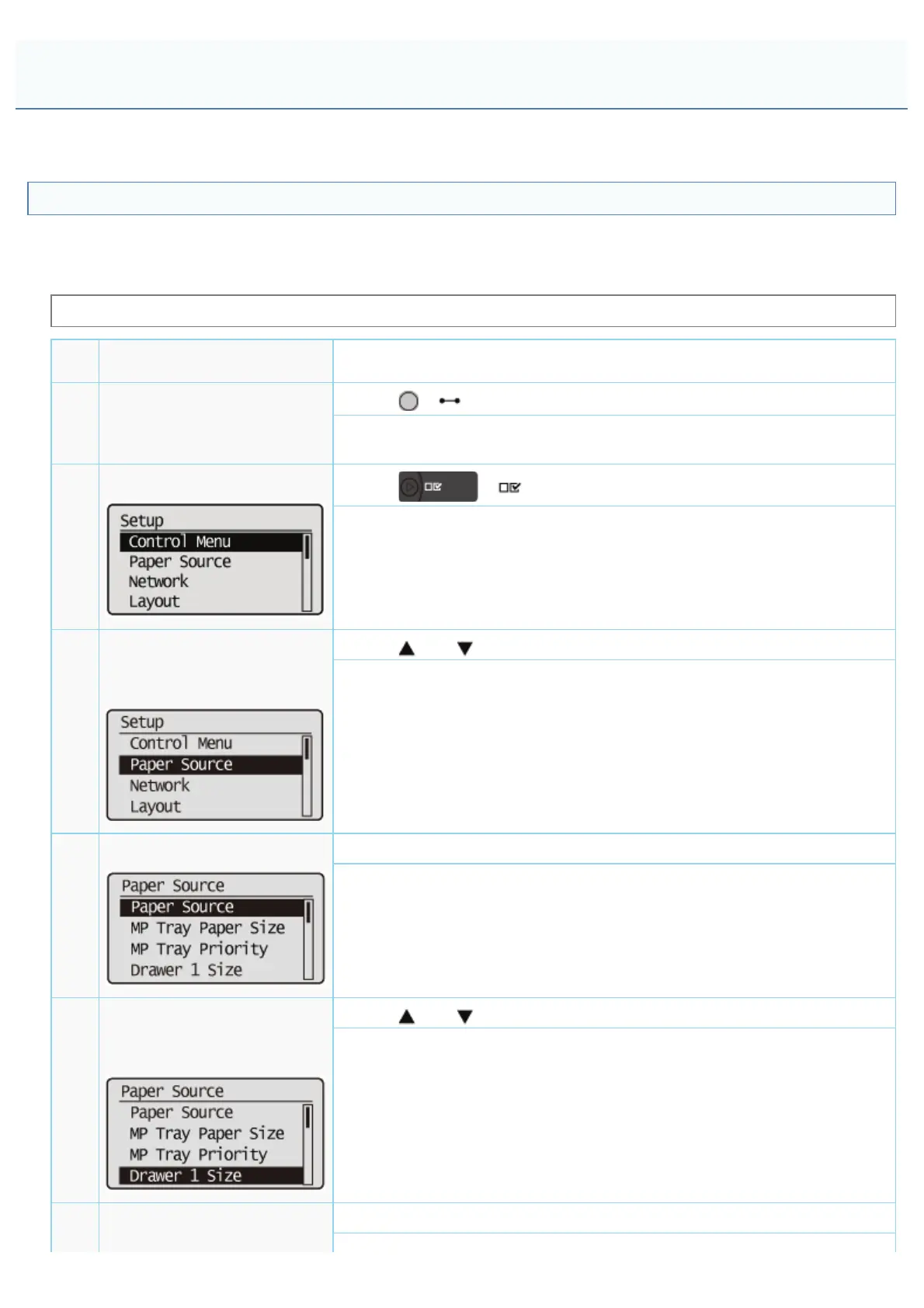
The menu consists of three hierarchies: "Option", "Item", and "Setting Value." Select the target options in each hierarchy.
As an example of the setting procedure, this section describes the procedure for setting [Drawer 1 Size] in the [Paper
Source] to [B5]. Start the key operation from Step 1.
Before specifying the setting, see "Attention (Control Panel Setting)."
Operation Procedure
Key Operation
1 Place the printer offline.
Press [
] ( : Online).
When the printer is online, the [Setup] menu can be displayed, however, the
[User Maintenance] options cannot be specified.
2
Display the [Setup] menu.
Press [ ] ( : Settings).
The [Setup] menu is displayed.
3
Select the option.
When the [Paper Source]
options are selected
Press [ ] or [ ].
The target option is displayed.
4
Display the item.
Press [OK].
The selected item is displayed.
5
Select the item.
When [Drawer 1 Size] is
selected
Press [ ] or [ ].
The target item is displayed.
Select the item.
Press [OK].
Control Panel Setting
㻡㻢㻜㻌㻛㻌㻥㻣㻜



 To Next Page