0978-0JH
If you cannot print when the printer is connected to the computer by a LAN cable, check the problem following the
questions below.
NOTE
For Macintosh users
This section describes the procedure for Windows as an example.
For details on the procedure for Macintosh, see "Driver Guide."
For details on the procedure for displaying "Driver Guide", see "Viewing the Driver Guide."
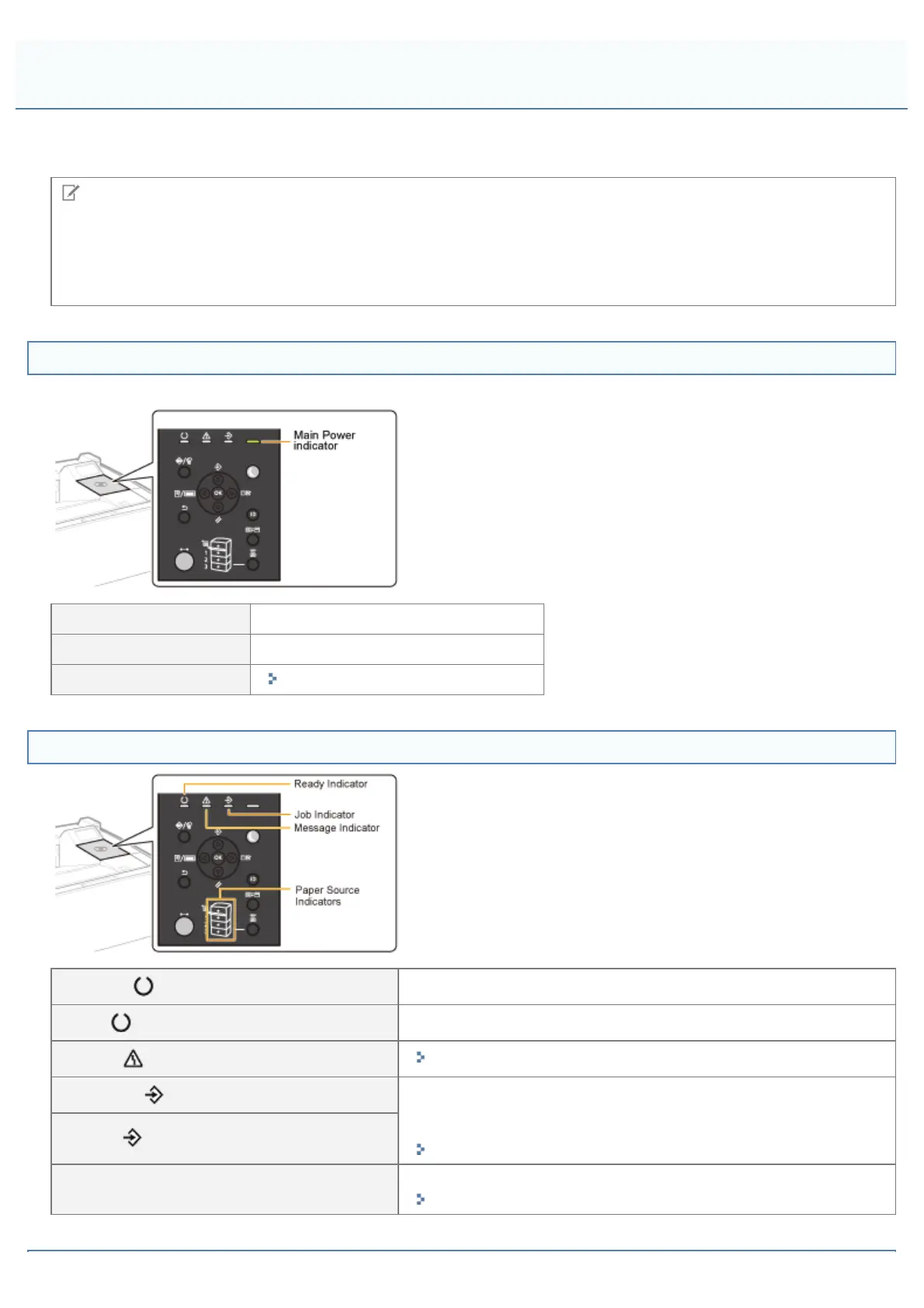
<Question 1> Is the printer turned ON?
Check if the Main Power indicator on the control panel is turned on.
ON To <Question 2>
OFF Turn the printer ON.
Cannot be turned ON
"You Cannot Turn the Printer ON"
<Question 2> Check the indicators on the printer unit.
The (Ready) indicator is on.
To <Question 3>
The
(Ready) indicator is blinking.
The printer is warming up. Please wait a moment.
The
(Message) indicator is on.
"The Message Indicator Is On"
The
(Job) indicator is on.
The printer is operating. Please wait a moment.
If the printer does not perform printing for a while, perform the print
data output or soft reset.
"Canceling a Job"
The
(Job) indicator is blinking.
The Paper Source indicator is blinking.
Load paper.
"Paper Loading and Output"
Printing Cannot Be Performed (LAN Connection)
㻤㻠㻝㻌㻛㻌㻥㻣㻜



 To Next Page