0978-0A0
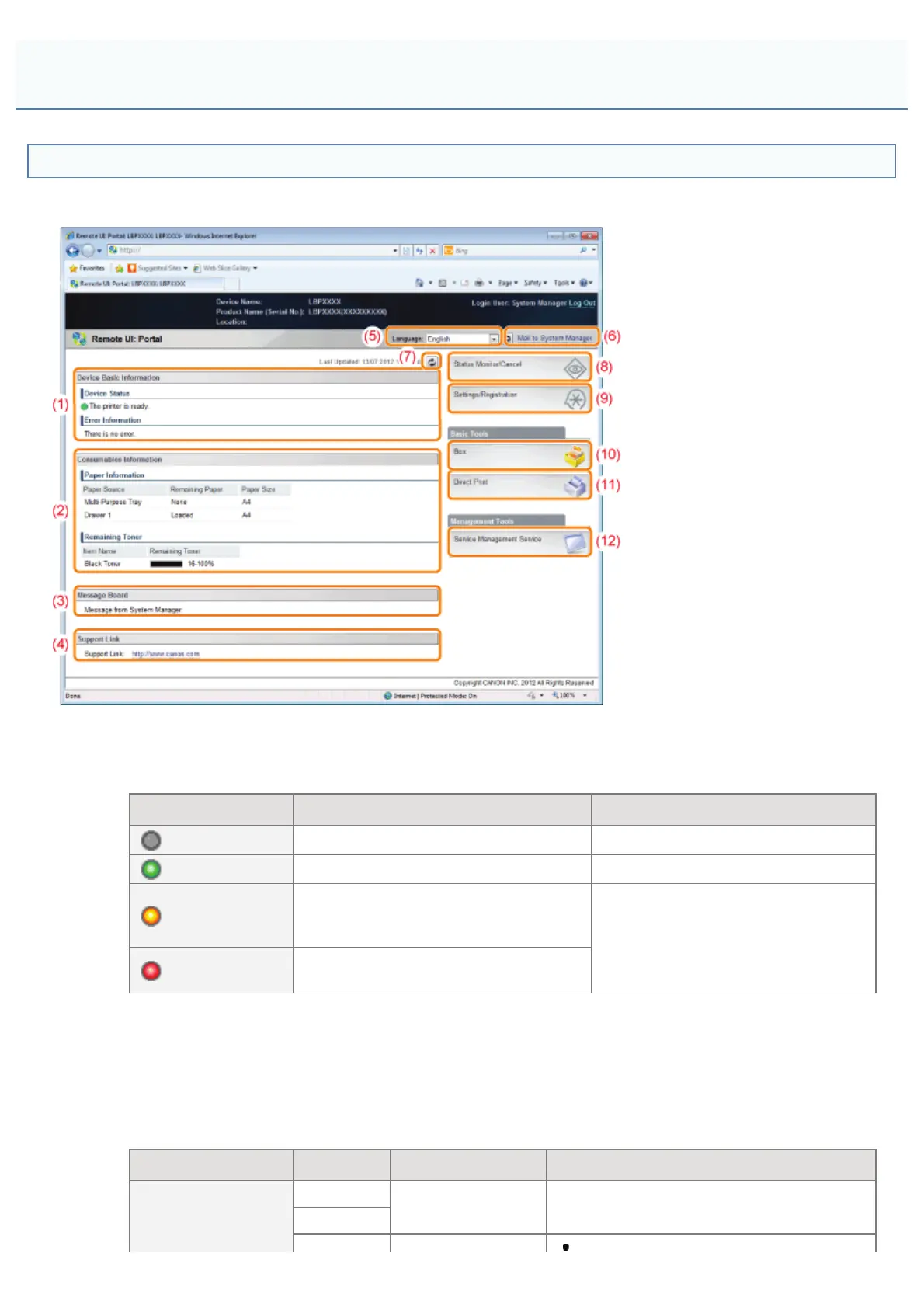
Remote UI Portal Page
The screen shown below, which is displayed when the Web browser is launched and you have logged in to the Remote UI,
is called the Portal Page.
(1) [Device Basic Information]
[Device Status]
The indicators and status messages show the current printer status. You can see the status of the printer from the
indicator colors, as shown below.
Indicator Color Printer Status Solution
(Gray):
Offline (not accepting print data) Go back online and print.
(Green):
Normal status (able to print)
(Yellow):
There is no printing trouble, but some
type of action is required (a warning
message is displayed)
Follow the on-screen instructions
shown in [Error Information] below
and solve the problem.
(Red):
Printing is not possible for some reason
(an error message is displayed)
[Error Information]
It displays error information generated by the printer.
(2) [Consumables Information]
[Paper Information]
It displays paper level, size and type for each of the paper sources.
[Remaining Toner]
It displays the amount remaining in the toner cartridge.
Consumables Display Status Solution
16-100%
Able to print -
9-16%
*
Screen Layout of the Remote UI (Details on Each Setting Page)
㻡㻟㻝㻌㻛㻌㻥㻣㻜



 To Next Page