0978-0A9
NOTE
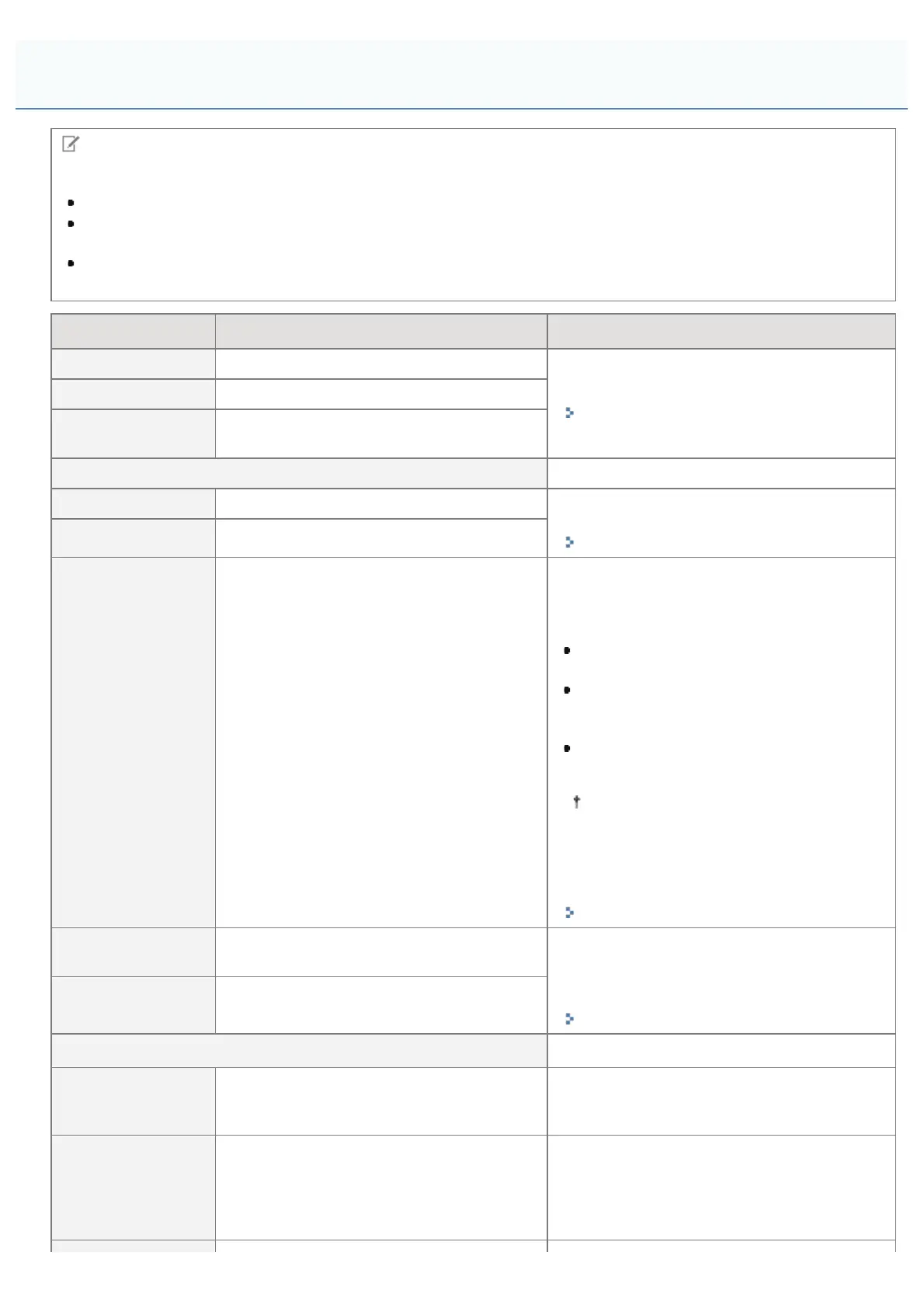
Table description
Bold values in the table indicate the default settings.
After changing the setting items with "*1", cycle the power of the printer or perform a hard reset to make the
settings effective.
The setting items or setting values with "*2" may not be displayed depending on the availability of the optional
accessories and other settings.
Setting Item Setting Value Setting
[Sleep Mode] [High (Deep Sleep)], [Mid (Printer Sleep)]
Set the sleep mode.
"Sleep Mode"
[Sleep Even if Error] [Off], [On]
[Auto Sleep Time]
[5 minutes], [10 minutes], [15 minutes],
[30 minutes], [60 minutes]
[Timer Settings]
[Wake Up Timer] [Off], [On] Set sleep modes (printer sleep mode and deep
sleep mode) to cancel automatically.
"Sleep Mode"
[Wake Up Time] 00:00 to 12:00 to 23:59
[Auto Reset Time]
[Off], [10 seconds], [20 seconds], [30
seconds], [40 seconds], [50 seconds], [1
minute], [2 minutes], [3 minutes], [4
minutes], [5 minutes], [6 minutes], [7
minutes], [8 minutes], [9 minutes]
Specifies whether one of the following
transitions is to take place when no key
operation has been performed in a particular
screen.
A transition to the MEAP authentication
screen
A transition to the ready status screen
and the screen for using MEAP
applications
A transition from offline status to online
status
When no key operation has been
performed during a job processing
session, this function is also executed
depending on the current screen or
current position in a menu.
"Online and Offline"
[Sleep Mode
Timer]
[Off], [On]
Specifies whether the sleep timer function is
used to put the printer into a sleep mode
(printer sleep mode or deep sleep mode) when
the printer is not used for a certain time.
"Sleep Mode"
[Sleep Mode
Time]
00:00 to 12:00 to 23:59
[Warning Step]
[Toner Cart.
Warning]
[Continue Printing], [Stop Printing]
Specifies whether the printer should continue
or stop printing when <Toner cartridge will
soon reach end of lifetime.> appears.
[Auto Continue] [Off], [On]
Specifies whether the printer should
automatically use the function that, when an
error is occurring, releases the printer from the
error temporarily (Error Skip) and continues the
job.
[Setup] Menu ([Control Menu] Options)
㻡㻢㻠㻌㻛㻌㻥㻣㻜



 To Next Page